Blogged with Flock
Showing posts with label drawing. Show all posts
Showing posts with label drawing. Show all posts
Wednesday, October 24, 2007
The Dirty Car Art Gallery
Wow. Have you ever seen the Dirty Car Art Gallery. Absolutely amazing. I'm used to seeing what we call the old 'Charlie Weiber'.. which amounts to a simplified version of a portion of the male anatomy usually seen on the back windows of dirty white construction vans. This is a few million notches above that! :)


Tuesday, September 25, 2007
Sketchcast
Are you trying to illustrate some important world changing idea? Or just want to show the world you're the next xkcd or the next Hugh Macleod?
Check out Sketchcast.
BTW - man do I miss not having my Wacom Tablet at work. ;)
[via Drawn!]
Check out Sketchcast.
BTW - man do I miss not having my Wacom Tablet at work. ;)
[via Drawn!]
Blogged with Flock
Thursday, April 12, 2007
Sketching, Creativity and the Design Process
I'm a big fan of the design process. Almost more than the result itself.
I remember when I first got my hands on the wonderful book Driving Ambition, and I found myself quickly drawn not to the high quality photography, but to Gordon Murray's initial sketches and the drawings involved in developing various ideas. It's something that has always fascinated me - how people create the things we see and enjoy. If you're at all into car design I can't recommend it enough.
Recently, David Airey had a great post on logo design where he made the point that sketching was a vital ingredient in the design process. He also posted many design options for a project he was involved in.
While reading that post, I was in the midst of posting logo submissions for the Xmms2 graphic contest. And I was, in fact, doodling ideas in a hardcover notebook I keep for jotting down ideas and sketches. So after reading it, I decided that after I was done submitting logos, I'd post up the various doodles and sketches.
Now, I'm far from an accomplished artist, but I had fun generating ideas and transforming them into digital form with Inkscape. Hopefully this will encourage others to post things that illustrate their design process (whatever process that might be). It's something that I don't see enough of on the web (if you know where it is, then point me to it). There's a lot of inspiration in seeing how people create things, even if they're just pencil sketches on a knapkin.
Here are the various ideas I played around with. You can see a fair number of my xmms2 logo submissions that come directly from these sketches. Others never quite went anywhere....
[click on the image(s) to see larger versions]


I remember when I first got my hands on the wonderful book Driving Ambition, and I found myself quickly drawn not to the high quality photography, but to Gordon Murray's initial sketches and the drawings involved in developing various ideas. It's something that has always fascinated me - how people create the things we see and enjoy. If you're at all into car design I can't recommend it enough.
Recently, David Airey had a great post on logo design where he made the point that sketching was a vital ingredient in the design process. He also posted many design options for a project he was involved in.
While reading that post, I was in the midst of posting logo submissions for the Xmms2 graphic contest. And I was, in fact, doodling ideas in a hardcover notebook I keep for jotting down ideas and sketches. So after reading it, I decided that after I was done submitting logos, I'd post up the various doodles and sketches.
Now, I'm far from an accomplished artist, but I had fun generating ideas and transforming them into digital form with Inkscape. Hopefully this will encourage others to post things that illustrate their design process (whatever process that might be). It's something that I don't see enough of on the web (if you know where it is, then point me to it). There's a lot of inspiration in seeing how people create things, even if they're just pencil sketches on a knapkin.
Here are the various ideas I played around with. You can see a fair number of my xmms2 logo submissions that come directly from these sketches. Others never quite went anywhere....
[click on the image(s) to see larger versions]


Tuesday, March 20, 2007
Indefatigable?
I've been called a lot of things in my 39 years on this planet, but indefatigable hasn't been one of them - until now. That's what I was called on the XMMS2 Logo contest blog today. While I assumed (correctly) it was a compliment, I am nothing if not honest about the fact that despite what my daughter might think, I do NOT know everything, and that includes the definition of indefatigable.
Did I ever mention that the Google search keyword "define:" is one of my best friends? Well me and the Google define: keyword have been intimate for quite some time.
A quick search yielded "showing sustained enthusiastic action with unflagging vitality". Not bad. Quite nice actually.
While not really wanting to toot my own horn, it is quite remarkable how a single word compliment can raise your day.
Check out the XMMS2 contest blog for the slew of great entries so far.
Did I ever mention that the Google search keyword "define:" is one of my best friends? Well me and the Google define: keyword have been intimate for quite some time.
A quick search yielded "showing sustained enthusiastic action with unflagging vitality". Not bad. Quite nice actually.
While not really wanting to toot my own horn, it is quite remarkable how a single word compliment can raise your day.
Check out the XMMS2 contest blog for the slew of great entries so far.
Thursday, March 15, 2007
Develop your Inkscape chops (and maybe win something too!)
Seems like everybody and their grandmother are holding a logo contest these days:
create.freedesktop.org is a project whose aim is to facilitate the sharing of things like code, media and infrastructure between various free and open source creative applications (think Inkscape, GIMP, cinepaint, scribus, Audacity and the like). They're going to be holding a logo competition. It's supposed to start soon. If you're looking to improve your Inkscape skills and stretch your creative muscles at the same time, then have a go when it starts. It'll accomplish both things. The contest is supposed to have started, but I see no confirmed details posted about it yet, but there are some tentative details over in the openclipart.org wiki.
Xmms2 as you might imagine is a project aimed at providing a followup to the venerable xmms media player application. They're holding a logo competition too. And in this one, they're offering a $400 Amazon Gift Certificate to the winner! This one has already started and entries are being accepted until the 13th of April. Drag your butt over to the Xmms2 Logo Competition page for details.
If you think you haven't got what it takes, I've got a small piece of advice for you:
Just drawing *something*. Anything. Don't go into it as something you have to submit on the first go-round. Once you come up with something, go get a coffee and stare at it for a while. Play with it. Before long you'll see what you like and don't like about it and you'll refine it (or even scrap it). But by that time your creative juices will at least be flowing. You'll then likely see off-shoots or completely different ideas. And even more importantly (IMO) you'll figure out different way of achieving the results you want. All the while, you'll be building your chops bit by bit. What is the worst thing that can happen by trying?
I am absolutely killer at throwing up obstacles to getting unappealing work started. I can be extremely creative in finding ways to avoid scary or potentially daunting tasks. But if I just summon up the willpower to do something (usually the easiest, shortest portion of the task), I quickly find myself achieving more and more progress. It's getting the boulder rolling that's tough. Once it's going you'll find it's a lot easier to keep it moving.
Cheers and good luck.
create.freedesktop.org is a project whose aim is to facilitate the sharing of things like code, media and infrastructure between various free and open source creative applications (think Inkscape, GIMP, cinepaint, scribus, Audacity and the like). They're going to be holding a logo competition. It's supposed to start soon. If you're looking to improve your Inkscape skills and stretch your creative muscles at the same time, then have a go when it starts. It'll accomplish both things. The contest is supposed to have started, but I see no confirmed details posted about it yet, but there are some tentative details over in the openclipart.org wiki.
Xmms2 as you might imagine is a project aimed at providing a followup to the venerable xmms media player application. They're holding a logo competition too. And in this one, they're offering a $400 Amazon Gift Certificate to the winner! This one has already started and entries are being accepted until the 13th of April. Drag your butt over to the Xmms2 Logo Competition page for details.
If you think you haven't got what it takes, I've got a small piece of advice for you:
Just drawing *something*. Anything. Don't go into it as something you have to submit on the first go-round. Once you come up with something, go get a coffee and stare at it for a while. Play with it. Before long you'll see what you like and don't like about it and you'll refine it (or even scrap it). But by that time your creative juices will at least be flowing. You'll then likely see off-shoots or completely different ideas. And even more importantly (IMO) you'll figure out different way of achieving the results you want. All the while, you'll be building your chops bit by bit. What is the worst thing that can happen by trying?
I am absolutely killer at throwing up obstacles to getting unappealing work started. I can be extremely creative in finding ways to avoid scary or potentially daunting tasks. But if I just summon up the willpower to do something (usually the easiest, shortest portion of the task), I quickly find myself achieving more and more progress. It's getting the boulder rolling that's tough. Once it's going you'll find it's a lot easier to keep it moving.
Cheers and good luck.
Wednesday, November 22, 2006
More Inkscape Fun...
Participating in the logo discussion for the LinuxReality podcast over the past couple of weeks got me using Inkscape again. (BTW, Chess ended up going with one of the puzzle piece logos I submitted - check out the site banner over there. It was great fun discussing and coming up with that logo.)
Inkscape really is a full featured vector-based editing program. Being vector based, it lets you do a lot of things that you just can't do in a bitmap editor like Photoshop, The GIMP or Paintshop Pro. One of the things I've been playing with since trying to come up with logo ideas is using hand doodles, my scanner, and Inkscape to experiment and have some fun. Here I'll illustrate the basic process I've been monkeying around with.
First I scan the post-it note into bitmap form (in my case .jpg):
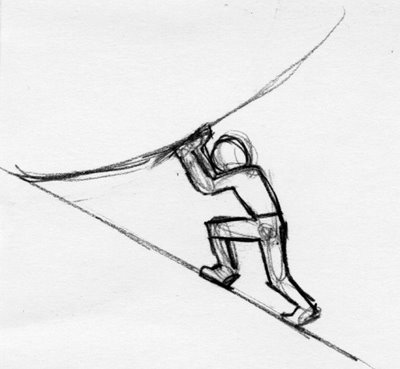
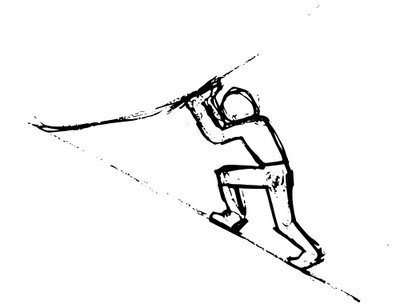
I then import the jpg file into Inkscape. Once it's in there I select it and then choose Path->Trace Bitmap. This gives a dialog with 5 different methods of creating a vector object from a bitmap. In this case I used the 'Image Brightness' method and got a fairly faithful vector representation of the original sketch. It creates a path of nodes making up the shape of my sketch.
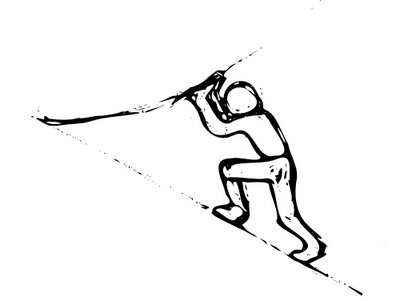
Then I selected the resulting path object and used the Simplify Tool (Ctrl-L) which well ...er... simplifies it. It rounds corners and makes it slightly more organic looking. You can repeatedly apply Ctrl-L and watch the effects. The image below shows the effect of only one Simplify application.
After simplifying I created a rectangle matching the background colour of my blog and placed it under the simplified path object.

Of course there are a ton of other neat things you can do with Inkscape (and a ton of better sketches you could work with) but it does illustrate some of the flexibility and fun of using a vector based application like Inkscape. And it's currently available for both Linux and Windows (with a native Mac version coming very soon apparently as well), so everyone can join in the fun.
Inkscape really is a full featured vector-based editing program. Being vector based, it lets you do a lot of things that you just can't do in a bitmap editor like Photoshop, The GIMP or Paintshop Pro. One of the things I've been playing with since trying to come up with logo ideas is using hand doodles, my scanner, and Inkscape to experiment and have some fun. Here I'll illustrate the basic process I've been monkeying around with.
First I scan the post-it note into bitmap form (in my case .jpg):

I then import the jpg file into Inkscape. Once it's in there I select it and then choose Path->Trace Bitmap. This gives a dialog with 5 different methods of creating a vector object from a bitmap. In this case I used the 'Image Brightness' method and got a fairly faithful vector representation of the original sketch. It creates a path of nodes making up the shape of my sketch.
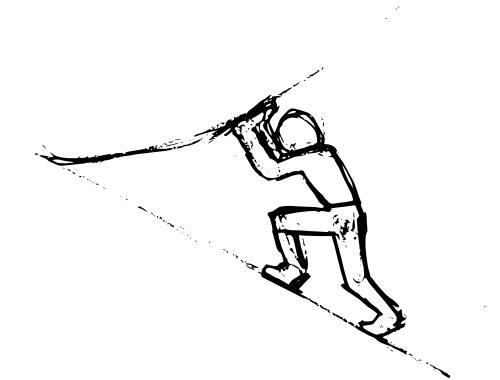
Then I selected the resulting path object and used the Simplify Tool (Ctrl-L) which well ...er... simplifies it. It rounds corners and makes it slightly more organic looking. You can repeatedly apply Ctrl-L and watch the effects. The image below shows the effect of only one Simplify application.
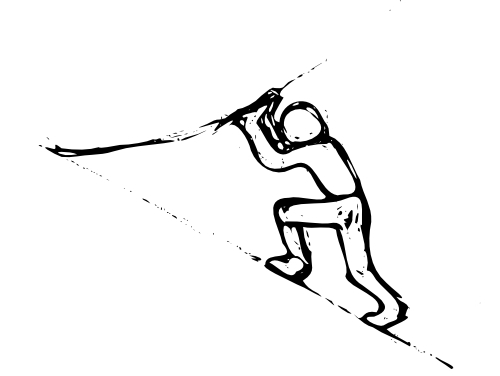
After simplifying I created a rectangle matching the background colour of my blog and placed it under the simplified path object.

Of course there are a ton of other neat things you can do with Inkscape (and a ton of better sketches you could work with) but it does illustrate some of the flexibility and fun of using a vector based application like Inkscape. And it's currently available for both Linux and Windows (with a native Mac version coming very soon apparently as well), so everyone can join in the fun.
Subscribe to:
Posts (Atom)

