Thursday, August 24, 2006

Photography Concept 5 - Histograms

It's been over a month since I last posted a Photography Concept. My apologies. Simply taking on too many things once again I guess. Hopefully, some will find this one useful. In previous installments we've discussed exposure, focal length and lenses, depth of field, and metering).

This time we're going to take a quick gander at histograms. As always, this will not be an all-encompassing discussion but a more practical look at what a histogram is, and why it can be useful to the digital photographer. Note: for those in the know, I have stayed away from things like output range, RGB channels and the like, to keep it simple and straightforward. As always I'll try to point out a few good resources for further info.

In terms of digital imaging, a histogram is a vertical bar graph showing the frequency distribution of the different tones in your image. More simply, and more importantly, it's a graphical representation of the exposure of your image. Imagine if you took a count of all of the pixels in your image and categorized them by their tone into 256 shades of grey (from black through to white). Now if you create a bar graph showing the number of pixels in each of the 256 categories with black on the left and white on the right, you would end up with a typical histogram. Here is a typical image histogram. (Note my screenshots were taken using the GIMP, but histogram displays are similar in other image programs like Photoshop, PaintShop Pro, etc.)
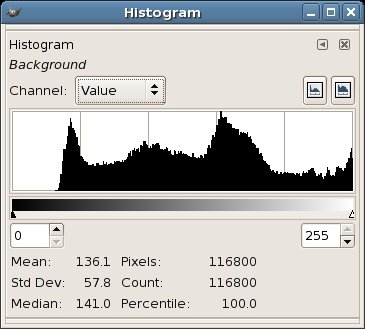

The key things to remember when looking at a histogram for one of your images are:

1. The left end of the histogram represents black, the right end represents white.
2. The height of the curve above the horizontal (or 'zero') axis indicates the relative quantity of pixels at that tonal value. So when the curve hits the horizontal axis, there are few, if any pixels at that value.
3. By virtue of 1. and 2., if the curve runs into the left end of the histogram before hitting the horizontal axis, there are a significant number of pure black pixels.
4. Also by virtue of 1. and 2., if the curve runs into the right end of the histogram before hitting the horizontal axis, there are a significant number of pure white pixels.
5. If the curve runs into the horizontal axis well before it reaches the left or right ends, your image may not be making use of the full tonal range and might be significantly improved (more on this in a moment).
6. There is no one single ideal histogram curve. That is to say that 3. does not necessarily always indicate underexposure, and 4. does not necessarily always indicate overexposure. (eg. if you are shooting a scene with lots of black in it, you will undoubtedly get the situation described by 3.)
7. Just to confuse matters, it must be said that the histogram of an image can give you a good indication of over or under-exposure conditions in your image.
8. If you have an option on your digital camera to view the histogram after taking the shot (no matter how small the display), you would do well to utilize it. A small histogram can in most cases be a better, more accurate indicator of exposure problems than viewing the image itself on a camera's LCD display.

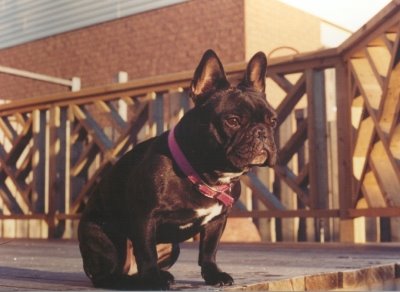
So let's look at an example histogram for the image below (a striking pose by Delilah, our Frenchie):

Here is the histogram for the image:
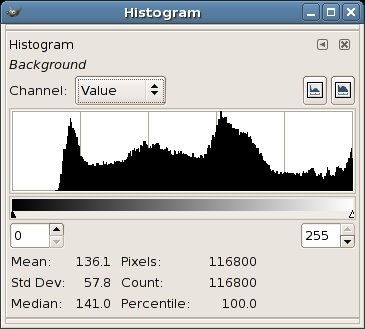

As you can see, there is a peak at the leftish end, most likely coming from the fact that our model Delilah is very dark. There is also another peak just right of the midpoint which is most likely coming from the abundance of wooden decking and brick in the picture.
Another key thing to note is that the right hand end of the histogram does not reach the horizontal (zero) axis - in fact it's rising up when it reaches the right end. This indicates that there are a significant number of pixels in the shot that are approaching pure white. This comes from the overexposed blotches in the upper right.
Finally, it can be noted that the left end of the curve reaches the horizontal or zero axis prematurely. This indicates that there are no pixels in the shot that are pure black. It's important to note that in this specific shot, we know because of Delilah's colour, that there should be some pixels that are approaching pure black, but in other cases there may not be any pixels approaching black (take for example a photo of a blue sky with clouds). Anyway, for this specific image, this looks like a situation where we're not utilizing the full tonal range in the image.

So how can we improve the image?

Well, unfortunately there isn't much that we can do with all the overexposed pixels in the upper right. It's difficult to recover image information from overexposed areas such as this. I've chosen to just ignore it, reasoning that it's not worth the trouble to fix (you could crop it out if desired).

We can however do something to better utilize the tonal range of the image. By using the 'Levels' tool found in many image editing programs, we can improve the image significantly. Let's look at the levels tool within the GIMP. There are similar tools in many other image editing tools as well - they won't differ too significantly from what I describe. Here is the levels dialog box:
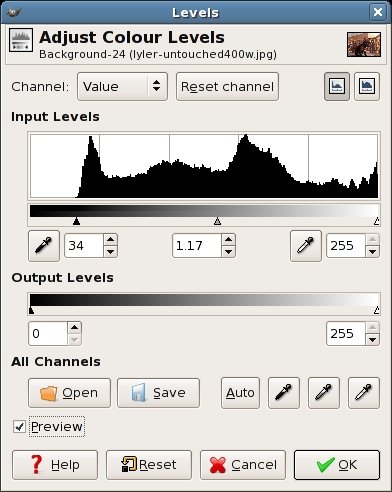

If we move the left slider in a rightwards direction as shown above so that it just stops where the histogram hits the zero axis, we can improve the image. Note that if there was a flat area on the right end of the histogram we would make a similar adjustment there. Also, there will almost always be a middle slider that will let you adjust the gamma of the image. This will result in brightening or darkening the midtones of the image. You can see that I made a slight adjustment to the gamma slider as well to slightly brighten the image after making the left-slider adjustment. If there is a preview checkbox available, I suggest you keep it on, as you want to see the dynamic changes to your image as you adjust. Here is a comparison of the original and corrected images (obviously the lower shot being the corrected one). Hopefully you will see the improvement:
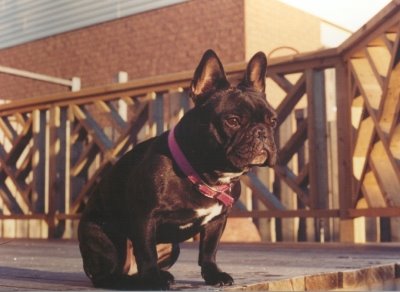
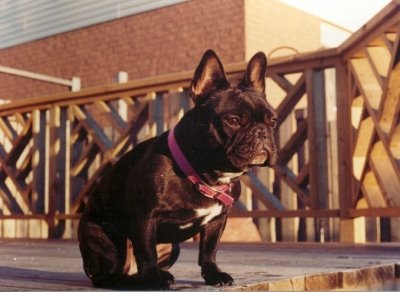

This is a quick fix that you can apply to any of your images that need a little extra punch. You might also find that your camera rarely gives you an image whose histogram is this far out of whack, but it does sometimes happen. Scanning prints will notoriously result in histograms with flat left (and right) hand sections. I remember having to do this virtually all my scanned photos. Luckily it is a quick fix and only takes a few seconds to perform.

So what are the take-away points of all this?

If your digital camera provides a histogram display, make use of it, no matter how small it is. Once you get used to interpreting it, you'll find that you can spot problematic photos immediately and possibly retake them with exposure compensation to correct the problem.

Don't blindly expect the perfect 'mountain' curve in your histogram for every image. You may very want a lot of white pixels or black pixels in your shot. And the curve will look different for different shots.

Play with the histogram adjustment tools in your photo editing software if they're available. They can vary from simple 'levels' dialogs, to more elaborate histogram adjustment tools (I quite liked the Paintshop Pro dialog for histogram adjustment, which would show you the percentage quantity of pixels you were modifying as you dragged the sliders left and right). Don't be afraid to experiment. You can improve the quality of your images signficantly with this simple tool.

Hopefully you found this useful. If you want to further expand your understanding histograms, check out this, this and this.

Wednesday, August 23, 2006

Photocast Network Launches

A new podcast network has been created which focuses (parden the pun) on photography related podcasts. You can find it at PhotocastNetwork.com. There are currently 8 shows on board. I'm only a regular subscriber to one of them at the moment (TipsFromTheTopFloor) but I've listened to (and watched) some of the other ones from time to time and they are all worthwhile. Potentially a good source for those interested in getting their photography fix on a regular basis.

Monday, August 21, 2006

Of Blogs and Blowhards

Jeff Sandquist takes issue with Robert Scoble's recent statement:

"Mike Torres of the Live Spaces team just said that more than half of all Live Spaces are private. Um, Mike, you DO realize that private Web spaces are NOT blogs, right?"


Backtracking to Robert's original post I have to say it reads like a list of rigid demands. If you don't meet the demands you can't call what you do a blog. (To be honest, I actually wish there was another name... 'blog' is such an ugly word now isn't it? But I digress..).

I really don't agree with Robert's definition of a weblog. Or anybody's really. It just seems so petty to be pidgeonholing something so free and so new. And to be honest, who really cares? If someone's got a static page that they update daily by hand, why should I care if they call it a blog or not?

But Jeff's response garnered this statement from Scoble to Jeff:

"And, OK, I’ll grant you that my ego is out of control. Blogging is something I’m a weeeeee bit of an expert on. Do you listen to anonymous jerks who come in your office and try to tell you what a good community is or what good software looks like? So, why do you quote such when trying to argue against me? "


First of all, when somebody writes that they're a 'weeeee bit of an expert' on something. It sends Richard's respect-o-meter into a nosedive. One thing Robert seems NOT to be an expert on lately is humility. And who exactly are the 'anonymous jerks' he claims Jeff is quoting? The commenters on Robert's own post? I'm still trying to sit down and figure this one out. But somehow leaving Microsoft has freed Scoble from his shell of humility and friendliness only to reveal an egostistical blowhard. I hope I'm wrong.

[UPDATE:] A quick visit to Scoble's page..er...blog, reveals that he has since rescinded his statements. Not so sure about the honesty of this one. One of those times you should have got a coffee and then re-read your post before hitting 'publish' I guess.

Friday, August 18, 2006

Canadian comedy and clubbing seals

Some clips of Rick Mercer's Talking to Americans show have been cited on BoingBoing via Digg. I'm not a huge fan of the show just because the belittling becomes tiresome after a time. However, I think the generalization that Canadians know more about Americans than Americans know about Canadians is true mostly because of our relative sizes and cultural influence.

It's easy for us Canadians to know a fair amount about America. We have been exposed to American media and culture all our lives. I grew up watching PBS and ABC almost as much as CBC. I think Americans are more inward looking than Canadians (and that is NOT a good thing) partly because they are surrounded by their own self-generated culture, insulated from the effects of other nations. I think that American producers could find similarly witless Canadians. Although they'd have to look a lot harder to find them, and nobody in their target viewing market would really care.

On a lighter note:

Rick Mercer (who has his own blog) was formerly a part of a CBC satirical news show called "This Hour Has 22 Minutes ". It's focused primarily on politics and current events. One of the all time greatest segments was when they sent recurring character Marg Delahunty to then Prime Minister Jean Chretien's office in Ottawa:

After some comedic conversation (also involving Marg sitting on the arm of Chretien's chair while he was sitting in it), she managed to get the Prime Minister to help her practice her golf swing.

So there he is, the leader of our country, standing in his office with his arms around Marg, helping her hold the club - y'know like 2 spoons in a drawer. Overcome by being cradled by the Prime Minister, Marg mocks a faint and collapses to the floor at the prime minister's feet. Just before they cut to commercial, Jean Chretien, our then-current leader, raises the club high over his head giving the indication that he's going to club her like a baby seal.

I remember thinking two things to myself: 1) How the hell did they convince him to do this on national television? and 2) I'm so proud that he's got such a great sense of humour.

Where have all the great personalities in politics gone?

Two complaints

Two things worth commenting on (or rather complaining about) this morning:

Item 1:
Scoble posts a picture of a sign at LinuxWorld stating that those under 18 are not admitted. Smart move? Dunno. It depends on the purpose of the conference holders. But what struck me about Robert's post was his opening line:

"Ahh, when the Open Source folks wonder why using Linux isn’t “cool” you have no further to look than this sign for the reason..."

Ok. So exactly which open source folks are wondering why using Linux isn't "cool" ? And maybe Robert is missing the point on Linux and the open source community - that can happen when you're working inside enemy lines for so long ;) If the viability and success of Linux and open-source depends on conferences we are all in trouble. It's being powered by a community. Most of which never attend conferences.

Robert goes on to write:

"...any conference where I can’t take my son and walk around is just something that’s going to have a hard time impressing me (hint: we both went to MacWorld with Dave Winer and then walked across the street and bought a Mac): "

For me, it's up to the organizers. If under-18's would benefit from attending but are not allowed then it's clearly the conference organizer's loss - but extending that loss to open-source and Linux in general is.. well, dumb. And btw, you don't have to buy proprietary hardware across the street from this conference. Those pc's you've currently got running Windows will do just fine for Linux :)

Item 2:
I've heard Mike Arrington mention his feelings that the blogosphere seems to be more vindictive, mean and uncaring lately (just listen to the session he led at this past Bloggercon). He also points out that Nick Carr is someone who fuels this. Do I agree with Mike? Yes. And I'm not sure it's limited to the blogosphere either. But that is another story for another time.

Now, this morning I see a post on Mike's weblog that says simply:

Shel Israel to Dick Carr: “just sit down and shut up”

Hello? Mike? You're lowering your standards and losing principled readers like me in the process. Take the higher road. When I read posts like this I'm inclined to unsubscribe. It's name-calling, and not even funny name-calling. Grow up. This is exactly what you rallied against in your session at Bloggercon.


Sheesh.

Wednesday, August 16, 2006

US-Canada Relations Summed Up

From this thread about U.S./Canada relations on the zefrank forums:

On why the US & Canada aren't the best of friends anymore...
Canada and the US used to be great friends. We got into all sorts of trouble together growing up, chasing girls, crushing fascism, drinking beers, redefining socioeconomic norms for the entire world. Then one day the US suggests we go rob a liquor store. Canada bailed and reconnected with its old friends in Europe who were busy raising families.

Interesting and funny on many levels.

Ahh the joy...

Just as a little side note to my previous post about the struggle for attention:

I don't share Seth Finklestein's view of it: "...It's painful to admit that you've wasted so much time and effort and pretty much nobody is listening..." (see the comments to Kent's post from a week and a half ago for his full comments). Rather, I have a much more naive view...

My bloglines reader shows 7 subscribers to my blog. And 1 of those 7 is me - so I don't count. Let's say it's 6. Now I have no other stats to go by, and maybe there are others who are subscribed via other means, but for the sake of argument, let's say there are 6.

The way I look at it is that there are exactly 600% more people reading what I write than if I never blogged in the first place. Mission successful.

Ahh, the joys of not being in the game....

:)


Sometimes it's nicer not to be in the game

With all the fighting about the neverending struggle for attention in the blogosphere, it was refreshing to hear something from Dave Winer on the issue. He points out to Scott Karp, Mike Arrington and Nick Carr and "others who believe that the number of people who read your blog means anything " that,  "I have reasons to believe that almost no one actually reads this stuff.". He goes on to describe how he feels that most people skim posts without reading them thoroughly and cites a few stories to back it up.

While I agree with Dave that a lot of people scan posts and respond too quickly (without reading, considering and evaluating the post) I'm not sure they are in the majority. Now Dave also comes from a viewpoint where he's got lots of people skimming his posts and probably lots of people looking for ways to disagree with him. I would think that comes with a combination of a high traffic blog and outspokeness (I don't know much about either). But from my perspective, the people who do comment on my blog posts (or write their own posts referencing them) usually have done a respectable job of actually reading my posts. I've rarely, if ever, been misunderstood. Maybe that could be put down to good writing, but more likely to an extremely small sample size. ;)

Kent Newsome sides with Nick on this one and claims that, for Mike "..It's easy to say money doesn't matter when you just won the lottery.." . I guess  that's true, but I tend to make a lot of my judgements based on past performance. And that would be bad news for Nick and good news for Mike.

In any case, I'm actually quite glad sometimes that I don't rely on blogging (and blog traffic) to make any portion of my living. Not just because I'd have been in the poorhouse months and months ago (!), but because I don't have that pressure to write for any reason other than my own selfish satisfaction.

As I've said before, many times I lose interest in things when they become "have-to's" instead of "want-to's". I like photography, blogging and programming because I want to do those things. If I had to do those things to earn my living, they would lose a lot of their appeal.


Monday, August 14, 2006

Blogger showing signs of life...

Finally it seems Blogger is showing signs of significant improvement! Looks like they've launched Blogger Beta with the intention to get categories and easier template editing among other things, up and running. Existing blogger blogs (like this one) will be able to transition over to the new format eventually (let's hope that means 'soon').

To be honest, I really haven't needed much in the way of new features, but then again needed and wanted are two different things. Being able to categorize my posts is probably the most important feature to me. But besides that, I've been pretty content with my blog platform. I haven't really spent too much time seeing how much greener the grass is on other platforms. It's likely just coming up to par with other platforms, but it's clear that I don't know what I've been missing.

Friday, August 11, 2006

Posting Block and The Risks Of Blogging

In a recent post, Brad Kellett writes:

but I have been at a loss for anything to write about on a more personal note. It's not that nothing has been happening to me, just that there is nothing that I have had the urge to blog.

I can comiserate with Brad in that sometimes there just isn't anything I want to blog about. And consciously looking for things to blog about usually results in a more lacklustre blog post - IMO of course.. I think my blog is personal in the way it's written, but I simply write about the things that interest me and the things that I think people will find useful or interesting. I don't go searching for those things. If they appear, then they might get blogged. Most of what is going on in other parts of my life would likely be neither interesting nor useful to anyone, so  that stuff just doesn't get  through the filter. Some people have no filter at all. Myself, I have a fairly substantial filter. There are two issues that sometimes gnaw at me in this respect:

My private life is mine. You will likely never see an "uh-oh...he's finally lost it" post here. If I need that kind of outlet (and I likely will at some point) it will be done under a pen-name somewhere else. If I need to relate my personal state of affairs about something on this blog  then I would likely pass it through my standard question: "would I be ok with everyone I currently know reading this post?" If the answer is anywhere close to no, then I don't post it.

There is also the issue of my livelihood. I don't write about my work, and I don't write about people I work with or deal with. The last thing I need is this blog to come back and haunt me 10 years from now when people I know are actually reading blogs.  It's funny because I never really admitted that to myself until I listened to the recent Bitterest Pill podcast in which Dan Klass says he needs a break. He relays a story about how he was chatting with another father at a school function where he described what it is he does (this whole podcasting schtick). He told the guy what it was called and basically gave him a quick description of what it is. Well of course one of the things Dan is good at is describing the social retardation of many of his parent-peers, he does it with vigor. Anyway, he sees the guy sometime later and the guy is just pissed. He listened to the podcast and felt that Dan was ridiculing everything this guy was about. Not a happy camper. Dan also goes on to say that he's now constantly worried about how his podcasts will affect his relationship with other non-immediate family members. His wife asking "Did you say such-and-such about so-and-so on the podcast?" is becoming more commonplace. He's basically not ready to run roughshod over his family's personal life for the sake of his podcast.

Now of course, I don't have a ton of subscribers (speak up you four!!) but it would seem pretty likely that someone I work with or deal with will eventually google me and read what I write here. So as anti-ballsy as it might sound, I'm not going to jeopardize other areas in my life for the sake of my blog. I want to be proud (or at least not ashamed) of what I write here.  So Brad, if it takes weeks for you to find something *you* feel is worthy of posting, then let it be weeks.


Ubuntu related comments...

In the comments to my previous post about Ubuntu, Earl Moore of Meandering Passage had a couple of questions. I thought I'd address them in a post just in case this discussion might be of interest to others. And of course others might want to leave their own comments on the subject. Here are Earl's comments to my post:

Richard, I've got a few questions I hope you won't mind answering.

Is Ubuntu being used as your primary computer desktop?

If so, what's been the biggest pro and con points of using it as such?

What would you consider the minimum hardware requirement for running Ubuntu with reasonable performance?

I've got an older PC that my wife use to use that has Windows XP Professional loaded on it. I've heard a lot of positive things about Ubuntu and I was thinking of installing it on this PC as a test bed. I'm interested in any recommendations you can provide.


Right now Ubuntu is definitely my primary desktop. When I installed Ubuntu Dapper, I had to fiddle a bit to get XP to play nicely in a dual boot situation. I knew the steps I had to take (I had done it before with the previous version of Ubuntu), but decided at that time to 'do it later'. Well, it's still later, and I haven't fixed it up yet. So right now I'm running an Ubuntu system with access to my XP files, but technically speaking I can't boot to XP. More telling is that I haven't really needed or wanted to.

There are many positives about running Ubuntu, I'll select a few of the bigger ones from my perspective:

  1. Not having to run virus and spyware scanning software.
  2. Realizing that open-source software can be pretty damn good.
  3. Being part of a relatively close-knit community (compared to XP users anyway) and the generally great support that comes with it.
  4. Being able to find software that will do just about anything and being able to communicate directly with those responsible for making the software.
  5. Having a stable system that only requires rebooting for kernel updates and virtually never for software installation (mind you XP was pretty stable on this machine as well - I had no complaints really).
  6. Not being locked in by a single vendor (this is a bigger deal to me that I initially thought). I don't necessarily want to play with Gates and Jobs for the rest of my life ;)
  7. And the list could go on...

Now, I try to be even-handed, and using Ubuntu has also had its drawbacks:

- You have to be prepared to learn and do more in terms of system setup and problem solving than when you run XP or a Mac (I would assume - never owned one). I love learning new things, so this is a pleasure to me and not really a curse. But if you want a completely hands-off solution, then Ubuntu or probably any Linux distro is not for you.

- You have to be prepared to go the extra mile to get certain kinks ironed out. For instance, with Ubuntu you have to run a 3rd party script or install a few things manually to get full support of mp3, certain proprietary video codecs (like wmv and mov), and flash. All of these things work on my machine, but the stock install won't include them. You can run very simple automated programs like Automatix and EasyUbuntu that will install all of this stuff for you.

- Hardware can sometimes be a problem. In general, if you have bleeding edge stuff like a just-released video card, then Linux support might be dodgy. A lot of this comes down to manufacturers not releasing their proprietary driver info. Generally though, hardware support is getting very good in Linux. Much much better than it used to be.

- There might be an app that you need that isn't available in Linux. There is always Wine which will run quite a few Windows programs, but it's not guaranteed to work. And you won't be able to run down to your local Staples to buy boxed software for your Ubuntu machine. This could be a concern depending on your needs.


As far as system requirements go, the Ubuntu site keeps it pretty simple and lists the following requirements:

For a desktop install: 256MB Ram and 3GB of hard drive space

For a server-only install: 64MB Ram and 500MB of hard drive space


Pretty basic requirements. They do state that you could run with less, however that might result in a more frustrating experience. Anything that will run XP will run Ubuntu I would think. And it is quite likely that Ubuntu will run on much older hardware than XP will. Also remember that the stock Ubuntu install will use the Gnome desktop environment, but you could also install Kubuntu which uses the KDE desktop (more similar to windows functionality) or even Xubuntu which uses the XFCE desktop - which is a lighter weight environment that might be better suited to older hardware. Also remember that if, for instance, you install Ubuntu, you can later easily install Kubuntu and/or Xubuntu desktop environments and boot into whichever you want after that.

Also, note that as with many Linux distributions (not only Ubuntu), you can download a Live CD. You basically download an ISO file that you burn to a CD. Then you reboot your PC with the CD in the tray and if the BIOS is set correctly it will boot into a fully functioning Ubuntu desktop. Anything you do or change won't remain after you shut down, but it is a great way to see how Ubuntu would run and what kinds of apps and functionality it has without doing anything to your existing system.

Ubuntu's Live CD is quite nice in that it gives you a full desktop that is identical to the stock install (although it's slower because it's running from the CD) and gives you an icon on the desktop to launch the actual installer if you like what you see.

My recommendation would be to try out the Live CD first. And again, most Linux distro's now have live CD's so you could also try others. Then, if you like what you see, I would erase and reformat the old machine's drive (after backing up any data of course) and do an Ubuntu-only install. It will be generally painless (hehe famous last words). The installer from the live CD just asks some basic questions and is quite quick. You'd likely have a fully functional Ubuntu box in under an hour. I would recommend against trying to dual boot it with the XP-Pro. It's a bit of a challenge and not something I'd recommend to someone new to Linux.

Although if you really need to keep the XP pro and dual boot it, it can be done. Lots of people do it this way. It's just not the simplest way.

Also note that Ubuntu will ship install CD's to you free of charge. The base system will install with a single CD, however I think Ubuntu will send you several (again, at no cost to you) so that you can distribute them to friends. Or you can download the LiveCD iso file and burn it yourself.

Hopefully this information helped you out Earl. There is a ton more out there. I'm still a newbie to Linux but I am constantly amazed at the amount of friendly support that's available from the Linux community. You would be wise to visit ubuntuforums.org, register there and post any questions you might have. You'll get a ton of great responses and info.

Ubuntu is now rockin'

Since moving to Ubuntu Dapper on my home system, I've been fairly pleased with the results. It has not been without its challenges, but I've been able to overcome them all with minimal fuss. However one issue that has plagued me from the get-go has been a slight lag in performance. Mostly, it manifested itself in application startup times which initially were 10 seconds for some applications. After searching high and low for possible causes and solutions, I managed to cut that to about 5 seconds. The frustrating thing is that periodically I would be given a glimpse of the full speed of the system. So after the odd kernel auto-update I would see full speed performance until the next reboot when things would slow down again. It's like when you have a car that you think is just fine, but your buddy then takes you for a ride in his brand-new wheels and your own car suddenly feels inadequate, dated and frumpy. You'd have been happier if you'd never been given the ride.

Now it was frustrating, but not big enough to be a deal-breaker. However, last night I think I finally put this problem to rest. I took some time to read this thread on ubuntuforums.org (a great resource for ubuntu users btw) which dealt with cutting down boot-up time by disabling unneeded services. I disabled about 5 or 6 services that I didn't require (pcmcia, hp-drivers, nvidia drivers etc..) and rebooted. Lo and behold my system booted up slightly faster, but more importantly it was running at full speed. I restarted the system a couple of times to double-check it was not another temporary fix. It wasn't.

So my bootup is slightly faster, my application startup times are significantly quicker, but even more important is the boost to other seemingly unrelated (or so I thought) tasks:

  1. Firefox was not terribly quick. Rendering of my Gmail inbox in particular was a bit doggish. Firefox is now much much better. My Gmail inbox is rendered in at least half the time.
  2. F-Spot (photo management app) used to lag behind in thumbnail generation. It now handles my thumbnails with aplomb while scrolling through my photos.
  3. The small wxPython application I've been working on used to take about 7 seconds to appear. It now appears in about 1.5s.
  4. Synaptic package manager used to take about 5 seconds to appear, plus another 5 seconds to show the list of available packages. The application and package listing appears in about 1.5 seconds.
  5. Flash sites like YouTube used to render fairly slowly and flash video used to lag considerably. It now works great.
  6. Launching any app, or carrying out just about any task (even a screensaver) used to register at or near 100% cpu time on the system monitor. Now the monitor shows much more reasonable cpu usage and screensavers show about 5% processor usage.

It's funny, because my system was always only showing about 5% cpu usage at idle, so I didn't think the problem was so system-wide.

In short, whatever it is that I disabled was crippling much of the system. Where Ubuntu was nice and stable before, it's now nice, stable AND fast! Woohoo!


Thursday, August 10, 2006

Bruised Ears and My Attention Deficit

Y'know, I don't demand a lot in terms of sound quality of the podcasts I listen to. I generally have no problem with somebody recording a podcast with a Radioshack cassette recorder in their basement. If the content is good I can normally tolerate a great deal.

Take the Linux Link Tech Show for example. They run a live stream once a week, record it and make it available as a podcast. The sound quality is always challenging, but the hosts are engaging and the topics interest me, so I sit there and listen to whole interviews with 4 second lag times, echoes and silent pauses and it doesn't bother me a bit. Actually it makes me chuckle sometimes. And Dave Winer's ever rare Morning Coffee Notes podcasts have never ever been about sound quality, but the content more than makes up for it.

But I have to admit that the current Gillmor Gang recorded live from Gnomedex crossed the line from annoyingly poor sound quality to unlistenable. And it wasn't just unlistenable in terms of sound quality but also in terms of content. Along with the usual crackle and lag of the call-in participants came a wharbling on-the-verge-of-feedback -its-not-hendrix-at-woodstock whistle that affected even the normally silken-voiced Doug Kaye. Just as I thought things would get better, Dan Farber or Doc Searls would interject with what sounded like walkie-talkie chatter from the bottom of a manhole somewhere. Ugh.

Now I was expecting better things after struggling through the previous multipart Gangfest which apparently culminated in the sharing of earbuds (ick) in order to get Hugh and Doc both involved aurally (!). But the Gnomedex gangfest (and a good deal of the previous multi-part gang) just sounded whiny, self-serving and unusually arrogant on all fronts. Hugh definitely did NOT feel the love on that one! I guess the 'attention deficit' in Attention Deficit Theatre is really meant to me mine.

I'm not going to complain and then threaten to unsubscribe (that would be too easy), I'll just have to make a quick judgement after skipping the 5 minute front end ad block -btw thanks for cutting those down Steve ;) - whether or not its going to be listenable for me. After all, if I unsubscribe I'd have nothing to complain about, Steve would have less to be grumpy about and the whole house of cards would flutter to the ground.

Do I wish the Gang would improve? Of course. Will it? Dunno. Maybe the experiment is really to see how far you can go before you actually lose subscribers. I'll be trying to skew the results.

Tuesday, August 08, 2006

Journalist's War Photos Photoshopped - and poorly at that!

Reuter's News Agency has withdrawn the photos submitted by Adnan Hajj after two of them were found to be 'Photoshopped'. Now of course I fully agree with their decision, but I have one relatively shallow comment on the article:

If you are going to tamper with photos for some intended purpose, at least do a decent job! I'm sure many in the photomanipulation communities on the web (like the Worth1000 crowd) will be horrified to see the modifications made to one of the photos to increase the smoke density in the sky. It's the worst photoshopping I've seen in quite a while.

On a less shallow note, the photographer is claiming he was just trying to remove dust marks and didn't see the resulting changes to the photo because of poor lighting conditions. I'd have to give him the benefit of the doubt since I find it hard to believe he thought he could fool Reuter's with such Photoshop butchery.

Note: I have only seen the photo of the smoke over Beirut, but the article says the other one is a photo of an Israeli jet that was modified to show the dropping of 3 flares instead of one.

The article states that he has submitted over 900 photos to Reuters and supposedly they are all going to be withdrawn immediately due to the two tampered submissions. Ouch.

More RAW on Linux Goodness...

Linux.com has a good article about Processing RAW Image Files on Linux. While not an exhaustive discussion on the subject, it provides a very practical description of the current situation with regards to RAW file processing on Linux. It also provides a few links to software I hadn't heard about before. Seems a lot of people are working to improve the situation. One open-source project that looks promising is RawStudio. It's a very young project so you have to download the source and compile it yourself. I think I'll give it a go in the next little while to see how it's shaping up. Plus, I haven't compiled anything on my Ubuntu system yet, and hey, I'm always up for a challenge ;)

One thing that I was glad to see at the RawStudio page was a screenshot showing the ability to paste RAW conversion settings from one image to another, this is tremendously useful and something that UFRaw doesn't do right now.

In fact, while perusing the links provided in the Linux.com article, I was checking out the dcraw page and found links to a whole host of RAW related projects. Many of which already do exactly what I am doing with my simple GUI for UFRaw project. Oh well. I'll still try to get it into working order just to keep my Python skills from fading completely ;)

BTW, the app is not completely dead yet. I'm working on it every so often when I get the chance and I've got most of the main functionality in the GUI already coded. Here's a screenshot:

Absolute Beginner Talk - For Linux Newbies

Derek Djons has a very useful and interesting blog called Absolute Beginner Talk aimed at the newbie Linux user. If you are thinking of switching to Linux or you're a newbie to Linux like me, you're probably on the lookout for good sources of practical information, he's definitely providing one. Check it out.

Saturday, August 05, 2006

Plight of the white male? Really?

Looking at the sexism-shitstorm Dave Winer seems to be weathering lately, I have to say that it's definitely been mountain building time at the molehill. Now I consider myself pretty liberal. I'm not an opponent of political correctness. I feel it has its place. It serves a purpose but it's not something that should be all-encompassing. If for instance, Canada's indigenous people want to be called 'Native Canadians' or 'First Nations' or 'Aboriginals', it really makes no difference to me. I will refer to them as they wish. Some people have a real problem doing that and complain about it until the cows come home. I don't. It is simply a matter of logic for me. It makes no difference to me what I call them, but it makes them (and me) happy to accomodate them. Where is the tough decision there?

I am simply happy to accommodate others concerns simply because they normally don't affect me. However, reading Dave's remarks in his post-blogHer posting, I don't think he did anything other than speak his mind and heart. There was nothing hurtful, or hateful in those remarks. Were there really things that negatively affected anyone at all? If you regularly read Dave's blog I don't think you'll find any air of sexism (quite the opposite actually). But you will also find that he writes many times from the heart. Would I have posted it? Likely not. But that is more my problem than his. His tendency to speak his mind is why I read him and why he is well-read.

However... there is one thing in Dave's recent post ' About the s-word' that I disagree with. He states:

And something I've only been learning in the last few years, if you're old, white and male, you're worth less than shit.


C'mon. That's just bullshit rhetoric. I'm white, male and aging rapidly. And I've had it really easy up to now and I still do. I know it, and you know it too. Look around at the state of North American society and tell me that the middle-aged white male is disenfranchised. It's simply not true. It's simply whining.

I remember fellow white, male engineering students grumbling about how more than half of our graduating class was of middle-eastern descent. "They're taking away opportunities for 'Canadian' students!" - I remember the complaints quite clearly. Bullshit. I was friends with these students and while we were out getting drunk at the local clubs or in our residence rooms, these guys were studying. They deserved to be there. If we decided to piss away our education then it's our own fault. Grrr.

Don't whine about the plight of the aging white male. There are so many other real plights to complain about like poverty, the homeless and illiteracy.

Friday, August 04, 2006

Who do you write for?


Kent Newsome has some really lucid opinions on the blogosphere and the misconception of it's importance and penetration. He also challenges people to write a paragraph answering the question: "Why do you write a blog and who do you write for?". Here you go sir:

I am surrounded by people who, for the most part, don't share my interests, so I write to express my otherwised buried thoughts on those subjects I care about. I write to challenge myself - can I focus and hone this swirling cloud of ideas into a cohesive set of statements? I also sometimes write to educate people, or at least contribute to an education on things, to broaden people's horizons. I take information from the net ALL the time, I feel it's right to contribute something as well. And finally, I write to explore and develop my own creativity. My profession - structural engineering - doesn't lend itself to this type of creativity (it has its own, completely different form of creativity). So if I look at those reasons, and their associated targets, I'd say I write mostly for my own selfish purposes, with a dash of 'helpfulness to others' thrown in as well. I would think it only logical that the people reading my blog on any kind of regular basis share some of my interests, but I don't think I target them in my writing. This is mostly a cathartic activity for me.

Curiously enough, I tend to google definitions all the time - I hate using a word or term incorrectly - it's so unelegant, and when I checked on "cathartic", wouldn't you know, the first ten definitions dealt with relieving constipation.. Hmmm...

Something really different...

Just when you thought non-linking was officially debunked, Scoble's written another annoying post about the subject. This time it seems like the main intent was to 'stir the pot'. (sounds like maybe Dvorak is ghost-writing for him).

Two things get me, the first being one of the initial comments (and Robert's response):

What does this give you? Being noticed?

Comment by James M. — August 3, 2006 @ 9:27 am


James: it gets guys like you to comment. :-)

Comment by Robert Scoble — August 3, 2006 @ 9:35 am


Smiley or no smiley, it sounds a little too Dvorakian to me. C'mon Robert, you can do better.

The second bit that just begs for a jibe is:

Seriously? I’m not gonna stop linking. I actually don’t agree with Gillmor either. But, I do appreciate that he tries to do something different which gets a conversation to start. If we were all the same this world would be so damn boring.


If Steve really wanted to do something different, he would translate his ideas into plain English, devoid of obtuse metaphors, so that they could actually be evaluated, and perhaps understood by the huddled masses. Now that would be different.

And if generating conversation is the goal, then I think Dave's method of actually writing about what he feels does a better, more honest and interesting job of it. Even if it does get him in trouble.

I'd like to see A-listers adopt a complete moratorium on linking for something like 2 months. Y'know, just to see if it works. According to Steve, it should work brilliantly. Any takers? ;)

Thursday, August 03, 2006

Maybe ultra-targeted ads are not the Holy Grail

Dave Winer writes:

"When they finish the process of better and better targeted advertising, that's when the whole idea of advertising will go poof, will disappear. If it's perfectly targeted, it isn't advertising, it's information. Information is welcome, advertising is offensive."


Is perfectly targeted product information really always welcome? On whose terms? The key thing is that part of being perfectly targeted to me is only showing up in my face when I need it, or perhaps even more restrictively, when I want it. That's a tough one isn't it? But that is the holy grail of advertising in my books.

I must be one of the few people in the world who *doesn't* always want to buy something. The key is somehow finding out when I'm interested in buying something and then, what I'm interested in buying.

At the risk of sounding like a luddite, I think focusing web technology efforts on providing a better 'Yellow Pages' model might be a path missed by many. I would give my left nut for a killer ad-site targeted to me. But one that I can go to, not one shoved in my face.

Google already does this to a large degree with their Google Local service, but it could be much much better.

I still visit Canada411.com when I'm trying to find a local service. It's an ugly, awkward site. It could be made a whole lot better and a whole lot more useful. That, my friends is the nut that nobody is even trying to crack. Instead, everyone wants to shove unwanted (and at the same time targeted) ads at me in a way that they hope doesn't piss me off. Is this model really working? If so, for how long?

Ubuntu billboard spotted...

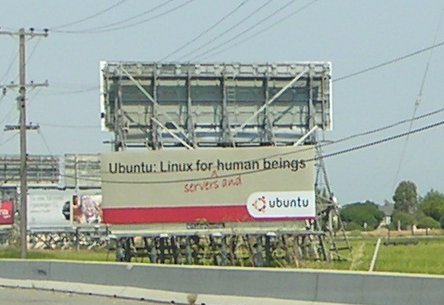
You know you've finally 'arrived' as an OS when you see the following:


It's about time baby! Photo courtesy of WildBill which was referenced on Ubuntonista's blog.

Tuesday, August 01, 2006

Somebody please write "Gestures for Dummies".. I beg you..

Ok. I am officially crying "Uncle!". Scoble's 'Gesture Firestorm' post leaves me dazed and confused, almost like one of the endless headlocks that my older brother used to give me throughout my youth.

Scoble contends that his posts about his mother and Montana were a 'gesture to the world' that was returned in kind by a 'gesture' from Rick Goff who informed him of news about a fire in that area. Robert then goes on to explain that he now understands what Steve Gillmor means by 'gestures'. I'm sure glad he does. I'm not entirely sure I do.

If 'gestures' mean the things I do which indicate my wants, needs or interests, then I'm not sure anybody will be able to usurp Google's lock on this information. They've already built a 'gesture' bank the size of which is just scary. Based on storing and scanning my Gmail, and search data, they've built a huge base of personal information from which to springboard all kinds of algorithmic-based services of the kind Scoble cites.

I truly wish Gillmor would hire someone to take his ideas and translate them into honest-to-gosh plain english, if indeed that's possible. Maybe there are some true nuggets in there, I just can't seem to decipher them. I think Doc Searls or even better yet, Dave Slusher should be hired on to route-the-info from InfoRouter so to speak.

And just to add confusion to the daze, witness this gem from Robert's post:

"One other thing. I didn’t link to Fred Wilson’s blog. Why? Cause if you really cared you’d have read it by now, right? I assume my readers know how to use Google and TechMeme. Cause you’re smarter than me and I can find Fred in both places right now."


Huh? I'd only consider myself smarter than you Robert because I'd have put the link in. Do you really think that people will stop in the middle of your article to Google a subject within your post? It is much easier (and dare I say - smarter) that I middle-click the interesting links in your post to open them on additional tabs for exploration after reading your post.

Will SOMEBODY please explain to me why making me search for things that you could easily point me to is somehow doing me (or that 'thing') a great service? Honestly, I want an explanation as to how this does anything for you as the blogger or him as a subject within your blog? (And in plain english please - babblespeak will not be tolerated).

I hope I'm wrong, but maybe Scoble is being assimilated by the Borg, only the Borg was not Microsoft but something else entirely. How soon until you're saying Office IS Dead Robert? ;)

[Update: Missed this somehow. Kent Newsome attempts to Debunk This Gesture Nonsense]

Chain Linking

Partly because it will piss off Mr. 'anti-linking' Gillmor (and now for chrissakes even Scoble!) I add myself to the list.


What you do is simply repost this blog entry as-is on your blog and add your website to the top (or bottom) of the chain of links below. Then email the blog entry to a couple blogger friends. For participating, you’ll get a little link love, a.k.a. Google juice.

1. http://www.kbcafe.com/iBLOGthere4iM/
2. http://www.newsome.org/
3. http://www.chipsquips.com/
4. http://tracytakespics.blogspot.com
5. http://jack-of-all-tradez.blogspot.com

Sunday, July 30, 2006

How experts become experts

Ze Frank says,

"People started telling me that if I wanted to do something, first I had to learn about how complicated it was..."

In his smart sharp-witted way, he goes on to explain that a lot of people tell you that you must understand something in it's entirety before you can even start to use something or start thinking about something, when actually picking up something and doing something with it quickly starts to fill in all that background reference material that ultimately lets future experts become experts.

Possible Bottom Line: Don't let the fact that people tell you something is so complicated dissuade you from breaking through that complexity and understanding new things.

PS - This mirrors a lot of what Dave Winer was trying to get across in his spirited discussion about exposing rss to users during the recent Bloggercon session "Standards For Users" headed by Niall Kennedy. The 2006 Bloggercon session MP3's can be found here.

Wednesday, July 26, 2006

Improving the space...

Kent, Earl and OmegaMom's posts regarding ProBlogger's series "If I Had to Start My Blog Again" are wonderful. In fact, I read Kent's last night and pondered it quite a bit today, sketching out some notes during my lunch in the car today. I was mildly shocked to read OmegaMom's post on the subject tonight, because it mirrored many of my own thoughts. But anyway, here are some of the things I'd do differently - (sorry for any duplication OmegaMom):

  1. I'd pick a blogging engine with categories. Aaargh. My varied interests just beg to be categorized.
  2. I'd try to limit my posting to my most enthusiastic topics. This is quite difficult given the fact that my interests seem to wax and wane with the tide some time.
  3. I would try to better highlight new voices not yet heard.
  4. I'm too hung-up about not being repetitive. Not with my own content but with regards to other bloggers. I'm sometimes hesitant to post about what someone else just posted about. I sometimes feel as if I'm riding coat-tails when I do that.
  5. I'd re-read Strunk & White and stop being so wishy-washy in my writing.This might possibly, could-a-would-a-should-a, just maybe (but correct me if I'm wrong) be a good idea. ;)
  6. I'd try to exercise a little more of my creativity in my content. I've tried to do this by writing some more informative/instructional posts about photography, linux and other topics lately. This is conscious. I want not only to comment on other people's content but provide some of my own so to speak.
  7. Something else I've noticed in Kent's, OmegaMom's and Earls posts about this topic is that there is a theme of building successful readership. This is not a bad thing. One of my other hang-ups has been my reluctance to overtly try to build readership. Growing readership is a good thing, but not necessarily the primary measure of success for me (and I'm not implying that it's the primary measure for Kent, Earl or Omegamom). I've said before that I love the fact that anybody at all reads what I write, but I don't want it to shape what I write about, or how I write it. That said, I'd like to do more to encourage readership. I'm all too happy to wallow in mediocrity.

As a commenter on OmegaMom's post quite nicely put:

"But there's no reason you can't do those things NOW if you really want to!"

So that being said... watch this space. Hopefully you'll see some improvement.

Digg' in without monetary motivation

As usual, Kent Newsome has some thoughtful analysis of the Kevin Rose/ Jason Calcanis conflict. In fact he's writing with some very insightful personal experience. However I have to think that it is quite possible that Kevin's wording is a little misleading (although of course he's free to correct me if I'm wrong):

Kevin states in his post:

"Ya see users like Digg, Del.icio.us, Reddit and Flickr because they are contributing to true, free, democratic social platforms devoid of monetary motivations."

If he means that the contributing users are devoid of monetary motivations, then he is correct. I think more often than not, people will construe that he's claiming Flickr, Digg, etc.. to be devoid of monetary motivations - which of course is preposterous.

Now are the contributing users actually devoid of monetary motivation? Well there's currently no monetary motivation on Digg to do it, so perhaps they're not devoid of it, but it's effectively a motivation that's all dressed up with no place to go. I think the point is that they are not contributing great links to make money. If they are, they should be doing it for Netscape. That might leave Digg with contributors who are simply doing it for the love of it. This is not a bad thing.

Part of Dave Winer's post just begs comment. He writes:

"No doubt Kevin is going to make something like $20 or $30 million when he sells Digg, which seems a pretty likely outcome. What will the users get?"

What should the users get? Where did it state that contributors get anything? If people start worrying about who's going to benefit from they're content or effort, they should start worrying more about the policies of the places they publish it. If you are worried that Flickr/Delicious/YouTube are going to make profits on the back of your work without compensating you, check their policies. If you're not satisfied they won't (and you're likely correct), then move on. Find and support services that pledge not to do that. OurMedia comes to mind.

Now I'm all for the 'user' - I'm a card-carrying member - but I realize quite simply that I'm publishing these words courtesy of Google (who owns Blogger). And if I really did care about who's profiting from my content (now that's a joke) I'd check Blogger's policies and go somewhere else if I wasn't happy with them (or host it myself).

While it would be nice if Digg paid all it's contributors if and when it gets bought, I think that's pie-in-the-sky unreasonable. Do you expect Google to pay you for all the search data you're giving them day after day which they use to build profitable services and products? These people have every right to make money with a novel idea. Cripes I'm not even American and I support that! :)

Maybe once users start realizing how important their content is, there will be a shift to organizations which protect that content. For now, I'm happily giving away my content. If a day comes when that happiness turns to anger, I will have no one to blame but myself.

Tuesday, July 25, 2006

Linux and The Mainstream

Toby Richards postulates on Newsforge about "Why Linux isn't mainstream". And in the huge whack of resulting comments, the discussion rages on as to what Linux has to do to make it mainstream.

I'm not entirely sure it will ever be. And I'm not entirely sure that it needs to be, at least in the way it's typically discussed.

I've been running Linux (Ubuntu Dapper) for the past month or so on my home system and I haven't booted to XP once within that time. Has it been a challenge? For sure, yes it has. But for me that is not a problem. In fact, I enjoy it. Is Windows ever a challenge? Maybe not for me, but ask my Father, Father-in-law, co-workers, and various friends why they've needed my computing help in the past and it wasn't because they were running Linux.

Toby is right in that you likely won't get Linux into organizations without full MS Exchange support. But that is that any different than other application segments? It is going to take products (and projects) that do things better than Windows without any penalty for switching. Is that impossible? Dont' tell the Firefox folks that. Sure it's tough, but with the shift to web-based applications and the ever improving nature of open-source software, maybe that rocky road is being paved smooth piece by piece.

Let me be clear, running Linux (Ubuntu Dapper anyway) has been more of a challenge than running XP. If I had bought a machine pre-installed with Linux maybe I wouldn't be saying that. (I've never actually installed any version of Windows). But in any case, I've had to do a fair amount of learning in the past month or so. To me this is never a bad thing, but for the typical mainstream PC user it might be distasteful. (I'm always awed by Joe Public's utter disdain for learning anything new - and not just in terms of computing).

So why do I like running Linux? Here are some of the reasons both practical and principled:

- The whole system is built and supported by people who are overwhelmingly doing things because they love doing them, and want to share them with others. Don't dismiss this. It's happening in lots of places on the web. Not only in open-source.

- Right now there are some 18000 software packages listed in my Synaptic Package Manager. I can choose to install any one of them right here, right now, for no cost.

- The support mechanism falls on the developers and the users. And for the vast majority of cases, it works and works well. There are a great number of sources for good, flame-free support. I'm blown away by how quickly passionate users will support other users. Of course this is not the exclusive domain of Linux, but I think being a smaller group has some advantages in this respect. There is a definite sense of community.

- XGL/Compiz is just plain cool.

- System stability. While my XP system was never too bad, it was significantly more sensitive to a multitude applications running concurrently. I've not had any kind of system crash running Linux yet.

- Installing software very rarely requires a reboot (kernel patches being one of the few exceptions). I just install software from the repositories and keep on trucking.

- The command line is a powerful thing. It's nice to be reminded that it is not always better to point and click. In fact many times it's not.

- Linux people generally don't whine and complain about their computers. We are all here by choice, so complaining about it is pointless. (It's pretty rare to hear about someone forced to use Linux)

- Choice. Now some will regard this as a major detriment to Linux, but I love it. I get to choose things like my desktop environment, word processor, text editor, spreadsheet, mail client, web browser, podcasting client, graphics program, etc. Sure, for a new user it's nice to provide good, safe defaults, but for me, I love the ability to choose and experiment.

- Very few worries about someone end-of-lifeing my favourite piece of software.

- I don't need to run three anti-spyware apps and an antivirus program to scan for malicious things on my system.

- Did I mention it's free?

Now of course the question remains 'Will it ever be mainstream?'. I think it might be more likely that open-source cross-platform software projects (running on Windows) will continue to claim more and more of the mainstream market. And after a time, it won't be such a big deal to switch XP out for Linux. There may come a time when it won't make a difference because many of the apps they use on Windows will have come out of a Linux-based development system anyway. But will that alone be enough reason to switch? Probably not. Maybe there will also need to be a compelling Linux-only 'killer' app that will pull the market across at that point. There are plenty of smart people in the open-source world. Don't think they're not working on it.

Monday, July 24, 2006

This Week In Tech - no rss/xml icons??

If you're a regular listener of This Week In Tech, you'll probably know that they've recently done a redesign of their site. It looks much much better, but there is one problem.

Now maybe it's too early on a Monday morning and I've just got to give my head a shake, but it seems to me that subscribing to the Twit series of shows on this site is a pain for someone like me who uses a plain-jane podcasting client like iPodder. I've recently re-installed it on my linux box (btw interestingly it's still called 'iPodder' in linux and NOT 'Juice') and had to resubscribe to a few shows like Floss Weekly.

If you visit the site, you will NOT see the ubiquitous 'xml' or 'rss' chicklet for the show's feed (or any of the show's feeds). I usually right-click this to copy the address to the feed and paste it into my aggregator.

No. Instead they have a 'Subscribe..' drop down box which lists all the subscriptions mechanisms ('I-Tunes, Odeo, etc..) and at the bottom you will see 'rss'. That's great. But I can't right-click that entry in the drop down list to copy the address (at least I couldn't) and when I select 'rss' I get the xml document tree representation that everyone calls 'scary'.

The only way I can copy the feed address is to click 'rss' from the dropdown list, ignore the document tree page and copy the feed link in the address bar of my browser when the document tree is showing.

Is this a good solution??? C'mon guys. We shouldn't have to do this to subscribe. NOT everyone uses I-Tunes. Give me some direct link to the feed address somewhere on your page that I can copy and paste. You should know better. For shame Leo.

Saturday, July 22, 2006

Linux Digital Photography Workflow Redux - Is Low Tech better?

Almost a month ago, I posted about how I was attempting to deal with my digital photo workflow under Linux. Since then, a couple of things have happened which have made me re-think my workflow... and probably in a way you might find surprising.

Here are the two things that have happened:

A) I've become enamoured with the linux command line and the linux philosophy. While no guru, I am becoming reacquainted with the simplicity and power of the linux file system, the command line and the Unix philosophy of 'writing small tools that do one thing and do it well' and utilizing those tools together to create a powerful solution.

B) Adobe recently released the Beta version of it's Lightroom program for Windows (previously it was only available for the Mac). I downloaded it and gave it a quick test spin.

In case you didn't already guess, B) is at odds with A).In fact, after running the Lightroom Beta, I immediately came to the realization that it was NOT what I needed.

In fact, I soon came to the realization that most photo management applications I've tried - and I've tried A LOT - are more frustrating than useful to me. I'm not so sure an all-in-one solution is what I'm after at all. In the past I've tried: Paintshop Pro Album, ACDSee, Photoshop Album, Picasa, and now F-Spot on linux among several others.

Here are some the main reasons they frustrate me:

1. References to my photos and metadata (including any tagging or rating systems etc.) are kept in a hard-to-access database. I realize that this is probably the fastest/most stable/best way to do it, but I don't like it. I can't see the data, move the data or copy the data without really getting my hands dirty.

2. I find that some of these programs have trouble when I move images around on my hard drive. I've sometimes got multiple copies of the same image in the database and it's hard for me to distinguish one copy from another. I don't feel safe moving image files around or reorganizing my folder structure without wiping things out or screwing things up.

3. Many times these apps rely on locking you into their way of doing things. They work much better (in terms of built-in versioning schemes etc) if you do all your editing within them. This is not what I'm looking for. I want to use the best tool for the job without worrying about how it affects another program's functionality.

4. What happens to all that metadata (ratings, tagging, etc.) that I spent hours and hours entering when I find a super-duper new application from a completely different company 5 years from now? Maybe F-Spot will do an honest job of exporting this info for others, but could you say the same about the proprietary solutions?

So what am I thinking about in terms of a digital photography workflow?

What about a relatively low-tech DIY photomanagement approach?

"Huh...Whuh?.." you might ask. Read on and I'll explain what I'm thinking about. It's by no means a complete solution (hence I said 'approach') but it may provide some food for thought. And if at the end of it you say 'screw off.. you're nuts! - I'm using Lightroom/Aperture/Iphoto', then go right ahead...

And also bear in mind that this was based on *my* workflow needs. Yours of course might be totally different.

The first thing I asked myself was 'what do I really do with the photos on my CF card?'. In it's most basic form, here's what I do:

1. Bring them into the computer.
2. Back them up to other media (usually DVD).
3. Make adjustments to them (crop, resize, colour correct, etc..).
4. Tag and/or rate them to make future searches easier - I've been hesitant at this.
5. Publish them to Flickr, and/or
6. Publish them to my blog directly, and/or
7. Print them

And what more specifically are the problems I have with the systems I've used in the past?

1. Many apps take a data-silo/lock-in approach to my photos and metadata (as I outlined at the start).

2. I find that my system gets 'photo-bloat'. I end up with 10 copies of the same image, all of different sizes or different cropping for different purposes and of course, none of those 10 is the one I want.

3. I have a hell of a time distinguishing one version of an image with another without examining each one in some kind of image browser.

I intend to try and let the OS do part of the work. I want to leverage the power of the ubiquitous 'filename'. A large amount of command line work can be done (nevermind scripting) when the file naming system is made somewhat useful and more importantly, consistent.

Some ground rules:

1. Make sure your camera is set to keep image numbering continuous. So if you empty and format your card or swap in a new card, it doesn't reset the file name to IMG001.jpg again. That rootname (or even the number portion alone) is key to my proposed filenaming system. This name will anchor all the versions of a given image.

2. Subjective or verbose filenames are Satan's work:
eg. UncleBills_birthday_Cousin_Huey_drunk_05.jpg

Don't even go there. This type of thing does nothing to help searching 6 months for now. Avoid it at all costs.


3. Exif data is your friend.
Make sure any editing you do (and any editing software you use) keeps the Exif data intact. Try not to duplicate any of the Exif data in your filename unless it's really necessary.


Folder structure:

On my linux system, I use F-spot to import my images. I shoot mostly in RAW, so a typical image filename would be 'img_2345.cr2'. F-spot creates a nice directory structure where the /photos folder contains a /2006 folder which itself contains monthly folders. Those monthly folders contain date folders which are created based on the Exif information in the images. So if the img_2345.cr2 file was shot on July 21, 2006, the path to the file would be:

/photos/2006/7/21/img_2345.cr2

Many systems do a similar thing. The Canon software on my XP system would create something like:

\MyPhotos\2006_7_21\img_2345.cr2

In any case, make sure you set up a workable date-based folder structure. Unless you're a professional photographer and have to separate things by project, a simple date-based folder structure is a good way to go.

I would NOT create separate subfolders for different photo tasks unless it makes sense. So I want my cr2 file, my jpeg master and any subsequent versions of that jpeg all in the same folder.The naming system I came up with makes better sense having all the versions of a file in one folder.

A Necessary Next Step (for RAW shooters):

Next I would create a duplicate set of jpegs from your RAW files. These would be colour-corrected and tuned with a raw conversion program. These would NOT be scaled, resized, or otherwise modified in any way. You're trying to create a master copy of jpegs here. If of course you're shooting jpeg anyway, then this step is unnecessary (other than doing some general colour correction if required).

Now the fun part.

Here's where you come up with a file naming system that will perform a kind of 'version tracking' with the filename itself. Here are a few simple principles I tried to follow when coming up with it:

- All naming to be lowercase (in windows this doesn't matter, but linux is case sensitive - so it's important)

- All modifications to the filename to be made using suffixes and not prefixes. I want the original image name ('img_2345') to remain intact in all versions. This way when you list these files they are all grouped together.

- Demarcation between suffixes to be done with a period. I think it looks a lot cleaner than using underscores, but the choice was arbitrary.

- An indicator of image size in the filename would be helpful but wouldn't be a requirement. So I considered it optional.

- The order of suffixes should match the actual order of processing if possible. This just gives you some clues as to how the photo was processed just by looking at the filename.


So what would my system look like:

Based on what I do with my photos, here's my file naming system. Yours of course might be different to suit your own needs:

rootname.purpose.modifications.sizeindicator.jpg

rootname - This is the original filename minus extension (eg. img_2345)

purpose - This is a short (2 or 3 character) suffix indicating the purpose of the image file. For me this would be either 'bp'-blog post, 'fl'-flickr post, or 'pr'-for printing

modifications - I do 3 general things to my images: crop, resize, and correct ('correct' meaning colour correction, levels, enhancement, noise-reduction etc..). So I will assign a short suffix indicating what type of basic correction was made to that specific image. 'cr'-indicates cropping, 'rz'-indicates resizing, 'co'-indicates corrected.

sizeindicator - An optional suffix, but when it is used I will likely use a '700w' OR '600h' suffix to indicate 700px wide or 600px high respectively. I would describe the width or the height but likely not both unless absolutely required. This gives a quick indication of the size of the image without having to open it up in an image browser.

So looking at a directory listing of an image with several versions might yield (path omitted for clarity):

img_2345.bp.cc.rz.500w.jpg
img_2345.fl.jpg
img_2345.pr.cc.rz.1500w.jpg
img_2345.cr2
img_2345.jpg


A couple of key things to remember:

- Keep It Simple Stupid: or you won't remember the system or use it!

- Document it. If you come up with a system, jot it down and stick it to your monitor. Don't give yourself excuses to let it fall apart.


Some discussion points:

- A system like this allows for a quick search for all versions of an image. So simply searching for 'img_2345*' will yield all the versions of the image.

- You don't have to create endless subfolders for each type or use of an image. Subfolders are good... to a point, after which I find they become a nuisance.

- You won't always need a thumbnailing program to tell versions of an image apart.

- A simple file naming scheme like this doesn't do anything about metadata. And seeing how that was one of my key gripes (way up at the start of this post) that is a big problem. I think metadata is useful. I'm not saying give up on F-Spot, Picasa etc.. I intend to still use them for metadata and visual searches on images. However they don't give me a flexible versioning or naming system. I will still use them, but for more limited uses.

- Maybe a system wide file tagging system is in order. Not just image files, but all files.

- Applying a system like this retroactively to existing images is of course near impossible. All I can say is that if you think it's a good idea, then start doing it now.

- Overwriting of a parent file with a child file is always a risk (for instance say you resize a file and save it out without changing the filename, overwriting your jpeg master copy). I have two ideas about this:

1. Perhaps using file permissions might be an answer, at least to protect your master files. Maybe after importing the RAW images and creating the jpeg master files, you set all of those files to be 'read-only' in the file permissions. This would prevent overwriting of the master files later on.

2. Getting into the habit of creating a file with the 'purpose' suffix prior to doing any editing. So if you know that you're going to publish a given file to Flickr and print it, you could create the img_2345.fl.jpg and img_2345.pr.jpg files PRIOR to doing any editing.

So that's it for now. I really didn't think it would take so long to explain a system so simple, but I think the reasons behind wanting to do it are valid ones. I'll probably continue to post about my workflow as I fine-tune it further.

Of course if you disagree, or have some something to add, correct, or improve by all means do so in the comments below.

Friday, July 21, 2006

Mood News - I Love It!

Found via a signature on a wxPython mailing list post of all places, this site has got to be one of the most interesting applications of news aggregation I've ever seen. It's marked as a proof of concept and it tries to rank the headlines from good news to bad news. Thankfully it starts with the good news stories and finishes with the worst ones.

Think of it as mainstream network news ranking in reverse ;) I love it!

Wednesday, July 19, 2006

Photography Concept 4

In this fourth post on basic photography concepts I'm going to explain metering. As always, I'm not going to attempt an exhaustive discussion on the topic, but rather I'll try to provide the basics in plain english, with hopefully just enough meat to build some understanding without reducing anybody to tears (of boredom or fear - take your pick).

If you've not been awaiting this post with baited breath (hah!) you can also check out the previous installments where we discussed the concepts of: exposure, focal length and lenses, and depth of field.

Back in that first post I described the concept of exposure. Exposure in photographic terms quite literally means how much light you let into the camera and for how long. I described that there are three ways to control the exposure: shutter speed, aperture and ISO speed. The first mechanism controls the duration of the exposure to light, the second controls the amount of light let into the camera and the third controls the light sensitivity of the camera sensor.

So why are we trying to control the exposure? In the most simplistic terms, we want the resulting photograph to accurately represent what we are seeing with our eyes (of course there are exceptions to this and quite wonderful ones at that!). If you underexpose, the photo will look dark. If you overexpose, the photo will be too bright and washed out.

So how do we know when we've got it right? The camera will tell us... hopefully. Modern cameras in fact make it quite difficult for us to get it completely wrong. But how does the camera know when it has it right (or at least mostly right)? Metering baby. Metering.

Measuring the amount of light in your scene (or more accurately the amount of light reflected off of it) is called metering. Now of course there are loads of different ways that metering can be accomplished. I'm not going to discuss all of them. Having you fall asleep at your keyboard is not my goal here. I'll briefly describe an older system of metering that I'm familiar with and we'll take a look at modern systems.

My first SLR camera was a 1977 Canon AT-1 given to me by my father about 5 years ago. That camera had TTL metering. The 'TTL' meaning "through the lens" metering. Older cameras had the photocell (the thing sensing the amount of light) on the camera body outside of the lens. On a TTL metering camera, the photocell was within the camera and measured the intensity of light coming through the lens - hence the name. This camera had what was called 'match-needle' metering. So the photocell would control a needle that you could see in the viewfinder. As the light intensity increased, the needle rose up and conversely, the needle lowered as the light levels dropped. There was a second needle which was controlled by the aperture and shutter speed adjustments on the camera. In order to get a decent exposure, you would make aperture and shutter speed adjustments that would bring the needle in line with the needle representing the light meter reading. You would 'match' the needles. This camera didn't have 'auto exposure'. The camera wouldn't make any effort to pick the right exposure settings to match the amount of light reflected off of the scene. This was left up to the photographer. In more modern systems with 'auto-exposure', the camera tries to make adjustments to the shutter speed or aperture settings (or some combination of both) based on the light coming in, in order to get a good exposure.

In a typical photographic scene, there are light areas and dark areas. So in order to judge what a proper exposure might be, the most basic system would come up with an average of all the brightness levels in the scene and then set the exposure settings (aperture and/or shutter speed) so that this average level was rendered an 'average' tone on the resulting photograph. An 'average tone' being a mid-grey (think of worn, sunlit asphalt). The key concept is that it would average all the brightness levels in the scene. So if there was one area that was very bright relative to the rest of the scene, it would throw the average off - the average tone would be brighter. So it would close down the aperture and/or increase the shutter speed to render this average tone a middle-grey. Imagine you were taking a picture of a person against a backdrop of snow. The white background would dominate the frame, providing a very high average brightness value. So the camera would try to render this high average value as a middle-grey, resulting in your white snowy background looking grey. Not a good solution.

So just averaging the brightness values of a scene is not a very good method. Unless your scene has a average tonal value somewhere close to middle grey. There had to be a better way. And there was.. actually there were several.

Most modern SLR (and DSLR) cameras have a variety of metering 'modes'. These modes take a much more complex look at the light coming into the camera from your scene. The most common metering modes are: centre-weighted, spot, and multi-segment.

It's important to remember that these modes were created to better analyze a scene so that the resulting exposure is more accurate. But don't forget that the resulting exposure still comes down to only 3 things: choosing a shutter speed, aperture and ISO speed. These fancy metering systems don't necessarily get you better pictures, they only make it easier (and more likely) for you to get correct exposure settings.

Centre-weighted metering is a system where the tonal values of a scene are averaged together, but the central area of the frame will get more weighting in that calculation. So if the your subject is in the centre of the frame, the brightness of that subject will have a more significant effect on the resulting exposure settings than if you just averaged the whole scene. This is still a viable method of metering. But it has been rendered somewhat redundant by multi-segment metering which we'll discuss in a moment.

Spot metering is a system by which the exposure is based on the tonal values read from a tight central area of the frame (say 5%) while any metering information from outside of that central area is ignored in the exposure calculation. This mode is good when you've got a dark subject against a bright background or a light subject against a dark background. Think of a bird against a bright sky, or an actor under a spotlight on a dark stage. This is a very useful mode. Not all cameras have a true spot-metering mode. My Canon Rebel XT for instance has what Canon calls a 'partial' metering mode. In this case, the camera takes about the central 9 or 10% of the frame and not the 4 or 5% present in true spot-metering systems.

Multi-segment metering goes by different names depending on what brand of camera you have. Canon calls it 'Evaluative metering', Nikon calls it 'Matrix metering', and Olympus has its 'Digital ESP'. Each manufacturer's technology differs of course, but the basis of each is the same. In a multi-segment system, the scene is divided up into many segments. Each segment is metered and the camera then tries to interpret this information into some logical exposure value. For instance, given a darker subject on a light background but where the subject is NOT centred within the frame, a multi-segment system could identify this and still expose based heavily on the darker subject, making the assumption that this is the primary subject of your photograph. (Don't forget that a typical spot metering system would not work here unless the subject was in that central 4 or 5% of the frame.). These systems can make getting a good exposure a piece of cake, however as with most technologies, they can be fooled.

With all this technical talk about whiz-bang metering systems, it's important to keep in mind that all you're trying to do is get the right shutter speed, aperture and ISO settings. A very capable photographer could get the same great exposures with only a match-needle metering system and a keen eye for tonal values. The high-tech systems just make it a little more foolproof for the rest of us.

A few quickie tips and comments:

- Try to look at your scene in terms of tonal values. That is, visualize your scene in greyscale. If you can do this, you can get a much better handle on when you're looking at a potentially tricky exposure.

- Experiment with the exposure compensation controls on your DSLR or digicam (not all have them). These let you override the in-camera metering. So if you think (or find) that the camera's high-tech system is not getting things exactly right, you can make quick adjustments to get the exposure brighter or darker. Don't be surprised. You're eyes and brain might be more than a match for the best metering system with a little practice.

- Make use of the histogram display on your digital camera. This can indicate quickly if you've got overexposed or underexposed portions in your photo. You won't always spot it on the lcd view of your photo, but a histogram will illustrate it much more clearly.

- Shooting in RAW format can give you significantly more leeway in terms of exposure. With my Rebel XT for instance I can adjust the overall exposure by +/- two stops. This is like having access to my exposure compensation controls after I've taken the photo. RAW format files allow you to make many significant adjustments to a photo that you would normally only be able to make on the camera. While you might not want to shoot RAW format for all your photos, you should experiment with it for shots that you feel might be tricky exposure-wise.

- I've only discussed TTL in-camera metering systems. There is a photography camp out there that would chastise me for not mentioning standalone light meters. So I'll do it here (I just have). These devices are a perfectly viable way of metering a scene - and in some ways are even better than relying on the in-camera systems. But this is a series of posts based on the layman, and I didn't feel it was appropriate to explore that whole avenue. For those interested, see here.

Tuesday, July 18, 2006

The Return Of Super...

The Man with the Bones has a great review of Superman Returns. This part just made me chuckle:

...In other instances, he weedily floats, bobs and slides around on his stomach as if he’s the asthmatic kid learning to swim on a tummy-board. Un-super in my opinion...


All in all a very well written and balanced review. I'm not a huge movie theatre guy (although I have recently enjoyed a few more courtesy of my daughter - think Wallace & Grommit, Chicken Little etc..), but Superman may be enough for me to lay down the obscene casheesh that it requires to see a movie these days. At least by the sounds of it.

Monday, July 17, 2006

Bursting my bubble....

Dave Winer's criticism of Podshow during the recent RSS feed hijacking fiasco seems to have earned him a blank paragraph in a recent Steve Gillmor post. Now Dave writes about why he was critical of them and why he was right. He ends of the post with:

If Steve Gillmor thinks I'm fucked up for calling them on it, Steve can think that, no one is perfect, not even Steve.";->"


Now why did Dave have to go and burst my bubble like that?!

;)

Saturday, July 15, 2006

Calling all HSS/CSS saavy readers...

I've got a header graphic at the top of my blog. I'm happy with the image. However when I first modified my blog template to use that image instead of the stock blog title, I also lost the ability to make the header a clickable link back to the main page of my blog. So when you're reading a specific blog post and you want to head back to the main page of the blog, clicking on the graphic won't take you there. That's bad form and it annoys the hell out of me. I've tried a few things but I'm caving on this one. Can anybody point me in the correct direction towards a solution?

The image is referenced in the CSS portion of the template as the background property of the #header id tag. Here's the code snippet from the template:

#header {
/*width:660px;*/
margin:0 0 0;
/*border:0px solid #468;*/
padding:0 0 8px;
background: url("http://home.primus.ca/~rico.jd/rm-header.jpg") no-repeat center top;
}

Where in my template should (or can) I put the tag to make that sucker link back to the main page of my blog? Or maybe it isn't that easy?

Friday, July 14, 2006

The New Black

Jon Udell has written an Infoworld article about the Distraction Free Desktop. In it, he describes a free Mac app called WriteRoom that provides an ultra simplified environment to write within. I can hear the Emacs crowd chortling just about now. But anyway, there is a Windows alternative for those of the XP-ilk. It's called Dark Room and can be found here.

I'm fairly well focused while I write. Mostly because I only spend a small part of my day trying to write. So I take the time when and where I can get it, and try to make the most of it. To me, the distraction of email and pop-up notifiers isn't a big issue while I write. Still, I always have a soft spot for PC related nostalgia, and working in Dark Room's stark, green on black environment reminded me of computer lab in high-school, programming simple things on the Commodore Pets we were using at the time.

On a nostalgic note, I still think the editor I was using to code with during graduate school was still at least as nice looking as anything on my 19" LCD looks now... and that was 12 years ago!! We were using Sun Sparc Stations with the OpenWindows environment. I'm not sure what the monitor resolution was back then (they were 21" CRTs I believe), but it sure seemed quite nice at the time. Maybe it's the tint of rose-coloured glasses, but I don't think I've seen an IDE yet that can match it's display of black 6pt Lucida Console text on a white background. That was truly magic.

A Good Interview

While it's kind of old in this fast-paced world of blogs and technology, I did find a podcast interview with Doc Searls on the LQ-Radio podcast. He's one of the people in this sphere of the web that I respect most. I think intelligence mixed with humility and honesty is a recipe for respect that can't be beat, and Doc has those ingredients in spades. Check it out. It's quite an interesting interview.

Wednesday, July 12, 2006

Turning a detailed vision into reality

Five years from now I'd love to be where Matt Inglot is in his life. Not in specific terms, but in a more general sense. His post Developing a Detailed Vision and Having It Become Reality is an inspiring and worthy read. In some respects, I'm where Matt was 5 years ago. The only difference is, I don't have a detailed plan. Maybe that can change.

I've finally found her.. and she's beautiful...

There are several things I am not. I am not an SUV guy, nor a minivan guy. I am not a pickup truck guy, nor a luxury sedan guy.

I am however, a car guy. And a 'big fan of good engineering' guy. I value performance but not stupidity. (Ok, I did have the obligatory Lamborghini Countach poster -with the hot chickie- on my bedroom wall growing up - right beside my Eddie Van Halen poster). So to me, the 16-cylinder, 1000+ bhp Bugatti Veyron is both obese and cartoonish, no matter what the performance.

At the ChampCar race Toronto this past weekend, while perusing a display of hotted up cars in the trade centre during a break in the action I happened to find my 'dream car'. The Lotus Elise. It seats only two (and I'd likely have to drop 20lbs to be comfortable in it) but it uses light weight - and not gobs of horsepower - to attain some pretty great performance. How is 190 bhp and a sub-5 sec. 0-60 mph time? Kind of like a McLaren F1 for the masses. And besides that, I find it simply beautiful. Now if I could find a way to get a child car seat in there somewhere.. Hmmm...

Monday, July 10, 2006

Digital Photography Workflow Diagram --update

I didn't realize this until now, but when I (or another collaborator on the document) makes a change to the Digital Photography Workflow diagram I posted about a while back, it updates the diagram in my original post. So you can actually check back to that post about Gliffy.com as I (or others) make changes to the document to see it hopefully growing and self-correcting.

The Gliffy document can be published or shared to multiple locations I think, so you could place it on your own site and have it update as people make changes to it...that is as long as you're a collaborator on the document. ...Neat!

This online diagramming thing is turning out to be quite interesting. There are a lot of good ideas that could spring up and be shared with a service like this.

Friday, July 07, 2006

Racing Towards The Weekend


I'm going to the Molson Grand Prix of Toronto tomorrow and Sunday! ..courtesy of a great Father's Day gift from my wife. Hopefully I'll get a chance to take some nice photos while I'm there...