We can be confident, and we can be self-assured; humility does not call for us to be meek, or consider ourselves lower in stature. We do not require less of ourselves, and we take our role and our responsibilities seriously. However what humility does, is create a sort of receptacle of acceptance in us, so we are open to being filled with the knowledge and opinions of others. Humility is a kind of hunger for more abundance. The greater our humility, the greater our fascination with the world around us, and the more we learn.
Thursday, September 21, 2006
Great post on humility...
One of the personal traits that I value most is humility. It doesn't always make for high traffic-generating blogposts (or efficient corporate ladder climbing) but it's still something I genuinely cherish. For example, it's much more efficient to be brazen about your views and absolutely unconvinced that anyone else could possibly be right. That type of thing may not win you any friends but it might garner you more page views. There is a great post about humility by Rosa Say over on Lifehack.org. You should definitely check it out. Here's a snippet:


Wednesday, September 20, 2006
Sparks on the Rails
Listening to the last few Gillmor Gangs has been like watching a train wreck. You can't take your eyes (or in this case ears) off of it as the brakeless train hurtles faster and faster. It only seems a matter of time until the wheels leave the rails. But man, until then it's getting less intellectual but more interesting with each installment.
Last time it appeared that Jason Calacanis had wrestled the controls from Steve and was bound and determined to drive it straight off the tracks. And in this latest episode Jason is not there (what happened to script continuity anyway?) but we find Mike Arrington regrettably rating poor Hugh after he's left the call. Not nice. But at least we're getting to hear some real opinion on things - even if the interesting ones are non-tech related.
Will Steve continue to piss off his fellow passengers by chopping and hacking each episode into bite sized chunks? It seems they're all against it - to Steve's apparent delight.
Will Mike Arrington finally realize that all his chuckling and backhanded comments about Hugh actually do hurt his own reputation?
Will mainstream media heroes Dan and MikeV finally join Jon Udell in leaving the dark side?
Will Adam Curry show up and respond to Steve's 'Fuck you Adam Curry...but he's a fantastic guy' statements?
Will Doc Searls actually say something that doesn't make absolute sense?
Good luck to Steve in keeping it on the rails. He's actually got me engaged again, but the problem with train wrecks is that while they are good at garnering attention, we all know how they ultimately end.
For now, you can check out the blog that doesn't exist by clicking this not-dead-yet link.
Last time it appeared that Jason Calacanis had wrestled the controls from Steve and was bound and determined to drive it straight off the tracks. And in this latest episode Jason is not there (what happened to script continuity anyway?) but we find Mike Arrington regrettably rating poor Hugh after he's left the call. Not nice. But at least we're getting to hear some real opinion on things - even if the interesting ones are non-tech related.
Will Steve continue to piss off his fellow passengers by chopping and hacking each episode into bite sized chunks? It seems they're all against it - to Steve's apparent delight.
Will Mike Arrington finally realize that all his chuckling and backhanded comments about Hugh actually do hurt his own reputation?
Will mainstream media heroes Dan and MikeV finally join Jon Udell in leaving the dark side?
Will Adam Curry show up and respond to Steve's 'Fuck you Adam Curry...but he's a fantastic guy' statements?
Will Doc Searls actually say something that doesn't make absolute sense?
Good luck to Steve in keeping it on the rails. He's actually got me engaged again, but the problem with train wrecks is that while they are good at garnering attention, we all know how they ultimately end.
For now, you can check out the blog that doesn't exist by clicking this not-dead-yet link.
Friday, September 15, 2006
Alter Egos
Pat Davila writes that in addition to being one of the hosts of The Linux Link Tech Show, he's also a cursing Philipino blogger and a thug from Albuquerque among other things...
I found out a couple of years ago that I was a board member of the Grande Prairie EMS in Alberta (and found out I look much older than I feel too!).
:)
I found out a couple of years ago that I was a board member of the Grande Prairie EMS in Alberta (and found out I look much older than I feel too!).
:)
Thursday, September 14, 2006
MOC and Music That Still Moves Me
I've never been one to obsess over my music. My digitized collection has always been what you might call a 'dogs breakfast'. I've ripped my own CD's as required but never made any concerted effort to digitize my entire collection. What music I do have on my hard drive is neither sorted nor categorized, neither rated, nor tagged. But I do enjoy it just the same.
Over the last few years I've imported my music into a few different applications such as Windows Media Player, ITunes, and more recently Rhythmbox, Banshee, and Listen. All of these applications are great, each has their own specific approach to playing my music, and many times this involves building a catalogue of all my music. But to be honest, they've all been a little over the top for me. Enter MOC (Music on Console)...
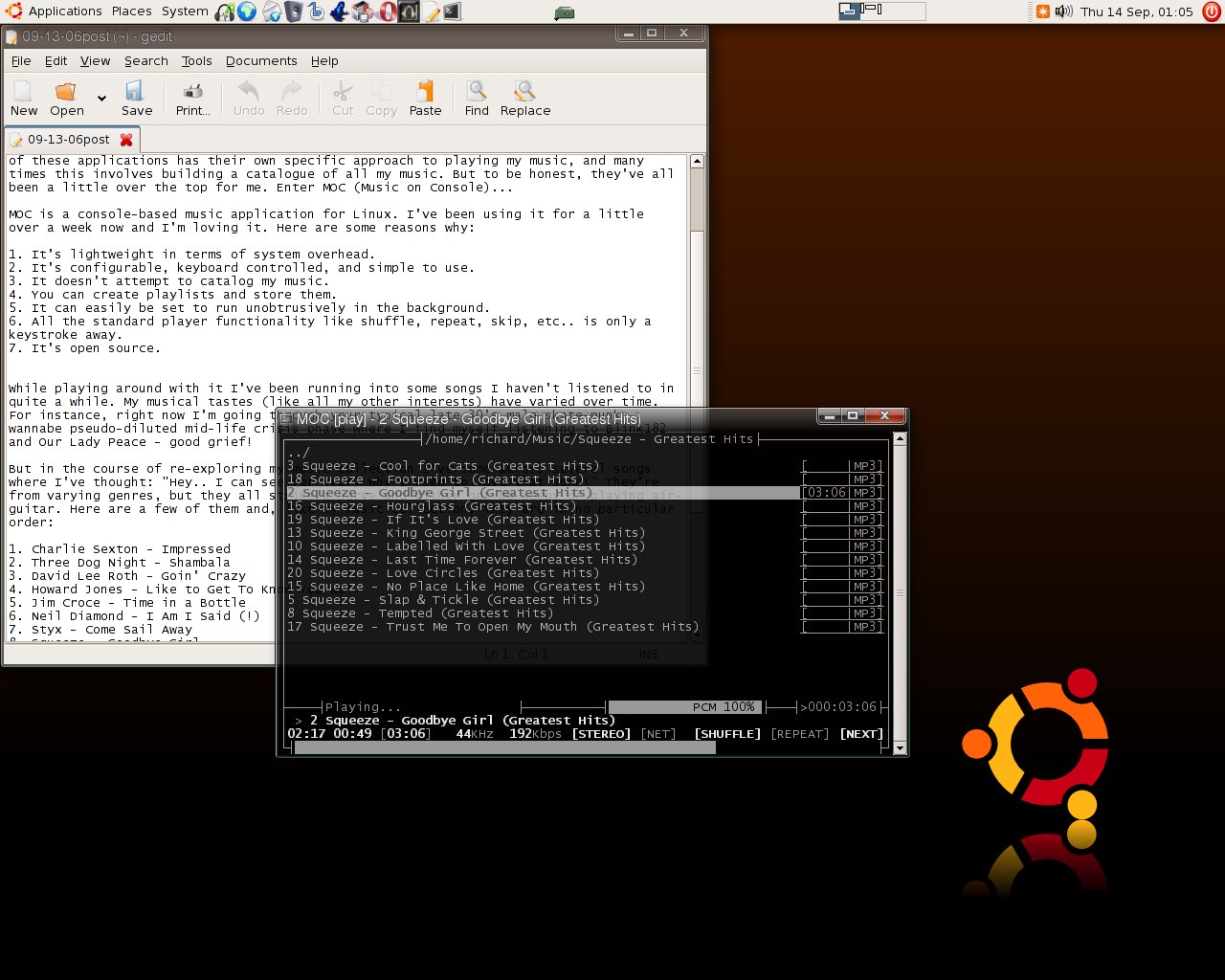
MOC is a console-based music application for Linux. I've been using it for a little over a week now and I'm loving it. Here are some reasons why:
1. It's lightweight in terms of system overhead.
2. It's configurable, keyboard controlled, and simple to use.
3. It doesn't attempt to catalog my music.
4. You can create playlists and store them.
5. It can easily be set to run unobtrusively in the background.
6. All the standard player functionality like shuffle, repeat, skip, etc.. is only a keystroke away.
7. It's open source.
While playing around with it I've been running into some songs I haven't listened to in quite a while. My musical tastes (like all my other interests) have varied over time. For instance, right now I'm going through your typical late 30's male skate-punk wannabe pseudo-diluted mid-life crisis phase where I find myself listening to Blink182 and Our Lady Peace - good grief!
But in the course of re-exploring my music collection I've come across several songs where I've thought: "Hey.. I can see (or hear) why I used to love that song!" They're from varying genres, but they all strike a nerve and either get me weepy or playing air-guitar. Here are a few of them and, like my music collection, they are in no particular order:
1. Charlie Sexton - Impressed
2. Three Dog Night - Shambala
3. David Lee Roth - Goin' Crazy
4. Howard Jones - Like to Get To Know You Well
5. Jim Croce - Time in a Bottle
6. Neil Diamond - I Am I Said (!)
7. Styx - Come Sail Away
8. Squeeze - Goodbye Girl
9. Van Morrison - Brown Eyed Girl
10. The Box - L'Affair Du Moutier
11. Van Halen - 5150
12. Louis Armstrong - La Vie en Rose
13. The Fabulous Thunderbirds - Wrap It Up
14. Jimi Hendrix - Stone Free
15. Tracy Chapman - The Promise
What are some of those songs that used to (and still) move you?
Over the last few years I've imported my music into a few different applications such as Windows Media Player, ITunes, and more recently Rhythmbox, Banshee, and Listen. All of these applications are great, each has their own specific approach to playing my music, and many times this involves building a catalogue of all my music. But to be honest, they've all been a little over the top for me. Enter MOC (Music on Console)...
MOC is a console-based music application for Linux. I've been using it for a little over a week now and I'm loving it. Here are some reasons why:
1. It's lightweight in terms of system overhead.
2. It's configurable, keyboard controlled, and simple to use.
3. It doesn't attempt to catalog my music.
4. You can create playlists and store them.
5. It can easily be set to run unobtrusively in the background.
6. All the standard player functionality like shuffle, repeat, skip, etc.. is only a keystroke away.
7. It's open source.
While playing around with it I've been running into some songs I haven't listened to in quite a while. My musical tastes (like all my other interests) have varied over time. For instance, right now I'm going through your typical late 30's male skate-punk wannabe pseudo-diluted mid-life crisis phase where I find myself listening to Blink182 and Our Lady Peace - good grief!
But in the course of re-exploring my music collection I've come across several songs where I've thought: "Hey.. I can see (or hear) why I used to love that song!" They're from varying genres, but they all strike a nerve and either get me weepy or playing air-guitar. Here are a few of them and, like my music collection, they are in no particular order:
1. Charlie Sexton - Impressed
2. Three Dog Night - Shambala
3. David Lee Roth - Goin' Crazy
4. Howard Jones - Like to Get To Know You Well
5. Jim Croce - Time in a Bottle
6. Neil Diamond - I Am I Said (!)
7. Styx - Come Sail Away
8. Squeeze - Goodbye Girl
9. Van Morrison - Brown Eyed Girl
10. The Box - L'Affair Du Moutier
11. Van Halen - 5150
12. Louis Armstrong - La Vie en Rose
13. The Fabulous Thunderbirds - Wrap It Up
14. Jimi Hendrix - Stone Free
15. Tracy Chapman - The Promise
What are some of those songs that used to (and still) move you?
Tuesday, September 12, 2006
The Value of Teaching
A great post on Copyblogger today: Don't Sell... Teach. I for one am tired of listening to people figure out how they can market at me or even how they can somehow get my consent to market at me. There is so much untapped value in teaching and sharing. You as a marketer must give me value in order to get value out of our relationship. It's about time the value of empowering and sharing knowledge becomes a cornerstone in building that relationship.
Send up a rocket...

This my 200th post on this blog! Woohoo! Who'da thunk I'd keep going this long (not me).
I've done 200 posts in 530 days. That's about 0.377 posts per day or more logically, a post every 2.65 days. I'm sure I can do better.
Incidentally, I reassured myself as to why I love Python. A couple of quick commands at the python interpreter:
>>> import datetime
>>> print datetime.date(2006,9,12) - datetime.date(2005,3,31)
yields me the difference in days. You gotta love the simplicity of it.
Looking back over my posts, nothing profoundly important jumps out at me. Except the fact that I'm having fun. If you are a subscriber to this blog, I truly say Thank You.
Connecting to my linux box at home...anybody?
One thing I'd like to be able to do is connect to my home machine from work. I'm running Linux at home (Ubuntu Dapper) and would love to be able to access my files from here at work. Unfortunately my work machine is XP-Pro, can't change that. But I am using Cygwin to achieve some command line goodness here at work.
I'm a relative newbie to linux and I know relatively little about remote computing. Can anybody point me to some good information on how to do this? I know it would involve ssh and some other things but I'm completely at a loss as to how to set it up. If you know of any good guides aimed at newbies like me I'd really appreciate it. Email me (rfquerinATgmail.com) or leave a comment.
I'm a relative newbie to linux and I know relatively little about remote computing. Can anybody point me to some good information on how to do this? I know it would involve ssh and some other things but I'm completely at a loss as to how to set it up. If you know of any good guides aimed at newbies like me I'd really appreciate it. Email me (rfquerinATgmail.com) or leave a comment.
Monday, September 11, 2006
Penguin Pete's Programming Pet Peeves...
Sorry, I just couldn't resist the alliteration in the title...
Penguin Pete's got quite a rant today. The subject is programming pet peeves and it's well worth a read. He's got six of them so far. His first peeve is 'web programming', here's a taste:
Nice to read complaints sometimes, even more so if they're entertaining...
Penguin Pete's got quite a rant today. The subject is programming pet peeves and it's well worth a read. He's got six of them so far. His first peeve is 'web programming', here's a taste:
...You want a user interface on your page? No, you need Javascript for that. Well, then, something to generate it all for you? Silly, you're scripting for the *server* side, not the *client* side - we COULDN'T have the same language do both, now could we? Go learn PHP! What, you want to run from the server side and the client side at the same time??? You knucklehead, you're going to have to learn AJAX, which is made of two languages you already know, but we had to combine them and change them subtly because every damn line of web page code simply MUST be in a different language! In fact, it simply KILLS us that you're able to use similar syntax to make text bold and italic, but we're working our ass off to break that.
Nice to read complaints sometimes, even more so if they're entertaining...
Thursday, September 07, 2006
Change of Face
I keep meaning to point people to this post and keep forgetting... It's a post by Penguin Pete asking if the Gimp can fool Photoshop fans. But it's the example subject that caught my interest.. :)
Weeding the garden and fighting boredom
Kent Newsome is bored with the blogosphere and puts it a lot of it down to the self-aggrandizing echo chamber that it's seemingly become (in the areas he frequents anyway). For the most part I agree. In fact if you take a broader look at my blog posts you'll likely see that my focus has been on learning, providing interesting info, and exploring the avenues that interest me. High-horse conversations about web 2.0 and the latest goings on in the blogo-podo-sphere bored me quite a while ago. I still post about them if something piques my interest, but by and large I have been in a more selfish learning/sharing mode for the last little while.
I've thought about whether or not my current interests and posting habits have lost me any readers and I've decided that's not the key thing for me. I'd rather be interested about what I post and read by two people than be bored and read by ten. In any case, checking my simplistic site stats it appears my readership has remained the same but the portion of visitors on Linux has increased (not surprised) and overtaken the Mac contingent which has correspondingly decreased. But it's the 'not being bored' part that's important.
Just to contribute a couple of complaints to go along with Kent's:
- I'm tired of reading blogposts that constantly self-reference and promote. I'm not talking about sites that reference past useful articles. I mean things like re-linking to past quotes that the writer thinks were so wonderful and insightful. I'm never sure if they honestly think these things are useful to the reader or if they really have no humility whatsoever.
- I (like Kent) am on the verge of unsubscribing from a few blogs. I've been mulling it over for a while. I'm thinking of keeping blogs that provide useful information, blogs that provide interesting, funny, and personal content, and one or two current event blogs. Self-promoting, humility-free, 'Look at me I'm f*&!$# great' blogs will fall by the wayside shortly.
- I usually try to see the angle that a blogger is coming from with his posts so that I can better interpret what I'm reading. It's pretty easy to see when posts are coming out truly out of interest or with goals of self-promotion in mind. I'm getting tired of reading about 'what wonderful things I did today'. Is the post trying to share some truly useful information with me, or is it just letting me know how great it is to be them? Doc Searls for instance has a magical way of providing interesting and thoughtful information about things he's finding out. He meets a ton of great people, but his posts are about the things he's learned and wants to share, not about how great it is that he met them. It's so funny to listen to him on the Gilmor Gang, because he sometimes seems like a smart, friendly goldfish swimming with a school of sharks.
Interestingly, my recent interest in Linux and open-source has put me in a place largely (not completely) free of the aforementioned nitpicks. It is almost all about helping others, learning and sharing information, creativity and tech. It seems to be very little about making money and self-promotion.
I'm always truly surprised when I see the depth of conversation going on in other, completely different areas of the web. The Web 2.0/Tech/Valley scene is really so tiny when you venture out and see how many other, less shiny, but more interesting things are going on.
Wednesday, September 06, 2006
The Polar Opposite of GUI Nirvana
Doing a little surfing for Linux info at lunch today and I came across this example of GUI nirvana...tooltips anyone?
Caution: those prone to epileptic fits might want to stay away ;)
Caution: those prone to epileptic fits might want to stay away ;)
Tuesday, September 05, 2006
Six Reasons
Six reasons why I like my Canon 50mm f1.8 lens:
1. It was - and still is - cheap and sharp. (How's $120 Cdn. for ya?)
2. I love shooting in natural light without flash and a wide aperture is great for maximizing available natural light.
3. I love using a shallow depth of field to soften backgrounds and focus attention.
4. Since it's a fixed lens, it forces you to 'zoom with your feet'. Instead of sitting on your duff zooming in and out, you tend to get up, move around and try new things.
5. Did I mention natural light?
6. Shots like these ones are so easy to get.
1. It was - and still is - cheap and sharp. (How's $120 Cdn. for ya?)
2. I love shooting in natural light without flash and a wide aperture is great for maximizing available natural light.
3. I love using a shallow depth of field to soften backgrounds and focus attention.
4. Since it's a fixed lens, it forces you to 'zoom with your feet'. Instead of sitting on your duff zooming in and out, you tend to get up, move around and try new things.
5. Did I mention natural light?
6. Shots like these ones are so easy to get.
Sunday, September 03, 2006
Linux Newbie - Photo Printing
As I alluded to in my previous post, I have finally taken the time to experiment with printing in Linux. I have a (brand new) Epson C88. Installing the printer was dead simple on my Ubuntu Dapper system. It was simply a menu selection of System->Administration->Printing. Then I clicked 'New Printer' and it autodetected my Epson C88 and installed it.
So printing from OpenOffice or other apps just worked. But what about photo printing? How about printing from the Gimp?
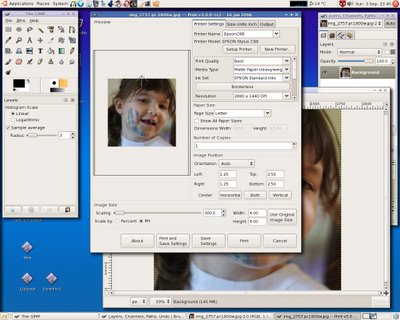
So I fired up the Gimp, opened up a photo and selected File->Print. What opened up in front of me surprised me. It was a dialog box with every single option (if not more) that Epson's own dialog had provided for me in Windows. Only it was laid out better to my tastes - no more advanced menus hiding and showing choices. It just gave me all the important settings to play with. Very nice. I selected my paper, print quality, resolution, alignment and positioning and voila, out came a wonderful print every bit as good as what I had done on Windows.
I was impressed (and relieved to be honest). Now I'm not sure how easy it will be to maintain the printer from within Linux (clean nozzles etc..) but I already know of one command line utility that gives me the ink levels in percentages. I have to explore that command further. I believe there are options for doing nozzle checks and print head cleaning cycles.
Here's a screenshot of my desktop showing the print dialog from within Gimp:
So printing from OpenOffice or other apps just worked. But what about photo printing? How about printing from the Gimp?
So I fired up the Gimp, opened up a photo and selected File->Print. What opened up in front of me surprised me. It was a dialog box with every single option (if not more) that Epson's own dialog had provided for me in Windows. Only it was laid out better to my tastes - no more advanced menus hiding and showing choices. It just gave me all the important settings to play with. Very nice. I selected my paper, print quality, resolution, alignment and positioning and voila, out came a wonderful print every bit as good as what I had done on Windows.
I was impressed (and relieved to be honest). Now I'm not sure how easy it will be to maintain the printer from within Linux (clean nozzles etc..) but I already know of one command line utility that gives me the ink levels in percentages. I have to explore that command further. I believe there are options for doing nozzle checks and print head cleaning cycles.
Here's a screenshot of my desktop showing the print dialog from within Gimp:

$72.00 in Ink for your $85.00 Printer.. Huh??
It was bound to happen sooner or later. There I was, standing in line at Staples pondering why it was that I had entered the store in search of ink cartridges and was now about to walk out with a brand new printer. This is my story.
Approximately 5 years ago I bought an Epson C80 inkjet. It was not the sexiest printer, but it had several things going for it: great quality photo printing on matte paper, great quality black text at high print speeds, and pigment based inks. It did not produce the same quality glossy photos as some of it's dye-based brethren, but almost all the prints I made on it were normally displayed under glass or stored away. And many times, a matte photo actually looks better under a glass frame than a glossy photo anyway. The big benefit of using pigment based inks being that the prints are significantly more resistant to fading than many of those created on a dye-based printer. Hang one dye-based and one pigment-based print on your fridge for a year. You will see the difference.
Regardless, the C80 was a great printer. It finally started to go south about a year ago. So at that time I weighed my choices of moving upscale to the Epson R800 or R1800 printers. These are full-on photo printers with pigment-based inks but much better glossy output than the C80 and significantly better photo resolution. In fact I inspected prints from these printers at a photography shop and was blown away. But I really didn't want to pay $499.00 for a letter sized printer. So at that time I decided to purchase the latest C88 printer for 400 bucks less(!!) and wait for the R800 prices to come down (a year later and they still haven't !!!) Anyway, the C88 seemed to have similar specs to my original C80 printer albeit with lower quality construction. I have used this printer happily for the past year or so.
Now since moving to Linux - you knew it had to be involved here somewhere didn't you ;) - I've been a little hesitant to pursue the whole printing issue. It hasn't been on the top of my list. Consequently I didn't do a heck of a lot of printing. Well now that I actually have time to investigate it, I find that my print heads are out of whack, almost empty, semi-dried out and not working well at all.
So off to Staples I go to get some replacement cartridges. By the way, this printer (like the C80) has separate ink cartridges for C,M,Y, and K. It turns out that they don't have any cartridges for the C88 left in stock. Except for a single cyan cartridge. Hmmf. Out of luck.
The next day, I head to a different Staples store. Making a bee-line straight for the printer cartridge display (these stores are so bloody identical aren't they), I find to my utter amazement that they are out of C88 cartridges as well! There are tons of cartridges for the larger more expensive Epsons but the little rod hangers are completely devoid of plasma for my lowly C88 printer.
Turning around and about to walk out, I decide to peruse down the printer aisle just to see what the current printing options are like, and lo and behold I see my Epson C88 on display for $99.00. But more importantly, just beside it, I spot a printer labeled Epson C88+. Not sure what the '+' means (still not) but it's on special for $84.99!
Now as everyone knows, Epson, HP, Canon etc. are just like Gillette in that they're making money off the blades and not the razors so to speak. So a quick tally in my head gives (3 colour cartridges at $16.00 each and a single black cartridge at about $24.00) puts me at $72.00 to refill my existing printer. Is the extra 13 bucks for the new printer (which comes with ink) worth it? I for one am willing to pay a little extra to avoid aggravation. Heck, the name even says '+'. That's gotta be good!
So I decided to save myself another trip to Staples later this week and quite possibly further aggravation, by buying the Epson C88+ almost solely for the ink. It was bound to come to this I guess.
Interestingly, here's my best recollection of the conversation I had with the clerk immediately after he got the printer box from way up high on the shelf:
clerk: "There you go sir."
Me: "Thanks."
Clerk: "Are you interested in purchasing our extended service plan?"
Me: " Uh, nope. Thanks."
Clerk: "But it will get you service and maintenance for a full year"
Me: "No, really I'm not interested in the warranty. I'm interested in spending
the least amount possible today."
Clerk: " It may prove worthwhile if something goes wrong with the printer."
Me: "The printer itself is only ten bucks more than the ink. So every time I need new ink I could replace the printer itself if it's not working right."
Clerk: "Hehe, yeah I guess so."
Me: "Thanks for your time."
So there you have it. I've been waiting for a time when it's cheaper to buy a new printer than the replacement ink. That time is almost here.
Approximately 5 years ago I bought an Epson C80 inkjet. It was not the sexiest printer, but it had several things going for it: great quality photo printing on matte paper, great quality black text at high print speeds, and pigment based inks. It did not produce the same quality glossy photos as some of it's dye-based brethren, but almost all the prints I made on it were normally displayed under glass or stored away. And many times, a matte photo actually looks better under a glass frame than a glossy photo anyway. The big benefit of using pigment based inks being that the prints are significantly more resistant to fading than many of those created on a dye-based printer. Hang one dye-based and one pigment-based print on your fridge for a year. You will see the difference.
Regardless, the C80 was a great printer. It finally started to go south about a year ago. So at that time I weighed my choices of moving upscale to the Epson R800 or R1800 printers. These are full-on photo printers with pigment-based inks but much better glossy output than the C80 and significantly better photo resolution. In fact I inspected prints from these printers at a photography shop and was blown away. But I really didn't want to pay $499.00 for a letter sized printer. So at that time I decided to purchase the latest C88 printer for 400 bucks less(!!) and wait for the R800 prices to come down (a year later and they still haven't !!!) Anyway, the C88 seemed to have similar specs to my original C80 printer albeit with lower quality construction. I have used this printer happily for the past year or so.
Now since moving to Linux - you knew it had to be involved here somewhere didn't you ;) - I've been a little hesitant to pursue the whole printing issue. It hasn't been on the top of my list. Consequently I didn't do a heck of a lot of printing. Well now that I actually have time to investigate it, I find that my print heads are out of whack, almost empty, semi-dried out and not working well at all.
So off to Staples I go to get some replacement cartridges. By the way, this printer (like the C80) has separate ink cartridges for C,M,Y, and K. It turns out that they don't have any cartridges for the C88 left in stock. Except for a single cyan cartridge. Hmmf. Out of luck.
The next day, I head to a different Staples store. Making a bee-line straight for the printer cartridge display (these stores are so bloody identical aren't they), I find to my utter amazement that they are out of C88 cartridges as well! There are tons of cartridges for the larger more expensive Epsons but the little rod hangers are completely devoid of plasma for my lowly C88 printer.
Turning around and about to walk out, I decide to peruse down the printer aisle just to see what the current printing options are like, and lo and behold I see my Epson C88 on display for $99.00. But more importantly, just beside it, I spot a printer labeled Epson C88+. Not sure what the '+' means (still not) but it's on special for $84.99!
Now as everyone knows, Epson, HP, Canon etc. are just like Gillette in that they're making money off the blades and not the razors so to speak. So a quick tally in my head gives (3 colour cartridges at $16.00 each and a single black cartridge at about $24.00) puts me at $72.00 to refill my existing printer. Is the extra 13 bucks for the new printer (which comes with ink) worth it? I for one am willing to pay a little extra to avoid aggravation. Heck, the name even says '+'. That's gotta be good!
So I decided to save myself another trip to Staples later this week and quite possibly further aggravation, by buying the Epson C88+ almost solely for the ink. It was bound to come to this I guess.
Interestingly, here's my best recollection of the conversation I had with the clerk immediately after he got the printer box from way up high on the shelf:
clerk: "There you go sir."
Me: "Thanks."
Clerk: "Are you interested in purchasing our extended service plan?"
Me: "
Clerk: "But it will get you service and maintenance for a full year"
Me: "No, really I'm not interested in the warranty. I'm interested in spending
the least amount possible today
Clerk: "
Me: "The printer itself is only ten bucks more than the ink. So every time I need new ink I could replace the printer itself if it's not working right."
Clerk: "Hehe, yeah I guess so."
Me: "Thanks for your time."
So there you have it. I've been waiting for a time when it's cheaper to buy a new printer than the replacement ink. That time is almost here.
Thursday, August 31, 2006
Comic relief
Getting Things Done... in plain text
For quite a while I've been interested in personal time management. I'm always keeping an eye on new ideas and concepts in this area. Of course I've watched the whole GTD ( Getting Things Done ) scene without dipping more than a toe or two into the water. It seems like there are many good ideas at play there, but I'm a bit wary of something so all-encompassing. I'm normally more willing to experiment with smaller scale changes and ideas.
One thing that fits right in with my move to Linux (although it's not strictly a Linux thing) is a text based todo system. The idea was spawned when I read this article by Gina Trapani at Lifehacker. The article describes a rudimentary method of utilizing various command line controls to maintain a simple to-do list. From there it went on to this article, and then this article, and finally a dedicated domain at todotxt.com which houses the most recent scripts and discussion. I've found it to be very easy to implement and I love the fact that it doesn't depend on anything other than simple scripts and some text files. I have been using Ta-da list off and on for a while, but I don't like the fact that I can't really do much with all that data I enter there. Using a simple text file opens up all kinds of opportunity for expanded functionality if I want. For now it just means I can take that simple list and filter it on the command line, import it and format it in a word processor or spreadsheet, or a variety of other simple things. I like having that freedom.
It seems I'm (by far) not the only one who feels this way. Check out the 43Folders Plain Text wiki page for more .txt love.
Of course I needed this system to function both at work and at home. So in due course I found out about Cygwin. This lets me run a very linux-like shell on XP at work. I managed to get the same text based to-do system up and running there as well. So it's only a matter of transferring a simple text file between my work and home machines and I can work on the same task list at either location.
One thing that fits right in with my move to Linux (although it's not strictly a Linux thing) is a text based todo system. The idea was spawned when I read this article by Gina Trapani at Lifehacker. The article describes a rudimentary method of utilizing various command line controls to maintain a simple to-do list. From there it went on to this article, and then this article, and finally a dedicated domain at todotxt.com which houses the most recent scripts and discussion. I've found it to be very easy to implement and I love the fact that it doesn't depend on anything other than simple scripts and some text files. I have been using Ta-da list off and on for a while, but I don't like the fact that I can't really do much with all that data I enter there. Using a simple text file opens up all kinds of opportunity for expanded functionality if I want. For now it just means I can take that simple list and filter it on the command line, import it and format it in a word processor or spreadsheet, or a variety of other simple things. I like having that freedom.
It seems I'm (by far) not the only one who feels this way. Check out the 43Folders Plain Text wiki page for more .txt love.
Of course I needed this system to function both at work and at home. So in due course I found out about Cygwin. This lets me run a very linux-like shell on XP at work. I managed to get the
Wednesday, August 30, 2006
Linux Goodness 1
Moving to Linux as my OS at home has brought with it many challenges and discoveries. Every once in a while I think I'll try to share interesting things I've found on my journey for anybody going down a similar road:
google.com/linux - Simply a Google search page aimed at Linux. It does a decent job of cutting down my searching when it involves something linux-ey.
www.tuxfiles.org - I'm not sure what happened to this site! The last time I checked (a couple of days ago) this was a great source for plain-english tutorials on Linux (the tutorials on the command line were fantastic). But now I see the link brings up a spammy site pushing pay products (unrelated to linux). Grrrrr. Anybody know where it's gone??!!
listengnome.free.fr - A great music player for Gnome. It has very similar functionality to Amarok including a music library with features such as lyric-fetching, wikipedia info and cover-art fetching along with the usual playlist and music library features. I'm surprised I don't hear mention of this app very much. It works great for me. Very slick interface as well.
Lottalinuxlinks podcast - Dave Yates creates this podcast that provides a great source for Linux-related information, especially for someone in 'exploratory mode' like me. He's got a wonderful South Carolina drawl that makes it even more listenable to me. You won't get super-polished sound quality, but the content and delivery is right up my alley. He covers a ton of practical issues with running Linux and provides his opinion on a wide variety of topics like software reviews, linux install tips, and a whole host of other great stuff.
emelfm2 - A GTK2 two-pane file manager for Linux. This is exactly what I have been looking for. It has a very nice interface that is also very efficient for file management and completely customizable. I heard about this one on Dave Yates' Lottalinuxlinkspodcast. He sang its praises on his very first podcast and I immediately downloaded it to give it a try. I love it. It's much more to my liking than Nautilus. That's for sure.
The Compiz page at OpenSuse.org - This has to be the best page I've seen that outlines the functionality of Compiz. It gives all the keyboard shortcuts and good to-the-point descriptions of all the plugins. It's not my distro (I'm running Ubuntu Dapper) but it's very valuable to me nonetheless.
I'm trying to keep track of all the things I come across that might be of interest to others exploring Linux. Hopefully this will be the first post of many in this vein.
google.com/linux - Simply a Google search page aimed at Linux. It does a decent job of cutting down my searching when it involves something linux-ey.
www.tuxfiles.org - I'm not sure what happened to this site! The last time I checked (a couple of days ago) this was a great source for plain-english tutorials on Linux (the tutorials on the command line were fantastic). But now I see the link brings up a spammy site pushing pay products (unrelated to linux). Grrrrr. Anybody know where it's gone??!!
listengnome.free.fr - A great music player for Gnome. It has very similar functionality to Amarok including a music library with features such as lyric-fetching, wikipedia info and cover-art fetching along with the usual playlist and music library features. I'm surprised I don't hear mention of this app very much. It works great for me. Very slick interface as well.
Lottalinuxlinks podcast - Dave Yates creates this podcast that provides a great source for Linux-related information, especially for someone in 'exploratory mode' like me. He's got a wonderful South Carolina drawl that makes it even more listenable to me. You won't get super-polished sound quality, but the content and delivery is right up my alley. He covers a ton of practical issues with running Linux and provides his opinion on a wide variety of topics like software reviews, linux install tips, and a whole host of other great stuff.
emelfm2 - A GTK2 two-pane file manager for Linux. This is exactly what I have been looking for. It has a very nice interface that is also very efficient for file management and completely customizable. I heard about this one on Dave Yates' Lottalinuxlinkspodcast. He sang its praises on his very first podcast and I immediately downloaded it to give it a try. I love it. It's much more to my liking than Nautilus. That's for sure.
The Compiz page at OpenSuse.org - This has to be the best page I've seen that outlines the functionality of Compiz. It gives all the keyboard shortcuts and good to-the-point descriptions of all the plugins. It's not my distro (I'm running Ubuntu Dapper) but it's very valuable to me nonetheless.
I'm trying to keep track of all the things I come across that might be of interest to others exploring Linux. Hopefully this will be the first post of many in this vein.
Monday, August 28, 2006
Positive Filter Engaged
The only thing easier than not linking to opposing opinion or thought is not posting about it at all - so Dave Winer has not taken the absolute easiest route, just the second easiest. He cites that there are several recent blogposts asking the question 'why post from a Blackberry?', and proceeds to link to ..er.. zero of them. It's not quite 'links are dead' but only 'opposing links are dead' (not sure if SG would be happy on this one or not).
The reason it caught my eye was that Kent Newsome recently posted about that. In fact, doing a quicky Google Blog Search put a ZDNet blog post discussing (and linking to) Kent's post on top of all other results when searching on the string "why would you want to post from a Blackberry".
No great soapbox speech here (I'm not strong on the issue since I don't use my PDA for surfting- and to be honest don't really care too much about it either way at the moment). It just made me shake my head. Keep on truckin' Kent.
-link to Dave's post not provided for immature but obvious reasons ;)
The reason it caught my eye was that Kent Newsome recently posted about that. In fact, doing a quicky Google Blog Search put a ZDNet blog post discussing (and linking to) Kent's post on top of all other results when searching on the string "why would you want to post from a Blackberry".
No great soapbox speech here (I'm not strong on the issue since I don't use my PDA for surfting- and to be honest don't really care too much about it either way at the moment). It just made me shake my head. Keep on truckin' Kent.
-link to Dave's post not provided for immature but obvious reasons ;)
Friday, August 25, 2006
Is Everything Old really New(s) again?
It's interesting to watch the continual fight for recognition that occurs on the web. I'm reading complaints about Dave Winer's recent pushing of the 'River of News' concept. People are upset that many out there are acting as if this is a brand new thing. And meanwhile, Dave's got his defenders and explainers.
I tend to agree with those that say it's far from a brand new idea. Dave meanwhile tries to quell the unrest by saying that by just settling down and working together, they will all benefit. Heh. I'm not sure Dave would be so quick to reciprocate if it were someone more influential than him claiming ownership of the idea. And from what I've read, Dave has neither confirmed nor denied that it's a retooling of an existing concept. Would it be that hard to say "yeah, it's an existing idea, but I'm making it even better by doing x, y and z.". Wouldn't you gain a lot of goodwill, nevermind move the cause further forward, by doing that?
I thought attribution and shared recognition were just the 'right thing to do'(tm). Watching ideas percolate without either of those things isn't nearly as interesting. As I recently posted in a comment to Scoble's blog, many innovators and entrepreneurs I've met are headstrong, overconfident and sometimes boorish. But honestly, these might be prerequisites to success in those pursuits. However, in my view it doesn't set the stage for good relations and certainly doesn't make garnering respect from others any easier.
Perhaps even more interesting is the claim that 'River of News', whether a truly novel concept or not, is possibly not the cat's pajamas. I have to say that it's good food for thought. I'm not so sure I want to see every single story that flows by. Do important top stories flow down the list with nothing to set them apart from secondary items? If so, this is NOT what I want. I normally want the headlines first. I don't want them to sink down until I tell them to.
I had a similar problem with Dave's original concept of a River of News for RSS aggregation (also known as the sushi-bar concept if I'm not mistaken). While it sounds very nice, I still don't see the value in it for me. It doesn't feel natural to me (however it may to others of course). Then again I don't have any problems marking 200 unread Digg or BoingBoing posts as 'read' in one fell swoop. I don't feel obligated to read every unread post. My Bloglines aggregator may look like email, but that doesn't mean I treat it like email.
Bonus question: How will one go about avoiding the inevitable floating ad dingys bobbing by in the River of News?
Incidentally, there is another very similar, but entirely unrelated discussion occurring on the web recently regarding Apple's new implementation of virtual desktops (something Linux/Unix has had for years). Ahh, but that's another post for another time... ;)
I tend to agree with those that say it's far from a brand new idea. Dave meanwhile tries to quell the unrest by saying that by just settling down and working together, they will all benefit. Heh. I'm not sure Dave would be so quick to reciprocate if it were someone more influential than him claiming ownership of the idea. And from what I've read, Dave has neither confirmed nor denied that it's a retooling of an existing concept. Would it be that hard to say "yeah, it's an existing idea, but I'm making it even better by doing x, y and z.". Wouldn't you gain a lot of goodwill, nevermind move the cause further forward, by doing that?
I thought attribution and shared recognition were just the 'right thing to do'(tm). Watching ideas percolate without either of those things isn't nearly as interesting. As I recently posted in a comment to Scoble's blog, many innovators and entrepreneurs I've met are headstrong, overconfident and sometimes boorish. But honestly, these might be prerequisites to success in those pursuits. However, in my view it doesn't set the stage for good relations and certainly doesn't make garnering respect from others any easier.
Perhaps even more interesting is the claim that 'River of News', whether a truly novel concept or not, is possibly not the cat's pajamas. I have to say that it's good food for thought. I'm not so sure I want to see every single story that flows by. Do important top stories flow down the list with nothing to set them apart from secondary items? If so, this is NOT what I want. I normally want the headlines first. I don't want them to sink down until I tell them to.
I had a similar problem with Dave's original concept of a River of News for RSS aggregation (also known as the sushi-bar concept if I'm not mistaken). While it sounds very nice, I still don't see the value in it for me. It doesn't feel natural to me (however it may to others of course). Then again I don't have any problems marking 200 unread Digg or BoingBoing posts as 'read' in one fell swoop. I don't feel obligated to read every unread post. My Bloglines aggregator may look like email, but that doesn't mean I treat it like email.
Bonus question: How will one go about avoiding the inevitable floating ad dingys bobbing by in the River of News?
Incidentally, there is another very similar, but entirely unrelated discussion occurring on the web recently regarding Apple's new implementation of virtual desktops (something Linux/Unix has had for years). Ahh, but that's another post for another time... ;)
Blogging for mere mortals
Earl Moore shares his typical day and the fractions of which he uses for blogging. He finds it difficult to imagine how someone with a full time job manages to do multiple posts per day. He asks others to share their own stories and tips. Here is a rundown for you Earl:
Before leaving for work in the morning I normally get iPodder (it's still called iPodder in Linux btw) to run through my podcast subscriptions and then plunk those on an mp3 CD for the drive to work (I keep 3 CD-RW's in rotation as I described in this previous post). I then do a quick check of my RSS feeds (on Bloglines) and my Gmail. If something catches my eye I flag it. Normally I don't do any posts before work unless it's something that really grabs my thoughts. If I do find something I've just got to comment or post on, then I'm late for work like Earl. Then it's 50 minutes of back road commuting with a nice mug of coffee and an MP3 cd full of podcasts.
If I manage to get in a bit early, I usually read any posts I've flagged previously. If there's something that I want to write a substantial post about (like this) I sometimes start a post in a simple text editor or in GMail. When I've got a good chunk of it out of my head and onto the screen, I save it, even if it's incomplete, depending on the time.
I normally do one of two things at lunch. If I have lunch at my desk, I spend the time finishing any post I might have started or checking/reading any interesting blog or news posts. Other times I head out for a quick lunch (nothing fancy - we're talking a double-whopper combo or the like, mmm). I keep a hardcover notebook with me to jot down notes on while I listen to other podcasts and munch away. This book contains a variety of things. I make notes on potential blogposts, reminders about things to do and check out, diagrams, project related sketches and notes and generally try to get at least some of the stuff meandering in my brain out onto paper. It's absolutely amazing how much I can forget if I don't jot things down. I have a Palm, but the notebook and pencil is far more natural to me.
After that, it's work until 5:30 or 6:00 and then another 50 minutes home. The computer at home normally doesn't come on again until 9pm or later. Those 2-3 hrs belong to my daughter and wife. I normally spend an hour or so before bed crafting a post, reading a blog, downloading pictures or something else PC related. The downside is that this usually ends up being midnight or later, and I'm getting too old for a huge string of nights with 5 hours or less of sleep. TV watching is getting very sparse these last couple of years. Not a bad thing IMO.
I simply don't normally have the time to do multiple quality posts per day. I'm not sure I've got it in me anyway. I tend to latch onto an idea for a post and it might take me a few days to fill out the rest of the idea and generate the actual post.
That being said, one of my problems is that lots of times I don't take enough time to prepare and edit my posts. I'm trying to fix that. Ideally, for a substantial post, I'd like to write the post, sleep on it, and then look at it again. But I tend to hurry things. For instance, my last Photography Concept post was generated with no previous notes, and in one sitting with 2 cups of coffee. Sometimes it shows I'm afraid.
Two things that I find very valuable:
- The hardcover notebook was one of the best purchases I made - it's so useful to jot things down and go back to them later for fleshing out. It's nothing fancy really, just a Blueline NotePro book . Very cheap, very sturdy and nice paper.
- I've recently discovered (although it's not a new feature) that I can compose blog posts in my email program - GMail in my case - and email them in to my blog. For some reason, I occasionally have trouble accessing my blog from work and doing it via GMail is very convenient lots of times. It doesn't let you do images but it works quite well otherwise. So I am using GMail as my blog editor more and more lately.
Hopefully you find some of this interesting. Share your own views and point to Earl, I'd like to read about others opinions on this as well.
Before leaving for work in the morning I normally get iPodder (it's still called iPodder in Linux btw) to run through my podcast subscriptions and then plunk those on an mp3 CD for the drive to work (I keep 3 CD-RW's in rotation as I described in this previous post). I then do a quick check of my RSS feeds (on Bloglines) and my Gmail. If something catches my eye I flag it. Normally I don't do any posts before work unless it's something that really grabs my thoughts. If I do find something I've just got to comment or post on, then I'm late for work like Earl. Then it's 50 minutes of back road commuting with a nice mug of coffee and an MP3 cd full of podcasts.
If I manage to get in a bit early, I usually read any posts I've flagged previously. If there's something that I want to write a substantial post about (like this) I sometimes start a post in a simple text editor or in GMail. When I've got a good chunk of it out of my head and onto the screen, I save it, even if it's incomplete, depending on the time.
I normally do one of two things at lunch. If I have lunch at my desk, I spend the time finishing any post I might have started or checking/reading any interesting blog or news posts. Other times I head out for a quick lunch (nothing fancy - we're talking a double-whopper combo or the like, mmm). I keep a hardcover notebook with me to jot down notes on while I listen to other podcasts and munch away. This book contains a variety of things. I make notes on potential blogposts, reminders about things to do and check out, diagrams, project related sketches and notes and generally try to get at least some of the stuff meandering in my brain out onto paper. It's absolutely amazing how much I can forget if I don't jot things down. I have a Palm, but the notebook and pencil is far more natural to me.
After that, it's work until 5:30 or 6:00 and then another 50 minutes home. The computer at home normally doesn't come on again until 9pm or later. Those 2-3 hrs belong to my daughter and wife. I normally spend an hour or so before bed crafting a post, reading a blog, downloading pictures or something else PC related. The downside is that this usually ends up being midnight or later, and I'm getting too old for a huge string of nights with 5 hours or less of sleep. TV watching is getting very sparse these last couple of years. Not a bad thing IMO.
I simply don't normally have the time to do multiple quality posts per day. I'm not sure I've got it in me anyway. I tend to latch onto an idea for a post and it might take me a few days to fill out the rest of the idea and generate the actual post.
That being said, one of my problems is that lots of times I don't take enough time to prepare and edit my posts. I'm trying to fix that. Ideally, for a substantial post, I'd like to write the post, sleep on it, and then look at it again. But I tend to hurry things. For instance, my last Photography Concept post was generated with no previous notes, and in one sitting with 2 cups of coffee. Sometimes it shows I'm afraid.
Two things that I find very valuable:
- The hardcover notebook was one of the best purchases I made - it's so useful to jot things down and go back to them later for fleshing out. It's nothing fancy really, just a Blueline NotePro book . Very cheap, very sturdy and nice paper.
- I've recently discovered (although it's not a new feature) that I can compose blog posts in my email program - GMail in my case - and email them in to my blog. For some reason, I occasionally have trouble accessing my blog from work and doing it via GMail is very convenient lots of times. It doesn't let you do images but it works quite well otherwise. So I am using GMail as my blog editor more and more lately.
Hopefully you find some of this interesting. Share your own views and point to Earl, I'd like to read about others opinions on this as well.
Thursday, August 24, 2006
The not-so-good ole' days in Canada/US relations
I was never big into history when I was in school. I was busy playing videogames, doing a little Vic20 BASIC programming, and sticking to my maths and sciences I guess. But Matt Dattilo's Today in History podcast has been one of my favourite listens during my commute. Today's episode was especially interesting. It dealt with the burning of Washington DC by the Canadians ..er.. British back during the War of 1812. Strange to hear about war maneuvers between us and our friends to the south. Matt gives it a very even-handed treatment (as usual) and even interjects with his view on the patent office (not usual for Matt) which made me chuckle.
Give it a listen if you dismissed history as 'boring' during school.
By the way, Matt also typically gives a pretty accurate full text transcript of each episode as his blog post. I subscribe to his mp3 feed only, but if reading's more your thing than listening, still check it out.
Give it a listen if you dismissed history as 'boring' during school.
By the way, Matt also typically gives a pretty accurate full text transcript of each episode as his blog post. I subscribe to his mp3 feed only, but if reading's more your thing than listening, still check it out.
Photography Concept 5 - Histograms
It's been over a month since I last posted a Photography Concept. My apologies. Simply taking on too many things once again I guess. Hopefully, some will find this one useful. In previous installments we've discussed exposure, focal length and lenses, depth of field, and metering).
This time we're going to take a quick gander at histograms. As always, this will not be an all-encompassing discussion but a more practical look at what a histogram is, and why it can be useful to the digital photographer. Note: for those in the know, I have stayed away from things like output range, RGB channels and the like, to keep it simple and straightforward. As always I'll try to point out a few good resources for further info.
In terms of digital imaging, a histogram is a vertical bar graph showing the frequency distribution of the different tones in your image. More simply, and more importantly, it's a graphical representation of the exposure of your image. Imagine if you took a count of all of the pixels in your image and categorized them by their tone into 256 shades of grey (from black through to white). Now if you create a bar graph showing the number of pixels in each of the 256 categories with black on the left and white on the right, you would end up with a typical histogram. Here is a typical image histogram. (Note my screenshots were taken using the GIMP, but histogram displays are similar in other image programs like Photoshop, PaintShop Pro, etc.)
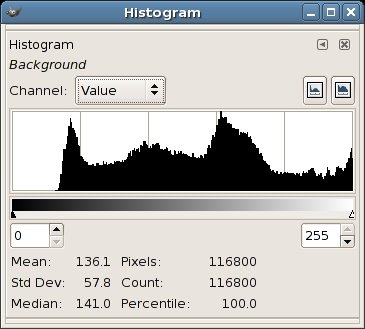
The key things to remember when looking at a histogram for one of your images are:
1. The left end of the histogram represents black, the right end represents white.
2. The height of the curve above the horizontal (or 'zero') axis indicates the relative quantity of pixels at that tonal value. So when the curve hits the horizontal axis, there are few, if any pixels at that value.
3. By virtue of 1. and 2., if the curve runs into the left end of the histogram before hitting the horizontal axis, there are a significant number of pure black pixels.
4. Also by virtue of 1. and 2., if the curve runs into the right end of the histogram before hitting the horizontal axis, there are a significant number of pure white pixels.
5. If the curve runs into the horizontal axis well before it reaches the left or right ends, your image may not be making use of the full tonal range and might be significantly improved (more on this in a moment).
6. There is no one single ideal histogram curve. That is to say that 3. does not necessarily always indicate underexposure, and 4. does not necessarily always indicate overexposure. (eg. if you are shooting a scene with lots of black in it, you will undoubtedly get the situation described by 3.)
7. Just to confuse matters, it must be said that the histogram of an image can give you a good indication of over or under-exposure conditions in your image.
8. If you have an option on your digital camera to view the histogram after taking the shot (no matter how small the display), you would do well to utilize it. A small histogram can in most cases be a better, more accurate indicator of exposure problems than viewing the image itself on a camera's LCD display.
So let's look at an example histogram for the image below (a striking pose by Delilah, our Frenchie):

Here is the histogram for the image:
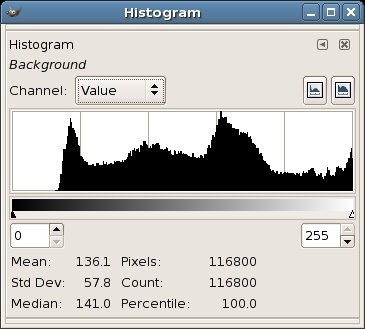
As you can see, there is a peak at the leftish end, most likely coming from the fact that our model Delilah is very dark. There is also another peak just right of the midpoint which is most likely coming from the abundance of wooden decking and brick in the picture.
Another key thing to note is that the right hand end of the histogram does not reach the horizontal (zero) axis - in fact it's rising up when it reaches the right end. This indicates that there are a significant number of pixels in the shot that are approaching pure white. This comes from the overexposed blotches in the upper right.
Finally, it can be noted that the left end of the curve reaches the horizontal or zero axis prematurely. This indicates that there are no pixels in the shot that are pure black. It's important to note that in this specific shot, we know because of Delilah's colour, that there should be some pixels that are approaching pure black, but in other cases there may not be any pixels approaching black (take for example a photo of a blue sky with clouds). Anyway, for this specific image, this looks like a situation where we're not utilizing the full tonal range in the image.
So how can we improve the image?
Well, unfortunately there isn't much that we can do with all the overexposed pixels in the upper right. It's difficult to recover image information from overexposed areas such as this. I've chosen to just ignore it, reasoning that it's not worth the trouble to fix (you could crop it out if desired).
We can however do something to better utilize the tonal range of the image. By using the 'Levels' tool found in many image editing programs, we can improve the image significantly. Let's look at the levels tool within the GIMP. There are similar tools in many other image editing tools as well - they won't differ too significantly from what I describe. Here is the levels dialog box:
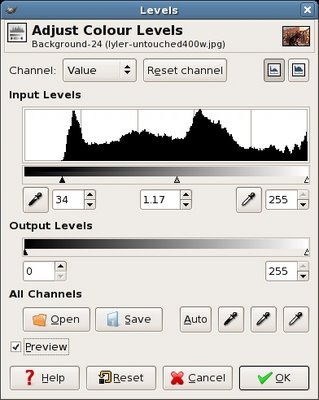
If we move the left slider in a rightwards direction as shown above so that it just stops where the histogram hits the zero axis, we can improve the image. Note that if there was a flat area on the right end of the histogram we would make a similar adjustment there. Also, there will almost always be a middle slider that will let you adjust the gamma of the image. This will result in brightening or darkening the midtones of the image. You can see that I made a slight adjustment to the gamma slider as well to slightly brighten the image after making the left-slider adjustment. If there is a preview checkbox available, I suggest you keep it on, as you want to see the dynamic changes to your image as you adjust. Here is a comparison of the original and corrected images (obviously the lower shot being the corrected one). Hopefully you will see the improvement:


This is a quick fix that you can apply to any of your images that need a little extra punch. You might also find that your camera rarely gives you an image whose histogram is this far out of whack, but it does sometimes happen. Scanning prints will notoriously result in histograms with flat left (and right) hand sections. I remember having to do this virtually all my scanned photos. Luckily it is a quick fix and only takes a few seconds to perform.
So what are the take-away points of all this?
If your digital camera provides a histogram display, make use of it, no matter how small it is. Once you get used to interpreting it, you'll find that you can spot problematic photos immediately and possibly retake them with exposure compensation to correct the problem.
Don't blindly expect the perfect 'mountain' curve in your histogram for every image. You may very want a lot of white pixels or black pixels in your shot. And the curve will look different for different shots.
Play with the histogram adjustment tools in your photo editing software if they're available. They can vary from simple 'levels' dialogs, to more elaborate histogram adjustment tools (I quite liked the Paintshop Pro dialog for histogram adjustment, which would show you the percentage quantity of pixels you were modifying as you dragged the sliders left and right). Don't be afraid to experiment. You can improve the quality of your images signficantly with this simple tool.
Hopefully you found this useful. If you want to further expand your understanding histograms, check out this, this and this.
This time we're going to take a quick gander at histograms. As always, this will not be an all-encompassing discussion but a more practical look at what a histogram is, and why it can be useful to the digital photographer. Note: for those in the know, I have stayed away from things like output range, RGB channels and the like, to keep it simple and straightforward. As always I'll try to point out a few good resources for further info.
In terms of digital imaging, a histogram is a vertical bar graph showing the frequency distribution of the different tones in your image. More simply, and more importantly, it's a graphical representation of the exposure of your image. Imagine if you took a count of all of the pixels in your image and categorized them by their tone into 256 shades of grey (from black through to white). Now if you create a bar graph showing the number of pixels in each of the 256 categories with black on the left and white on the right, you would end up with a typical histogram. Here is a typical image histogram. (Note my screenshots were taken using the GIMP, but histogram displays are similar in other image programs like Photoshop, PaintShop Pro, etc.)
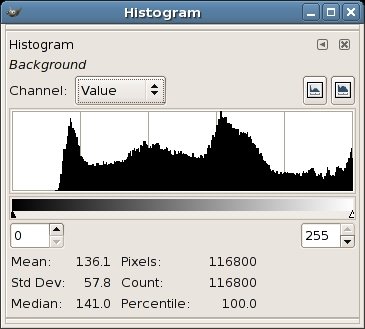
The key things to remember when looking at a histogram for one of your images are:
1. The left end of the histogram represents black, the right end represents white.
2. The height of the curve above the horizontal (or 'zero') axis indicates the relative quantity of pixels at that tonal value. So when the curve hits the horizontal axis, there are few, if any pixels at that value.
3. By virtue of 1. and 2., if the curve runs into the left end of the histogram before hitting the horizontal axis, there are a significant number of pure black pixels.
4. Also by virtue of 1. and 2., if the curve runs into the right end of the histogram before hitting the horizontal axis, there are a significant number of pure white pixels.
5. If the curve runs into the horizontal axis well before it reaches the left or right ends, your image may not be making use of the full tonal range and might be significantly improved (more on this in a moment).
6. There is no one single ideal histogram curve. That is to say that 3. does not necessarily always indicate underexposure, and 4. does not necessarily always indicate overexposure. (eg. if you are shooting a scene with lots of black in it, you will undoubtedly get the situation described by 3.)
7. Just to confuse matters, it must be said that the histogram of an image can give you a good indication of over or under-exposure conditions in your image.
8. If you have an option on your digital camera to view the histogram after taking the shot (no matter how small the display), you would do well to utilize it. A small histogram can in most cases be a better, more accurate indicator of exposure problems than viewing the image itself on a camera's LCD display.
So let's look at an example histogram for the image below (a striking pose by Delilah, our Frenchie):

Here is the histogram for the image:
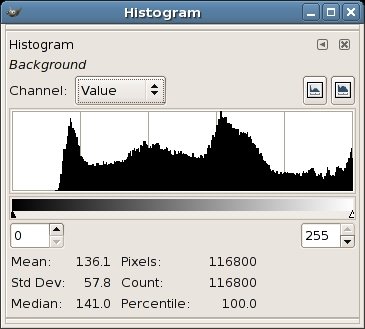
As you can see, there is a peak at the leftish end, most likely coming from the fact that our model Delilah is very dark. There is also another peak just right of the midpoint which is most likely coming from the abundance of wooden decking and brick in the picture.
Another key thing to note is that the right hand end of the histogram does not reach the horizontal (zero) axis - in fact it's rising up when it reaches the right end. This indicates that there are a significant number of pixels in the shot that are approaching pure white. This comes from the overexposed blotches in the upper right.
Finally, it can be noted that the left end of the curve reaches the horizontal or zero axis prematurely. This indicates that there are no pixels in the shot that are pure black. It's important to note that in this specific shot, we know because of Delilah's colour, that there should be some pixels that are approaching pure black, but in other cases there may not be any pixels approaching black (take for example a photo of a blue sky with clouds). Anyway, for this specific image, this looks like a situation where we're not utilizing the full tonal range in the image.
So how can we improve the image?
Well, unfortunately there isn't much that we can do with all the overexposed pixels in the upper right. It's difficult to recover image information from overexposed areas such as this. I've chosen to just ignore it, reasoning that it's not worth the trouble to fix (you could crop it out if desired).
We can however do something to better utilize the tonal range of the image. By using the 'Levels' tool found in many image editing programs, we can improve the image significantly. Let's look at the levels tool within the GIMP. There are similar tools in many other image editing tools as well - they won't differ too significantly from what I describe. Here is the levels dialog box:
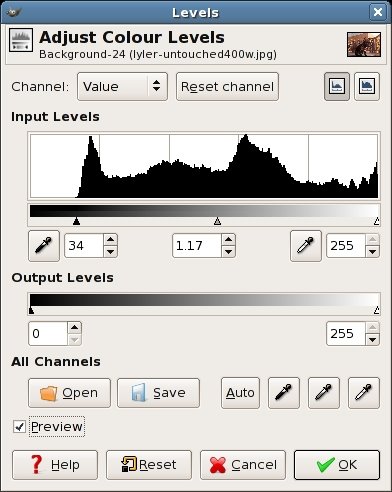
If we move the left slider in a rightwards direction as shown above so that it just stops where the histogram hits the zero axis, we can improve the image. Note that if there was a flat area on the right end of the histogram we would make a similar adjustment there. Also, there will almost always be a middle slider that will let you adjust the gamma of the image. This will result in brightening or darkening the midtones of the image. You can see that I made a slight adjustment to the gamma slider as well to slightly brighten the image after making the left-slider adjustment. If there is a preview checkbox available, I suggest you keep it on, as you want to see the dynamic changes to your image as you adjust. Here is a comparison of the original and corrected images (obviously the lower shot being the corrected one). Hopefully you will see the improvement:


This is a quick fix that you can apply to any of your images that need a little extra punch. You might also find that your camera rarely gives you an image whose histogram is this far out of whack, but it does sometimes happen. Scanning prints will notoriously result in histograms with flat left (and right) hand sections. I remember having to do this virtually all my scanned photos. Luckily it is a quick fix and only takes a few seconds to perform.
So what are the take-away points of all this?
If your digital camera provides a histogram display, make use of it, no matter how small it is. Once you get used to interpreting it, you'll find that you can spot problematic photos immediately and possibly retake them with exposure compensation to correct the problem.
Don't blindly expect the perfect 'mountain' curve in your histogram for every image. You may very want a lot of white pixels or black pixels in your shot. And the curve will look different for different shots.
Play with the histogram adjustment tools in your photo editing software if they're available. They can vary from simple 'levels' dialogs, to more elaborate histogram adjustment tools (I quite liked the Paintshop Pro dialog for histogram adjustment, which would show you the percentage quantity of pixels you were modifying as you dragged the sliders left and right). Don't be afraid to experiment. You can improve the quality of your images signficantly with this simple tool.
Hopefully you found this useful. If you want to further expand your understanding histograms, check out this, this and this.
Wednesday, August 23, 2006
Photocast Network Launches
A new podcast network has been created which focuses (parden the pun) on photography related podcasts. You can find it at PhotocastNetwork.com. There are currently 8 shows on board. I'm only a regular subscriber to one of them at the moment (TipsFromTheTopFloor) but I've listened to (and watched) some of the other ones from time to time and they are all worthwhile. Potentially a good source for those interested in getting their photography fix on a regular basis.
Monday, August 21, 2006
Of Blogs and Blowhards
Jeff Sandquist takes issue with Robert Scoble's recent statement:
Backtracking to Robert's original post I have to say it reads like a list of rigid demands. If you don't meet the demands you can't call what you do a blog. (To be honest, I actually wish there was another name... 'blog' is such an ugly word now isn't it? But I digress..).
I really don't agree with Robert's definition of a weblog. Or anybody's really. It just seems so petty to be pidgeonholing something so free and so new. And to be honest, who really cares? If someone's got a static page that they update daily by hand, why should I care if they call it a blog or not?
But Jeff's response garnered this statement from Scoble to Jeff:
First of all, when somebody writes that they're a 'weeeee bit of an expert' on something. It sends Richard's respect-o-meter into a nosedive. One thing Robert seems NOT to be an expert on lately is humility. And who exactly are the 'anonymous jerks' he claims Jeff is quoting? The commenters on Robert's own post? I'm still trying to sit down and figure this one out. But somehow leaving Microsoft has freed Scoble from his shell of humility and friendliness only to reveal an egostistical blowhard. I hope I'm wrong.
[UPDATE:] A quick visit to Scoble's page..er...blog, reveals that he has since rescinded his statements. Not so sure about the honesty of this one. One of those times you should have got a coffee and then re-read your post before hitting 'publish' I guess.
"Mike Torres of the Live Spaces team just said that more than half of all Live Spaces are private. Um, Mike, you DO realize that private Web spaces are NOT blogs, right?"
Backtracking to Robert's original post I have to say it reads like a list of rigid demands. If you don't meet the demands you can't call what you do a blog. (To be honest, I actually wish there was another name... 'blog' is such an ugly word now isn't it? But I digress..).
I really don't agree with Robert's definition of a weblog. Or anybody's really. It just seems so petty to be pidgeonholing something so free and so new. And to be honest, who really cares? If someone's got a static page that they update daily by hand, why should I care if they call it a blog or not?
But Jeff's response garnered this statement from Scoble to Jeff:
"And, OK, I’ll grant you that my ego is out of control. Blogging is something I’m a weeeeee bit of an expert on. Do you listen to anonymous jerks who come in your office and try to tell you what a good community is or what good software looks like? So, why do you quote such when trying to argue against me? "
First of all, when somebody writes that they're a 'weeeee bit of an expert' on something. It sends Richard's respect-o-meter into a nosedive. One thing Robert seems NOT to be an expert on lately is humility. And who exactly are the 'anonymous jerks' he claims Jeff is quoting? The commenters on Robert's own post? I'm still trying to sit down and figure this one out. But somehow leaving Microsoft has freed Scoble from his shell of humility and friendliness only to reveal an egostistical blowhard. I hope I'm wrong.
[UPDATE:] A quick visit to Scoble's page..er...blog, reveals that he has since rescinded his statements. Not so sure about the honesty of this one. One of those times you should have got a coffee and then re-read your post before hitting 'publish' I guess.
Friday, August 18, 2006
Canadian comedy and clubbing seals
Some clips of Rick Mercer's Talking to Americans show have been cited on BoingBoing via Digg. I'm not a huge fan of the show just because the belittling becomes tiresome after a time. However, I think the generalization that Canadians know more about Americans than Americans know about Canadians is true mostly because of our relative sizes and cultural influence.
It's easy for us Canadians to know a fair amount about America. We have been exposed to American media and culture all our lives. I grew up watching PBS and ABC almost as much as CBC. I think Americans are more inward looking than Canadians (and that is NOT a good thing) partly because they are surrounded by their own self-generated culture, insulated from the effects of other nations. I think that American producers could find similarly witless Canadians. Although they'd have to look a lot harder to find them, and nobody in their target viewing market would really care.
On a lighter note:
Rick Mercer (who has his own blog) was formerly a part of a CBC satirical news show called "This Hour Has 22 Minutes ". It's focused primarily on politics and current events. One of the all time greatest segments was when they sent recurring character Marg Delahunty to then Prime Minister Jean Chretien's office in Ottawa:
After some comedic conversation (also involving Marg sitting on the arm of Chretien's chair while he was sitting in it), she managed to get the Prime Minister to help her practice her golf swing.
So there he is, the leader of our country, standing in his office with his arms around Marg, helping her hold the club - y'know like 2 spoons in a drawer. Overcome by being cradled by the Prime Minister, Marg mocks a faint and collapses to the floor at the prime minister's feet. Just before they cut to commercial, Jean Chretien, our then-current leader, raises the club high over his head giving the indication that he's going to club her like a baby seal.
I remember thinking two things to myself: 1) How the hell did they convince him to do this on national television? and 2) I'm so proud that he's got such a great sense of humour.
Where have all the great personalities in politics gone?
It's easy for us Canadians to know a fair amount about America. We have been exposed to American media and culture all our lives. I grew up watching PBS and ABC almost as much as CBC. I think Americans are more inward looking than Canadians (and that is NOT a good thing) partly because they are surrounded by their own self-generated culture, insulated from the effects of other nations. I think that American producers could find similarly witless Canadians. Although they'd have to look a lot harder to find them, and nobody in their target viewing market would really care.
On a lighter note:
Rick Mercer (who has his own blog) was formerly a part of a CBC satirical news show called "This Hour Has 22 Minutes ". It's focused primarily on politics and current events. One of the all time greatest segments was when they sent recurring character Marg Delahunty to then Prime Minister Jean Chretien's office in Ottawa:
After some comedic conversation (also involving Marg sitting on the arm of Chretien's chair while he was sitting in it), she managed to get the Prime Minister to help her practice her golf swing.
So there he is, the leader of our country, standing in his office with his arms around Marg, helping her hold the club - y'know like 2 spoons in a drawer. Overcome by being cradled by the Prime Minister, Marg mocks a faint and collapses to the floor at the prime minister's feet. Just before they cut to commercial, Jean Chretien, our then-current leader, raises the club high over his head giving the indication that he's going to club her like a baby seal.
I remember thinking two things to myself: 1) How the hell did they convince him to do this on national television? and 2) I'm so proud that he's got such a great sense of humour.
Where have all the great personalities in politics gone?
Two complaints
Two things worth commenting on (or rather complaining about) this morning:
Item 1:
Scoble posts a picture of a sign at LinuxWorld stating that those under 18 are not admitted. Smart move? Dunno. It depends on the purpose of the conference holders. But what struck me about Robert's post was his opening line:
"Ahh, when the Open Source folks wonder why using Linux isn’t “cool” you have no further to look than this sign for the reason..."
Ok. So exactly which open source folks are wondering why using Linux isn't "cool" ? And maybe Robert is missing the point on Linux and the open source community - that can happen when you're working inside enemy lines for so long ;) If the viability and success of Linux and open-source depends on conferences we are all in trouble. It's being powered by a community. Most of which never attend conferences.
Robert goes on to write:
"...any conference where I can’t take my son and walk around is just something that’s going to have a hard time impressing me (hint: we both went to MacWorld with Dave Winer and then walked across the street and bought a Mac): "
For me, it's up to the organizers. If under-18's would benefit from attending but are not allowed then it's clearly the conference organizer's loss - but extending that loss to open-source and Linux in general is.. well, dumb. And btw, you don't have to buy proprietary hardware across the street from this conference. Those pc's you've currently got running Windows will do just fine for Linux :)
Item 2:
I've heard Mike Arrington mention his feelings that the blogosphere seems to be more vindictive, mean and uncaring lately (just listen to the session he led at this past Bloggercon). He also points out that Nick Carr is someone who fuels this. Do I agree with Mike? Yes. And I'm not sure it's limited to the blogosphere either. But that is another story for another time.
Now, this morning I see a post on Mike's weblog that says simply:
Shel Israel to Dick Carr: “just sit down and shut up”
Hello? Mike? You're lowering your standards and losing principled readers like me in the process. Take the higher road. When I read posts like this I'm inclined to unsubscribe. It's name-calling, and not even funny name-calling. Grow up. This is exactly what you rallied against in your session at Bloggercon.
Sheesh.
Item 1:
Scoble posts a picture of a sign at LinuxWorld stating that those under 18 are not admitted. Smart move? Dunno. It depends on the purpose of the conference holders. But what struck me about Robert's post was his opening line:
"Ahh, when the Open Source folks wonder why using Linux isn’t “cool” you have no further to look than this sign for the reason..."
Ok. So exactly which open source folks are wondering why using Linux isn't "cool" ? And maybe Robert is missing the point on Linux and the open source community - that can happen when you're working inside enemy lines for so long ;) If the viability and success of Linux and open-source depends on conferences we are all in trouble. It's being powered by a community. Most of which never attend conferences.
Robert goes on to write:
"...any conference where I can’t take my son and walk around is just something that’s going to have a hard time impressing me (hint: we both went to MacWorld with Dave Winer and then walked across the street and bought a Mac): "
For me, it's up to the organizers. If under-18's would benefit from attending but are not allowed then it's clearly the conference organizer's loss - but extending that loss to open-source and Linux in general is.. well, dumb. And btw, you don't have to buy proprietary hardware across the street from this conference. Those pc's you've currently got running Windows will do just fine for Linux :)
Item 2:
I've heard Mike Arrington mention his feelings that the blogosphere seems to be more vindictive, mean and uncaring lately (just listen to the session he led at this past Bloggercon). He also points out that Nick Carr is someone who fuels this. Do I agree with Mike? Yes. And I'm not sure it's limited to the blogosphere either. But that is another story for another time.
Now, this morning I see a post on Mike's weblog that says simply:
Shel Israel to Dick Carr: “just sit down and shut up”
Hello? Mike? You're lowering your standards and losing principled readers like me in the process. Take the higher road. When I read posts like this I'm inclined to unsubscribe. It's name-calling, and not even funny name-calling. Grow up. This is exactly what you rallied against in your session at Bloggercon.
Sheesh.
Wednesday, August 16, 2006
US-Canada Relations Summed Up
From this thread about U.S./Canada relations on the zefrank forums:
Interesting and funny on many levels.
On why the US & Canada aren't the best of friends anymore...
Canada and the US used to be great friends. We got into all sorts of trouble together growing up, chasing girls, crushing fascism, drinking beers, redefining socioeconomic norms for the entire world. Then one day the US suggests we go rob a liquor store. Canada bailed and reconnected with its old friends in Europe who were busy raising families.
Interesting and funny on many levels.
Ahh the joy...
Just as a little side note to my previous post about the struggle for attention:
I don't share Seth Finklestein's view of it: "...It's painful to admit that you've wasted so much time and effort and pretty much nobody is listening..." (see the comments to Kent's post from a week and a half ago for his full comments). Rather, I have a much more naive view...
My bloglines reader shows 7 subscribers to my blog. And 1 of those 7 is me - so I don't count. Let's say it's 6. Now I have no other stats to go by, and maybe there are others who are subscribed via other means, but for the sake of argument, let's say there are 6.
The way I look at it is that there are exactly 600% more people reading what I write than if I never blogged in the first place. Mission successful.
Ahh, the joys of not being in the game....
:)
I don't share Seth Finklestein's view of it: "...It's painful to admit that you've wasted so much time and effort and pretty much nobody is listening..." (see the comments to Kent's post from a week and a half ago for his full comments). Rather, I have a much more naive view...
My bloglines reader shows 7 subscribers to my blog. And 1 of those 7 is me - so I don't count. Let's say it's 6. Now I have no other stats to go by, and maybe there are others who are subscribed via other means, but for the sake of argument, let's say there are 6.
The way I look at it is that there are exactly 600% more people reading what I write than if I never blogged in the first place. Mission successful.
Ahh, the joys of not being in the game....
:)
Sometimes it's nicer not to be in the game
With all the fighting about the neverending struggle for attention in the blogosphere, it was refreshing to hear something from Dave Winer on the issue. He points out to Scott Karp, Mike Arrington and Nick Carr and "others who believe that the number of people who read your blog means anything " that, "I have reasons to believe that almost no one actually reads this stuff.". He goes on to describe how he feels that most people skim posts without reading them thoroughly and cites a few stories to back it up.
While I agree with Dave that a lot of people scan posts and respond too quickly (without reading, considering and evaluating the post) I'm not sure they are in the majority. Now Dave also comes from a viewpoint where he's got lots of people skimming his posts and probably lots of people looking for ways to disagree with him. I would think that comes with a combination of a high traffic blog and outspokeness (I don't know much about either). But from my perspective, the people who do comment on my blog posts (or write their own posts referencing them) usually have done a respectable job of actually reading my posts. I've rarely, if ever, been misunderstood. Maybe that could be put down to good writing, but more likely to an extremely small sample size. ;)
Kent Newsome sides with Nick on this one and claims that, for Mike "..It's easy to say money doesn't matter when you just won the lottery.." . I guess that's true, but I tend to make a lot of my judgements based on past performance. And that would be bad news for Nick and good news for Mike.
In any case, I'm actually quite glad sometimes that I don't rely on blogging (and blog traffic) to make any portion of my living. Not just because I'd have been in the poorhouse months and months ago (!), but because I don't have that pressure to write for any reason other than my own selfish satisfaction.
As I've said before, many times I lose interest in things when they become "have-to's" instead of "want-to's". I like photography, blogging and programming because I want to do those things. If I had to do those things to earn my living, they would lose a lot of their appeal.
While I agree with Dave that a lot of people scan posts and respond too quickly (without reading, considering and evaluating the post) I'm not sure they are in the majority. Now Dave also comes from a viewpoint where he's got lots of people skimming his posts and probably lots of people looking for ways to disagree with him. I would think that comes with a combination of a high traffic blog and outspokeness (I don't know much about either). But from my perspective, the people who do comment on my blog posts (or write their own posts referencing them) usually have done a respectable job of actually reading my posts. I've rarely, if ever, been misunderstood. Maybe that could be put down to good writing, but more likely to an extremely small sample size. ;)
Kent Newsome sides with Nick on this one and claims that, for Mike "..It's easy to say money doesn't matter when you just won the lottery.." . I guess that's true, but I tend to make a lot of my judgements based on past performance. And that would be bad news for Nick and good news for Mike.
In any case, I'm actually quite glad sometimes that I don't rely on blogging (and blog traffic) to make any portion of my living. Not just because I'd have been in the poorhouse months and months ago (!), but because I don't have that pressure to write for any reason other than my own selfish satisfaction.
As I've said before, many times I lose interest in things when they become "have-to's" instead of "want-to's". I like photography, blogging and programming because I want to do those things. If I had to do those things to earn my living, they would lose a lot of their appeal.
Monday, August 14, 2006
Blogger showing signs of life...
Finally it seems Blogger is showing signs of significant improvement! Looks like they've launched Blogger Beta with the intention to get categories and easier template editing among other things, up and running. Existing blogger blogs (like this one) will be able to transition over to the new format eventually (let's hope that means 'soon').
To be honest, I really haven't needed much in the way of new features, but then again needed and wanted are two different things. Being able to categorize my posts is probably the most important feature to me. But besides that, I've been pretty content with my blog platform. I haven't really spent too much time seeing how much greener the grass is on other platforms. It's likely just coming up to par with other platforms, but it's clear that I don't know what I've been missing.
To be honest, I really haven't needed much in the way of new features, but then again needed and wanted are two different things. Being able to categorize my posts is probably the most important feature to me. But besides that, I've been pretty content with my blog platform. I haven't really spent too much time seeing how much greener the grass is on other platforms. It's likely just coming up to par with other platforms, but it's clear that I don't know what I've been missing.
Friday, August 11, 2006
Posting Block and The Risks Of Blogging
In a recent post, Brad Kellett writes:
I can comiserate with Brad in that sometimes there just isn't anything I want to blog about. And consciously looking for things to blog about usually results in a more lacklustre blog post - IMO of course.. I think my blog is personal in the way it's written, but I simply write about the things that interest me and the things that I think people will find useful or interesting. I don't go searching for those things. If they appear, then they might get blogged. Most of what is going on in other parts of my life would likely be neither interesting nor useful to anyone, so that stuff just doesn't get through the filter. Some people have no filter at all. Myself, I have a fairly substantial filter. There are two issues that sometimes gnaw at me in this respect:
My private life is mine. You will likely never see an "uh-oh...he's finally lost it" post here. If I need that kind of outlet (and I likely will at some point) it will be done under a pen-name somewhere else. If I need to relate my personal state of affairs about something on this blog then I would likely pass it through my standard question: "would I be ok with everyone I currently know reading this post?" If the answer is anywhere close to no, then I don't post it.
There is also the issue of my livelihood. I don't write about my work, and I don't write about people I work with or deal with. The last thing I need is this blog to come back and haunt me 10 years from now when people I know are actually reading blogs. It's funny because I never really admitted that to myself until I listened to the recent Bitterest Pill podcast in which Dan Klass says he needs a break. He relays a story about how he was chatting with another father at a school function where he described what it is he does (this whole podcasting schtick). He told the guy what it was called and basically gave him a quick description of what it is. Well of course one of the things Dan is good at is describing the social retardation of many of his parent-peers, he does it with vigor. Anyway, he sees the guy sometime later and the guy is just pissed. He listened to the podcast and felt that Dan was ridiculing everything this guy was about. Not a happy camper. Dan also goes on to say that he's now constantly worried about how his podcasts will affect his relationship with other non-immediate family members. His wife asking "Did you say such-and-such about so-and-so on the podcast?" is becoming more commonplace. He's basically not ready to run roughshod over his family's personal life for the sake of his podcast.
Now of course, I don't have a ton of subscribers (speak up you four!!) but it would seem pretty likely that someone I work with or deal with will eventually google me and read what I write here. So as anti-ballsy as it might sound, I'm not going to jeopardize other areas in my life for the sake of my blog. I want to be proud (or at least not ashamed) of what I write here. So Brad, if it takes weeks for you to find something *you* feel is worthy of posting, then let it be weeks.
but I have been at a loss for anything to write about on a more personal note. It's not that nothing has been happening to me, just that there is nothing that I have had the urge to blog.
I can comiserate with Brad in that sometimes there just isn't anything I want to blog about. And consciously looking for things to blog about usually results in a more lacklustre blog post - IMO of course.. I think my blog is personal in the way it's written, but I simply write about the things that interest me and the things that I think people will find useful or interesting. I don't go searching for those things. If they appear, then they might get blogged. Most of what is going on in other parts of my life would likely be neither interesting nor useful to anyone, so that stuff just doesn't get through the filter. Some people have no filter at all. Myself, I have a fairly substantial filter. There are two issues that sometimes gnaw at me in this respect:
My private life is mine. You will likely never see an "uh-oh...he's finally lost it" post here. If I need that kind of outlet (and I likely will at some point) it will be done under a pen-name somewhere else. If I need to relate my personal state of affairs about something on this blog then I would likely pass it through my standard question: "would I be ok with everyone I currently know reading this post?" If the answer is anywhere close to no, then I don't post it.
There is also the issue of my livelihood. I don't write about my work, and I don't write about people I work with or deal with. The last thing I need is this blog to come back and haunt me 10 years from now when people I know are actually reading blogs. It's funny because I never really admitted that to myself until I listened to the recent Bitterest Pill podcast in which Dan Klass says he needs a break. He relays a story about how he was chatting with another father at a school function where he described what it is he does (this whole podcasting schtick). He told the guy what it was called and basically gave him a quick description of what it is. Well of course one of the things Dan is good at is describing the social retardation of many of his parent-peers, he does it with vigor. Anyway, he sees the guy sometime later and the guy is just pissed. He listened to the podcast and felt that Dan was ridiculing everything this guy was about. Not a happy camper. Dan also goes on to say that he's now constantly worried about how his podcasts will affect his relationship with other non-immediate family members. His wife asking "Did you say such-and-such about so-and-so on the podcast?" is becoming more commonplace. He's basically not ready to run roughshod over his family's personal life for the sake of his podcast.
Now of course, I don't have a ton of subscribers (speak up you four!!) but it would seem pretty likely that someone I work with or deal with will eventually google me and read what I write here. So as anti-ballsy as it might sound, I'm not going to jeopardize other areas in my life for the sake of my blog. I want to be proud (or at least not ashamed) of what I write here. So Brad, if it takes weeks for you to find something *you* feel is worthy of posting, then let it be weeks.
Ubuntu related comments...
In the comments to my previous post about Ubuntu, Earl Moore of Meandering Passage had a couple of questions. I thought I'd address them in a post just in case this discussion might be of interest to others. And of course others might want to leave their own comments on the subject. Here are Earl's comments to my post:
Right now Ubuntu is definitely my primary desktop. When I installed Ubuntu Dapper, I had to fiddle a bit to get XP to play nicely in a dual boot situation. I knew the steps I had to take (I had done it before with the previous version of Ubuntu), but decided at that time to 'do it later'. Well, it's still later, and I haven't fixed it up yet. So right now I'm running an Ubuntu system with access to my XP files, but technically speaking I can't boot to XP. More telling is that I haven't really needed or wanted to.
There are many positives about running Ubuntu, I'll select a few of the bigger ones from my perspective:
Now, I try to be even-handed, and using Ubuntu has also had its drawbacks:
- You have to be prepared to learn and do more in terms of system setup and problem solving than when you run XP or a Mac (I would assume - never owned one). I love learning new things, so this is a pleasure to me and not really a curse. But if you want a completely hands-off solution, then Ubuntu or probably any Linux distro is not for you.
- You have to be prepared to go the extra mile to get certain kinks ironed out. For instance, with Ubuntu you have to run a 3rd party script or install a few things manually to get full support of mp3, certain proprietary video codecs (like wmv and mov), and flash. All of these things work on my machine, but the stock install won't include them. You can run very simple automated programs like Automatix and EasyUbuntu that will install all of this stuff for you.
- Hardware can sometimes be a problem. In general, if you have bleeding edge stuff like a just-released video card, then Linux support might be dodgy. A lot of this comes down to manufacturers not releasing their proprietary driver info. Generally though, hardware support is getting very good in Linux. Much much better than it used to be.
- There might be an app that you need that isn't available in Linux. There is always Wine which will run quite a few Windows programs, but it's not guaranteed to work. And you won't be able to run down to your local Staples to buy boxed software for your Ubuntu machine. This could be a concern depending on your needs.
As far as system requirements go, the Ubuntu site keeps it pretty simple and lists the following requirements:
Pretty basic requirements. They do state that you could run with less, however that might result in a more frustrating experience. Anything that will run XP will run Ubuntu I would think. And it is quite likely that Ubuntu will run on much older hardware than XP will. Also remember that the stock Ubuntu install will use the Gnome desktop environment, but you could also install Kubuntu which uses the KDE desktop (more similar to windows functionality) or even Xubuntu which uses the XFCE desktop - which is a lighter weight environment that might be better suited to older hardware. Also remember that if, for instance, you install Ubuntu, you can later easily install Kubuntu and/or Xubuntu desktop environments and boot into whichever you want after that.
Also, note that as with many Linux distributions (not only Ubuntu), you can download a Live CD. You basically download an ISO file that you burn to a CD. Then you reboot your PC with the CD in the tray and if the BIOS is set correctly it will boot into a fully functioning Ubuntu desktop. Anything you do or change won't remain after you shut down, but it is a great way to see how Ubuntu would run and what kinds of apps and functionality it has without doing anything to your existing system.
Ubuntu's Live CD is quite nice in that it gives you a full desktop that is identical to the stock install (although it's slower because it's running from the CD) and gives you an icon on the desktop to launch the actual installer if you like what you see.
My recommendation would be to try out the Live CD first. And again, most Linux distro's now have live CD's so you could also try others. Then, if you like what you see, I would erase and reformat the old machine's drive (after backing up any data of course) and do an Ubuntu-only install. It will be generally painless (hehe famous last words). The installer from the live CD just asks some basic questions and is quite quick. You'd likely have a fully functional Ubuntu box in under an hour. I would recommend against trying to dual boot it with the XP-Pro. It's a bit of a challenge and not something I'd recommend to someone new to Linux.
Although if you really need to keep the XP pro and dual boot it, it can be done. Lots of people do it this way. It's just not the simplest way.
Also note that Ubuntu will ship install CD's to you free of charge. The base system will install with a single CD, however I think Ubuntu will send you several (again, at no cost to you) so that you can distribute them to friends. Or you can download the LiveCD iso file and burn it yourself.
Hopefully this information helped you out Earl. There is a ton more out there. I'm still a newbie to Linux but I am constantly amazed at the amount of friendly support that's available from the Linux community. You would be wise to visit ubuntuforums.org, register there and post any questions you might have. You'll get a ton of great responses and info.
Richard, I've got a few questions I hope you won't mind answering.
Is Ubuntu being used as your primary computer desktop?
If so, what's been the biggest pro and con points of using it as such?
What would you consider the minimum hardware requirement for running Ubuntu with reasonable performance?
I've got an older PC that my wife use to use that has Windows XP Professional loaded on it. I've heard a lot of positive things about Ubuntu and I was thinking of installing it on this PC as a test bed. I'm interested in any recommendations you can provide.
Right now Ubuntu is definitely my primary desktop. When I installed Ubuntu Dapper, I had to fiddle a bit to get XP to play nicely in a dual boot situation. I knew the steps I had to take (I had done it before with the previous version of Ubuntu), but decided at that time to 'do it later'. Well, it's still later, and I haven't fixed it up yet. So right now I'm running an Ubuntu system with access to my XP files, but technically speaking I can't boot to XP. More telling is that I haven't really needed or wanted to.
There are many positives about running Ubuntu, I'll select a few of the bigger ones from my perspective:
- Not having to run virus and spyware scanning software.
- Realizing that open-source software can be pretty damn good.
- Being part of a relatively close-knit community (compared to XP users anyway) and the generally great support that comes with it.
- Being able to find software that will do just about anything and being able to communicate directly with those responsible for making the software.
- Having a stable system that only requires rebooting for kernel updates and virtually never for software installation (mind you XP was pretty stable on this machine as well - I had no complaints really).
- Not being locked in by a single vendor (this is a bigger deal to me that I initially thought). I don't necessarily want to play with Gates and Jobs for the rest of my life ;)
- And the list could go on...
Now, I try to be even-handed, and using Ubuntu has also had its drawbacks:
- You have to be prepared to learn and do more in terms of system setup and problem solving than when you run XP or a Mac (I would assume - never owned one). I love learning new things, so this is a pleasure to me and not really a curse. But if you want a completely hands-off solution, then Ubuntu or probably any Linux distro is not for you.
- You have to be prepared to go the extra mile to get certain kinks ironed out. For instance, with Ubuntu you have to run a 3rd party script or install a few things manually to get full support of mp3, certain proprietary video codecs (like wmv and mov), and flash. All of these things work on my machine, but the stock install won't include them. You can run very simple automated programs like Automatix and EasyUbuntu that will install all of this stuff for you.
- Hardware can sometimes be a problem. In general, if you have bleeding edge stuff like a just-released video card, then Linux support might be dodgy. A lot of this comes down to manufacturers not releasing their proprietary driver info. Generally though, hardware support is getting very good in Linux. Much much better than it used to be.
- There might be an app that you need that isn't available in Linux. There is always Wine which will run quite a few Windows programs, but it's not guaranteed to work. And you won't be able to run down to your local Staples to buy boxed software for your Ubuntu machine. This could be a concern depending on your needs.
As far as system requirements go, the Ubuntu site keeps it pretty simple and lists the following requirements:
For a desktop install: 256MB Ram and 3GB of hard drive space
For a server-only install: 64MB Ram and 500MB of hard drive space
Pretty basic requirements. They do state that you could run with less, however that might result in a more frustrating experience. Anything that will run XP will run Ubuntu I would think. And it is quite likely that Ubuntu will run on much older hardware than XP will. Also remember that the stock Ubuntu install will use the Gnome desktop environment, but you could also install Kubuntu which uses the KDE desktop (more similar to windows functionality) or even Xubuntu which uses the XFCE desktop - which is a lighter weight environment that might be better suited to older hardware. Also remember that if, for instance, you install Ubuntu, you can later easily install Kubuntu and/or Xubuntu desktop environments and boot into whichever you want after that.
Also, note that as with many Linux distributions (not only Ubuntu), you can download a Live CD. You basically download an ISO file that you burn to a CD. Then you reboot your PC with the CD in the tray and if the BIOS is set correctly it will boot into a fully functioning Ubuntu desktop. Anything you do or change won't remain after you shut down, but it is a great way to see how Ubuntu would run and what kinds of apps and functionality it has without doing anything to your existing system.
Ubuntu's Live CD is quite nice in that it gives you a full desktop that is identical to the stock install (although it's slower because it's running from the CD) and gives you an icon on the desktop to launch the actual installer if you like what you see.
My recommendation would be to try out the Live CD first. And again, most Linux distro's now have live CD's so you could also try others. Then, if you like what you see, I would erase and reformat the old machine's drive (after backing up any data of course) and do an Ubuntu-only install. It will be generally painless (hehe famous last words). The installer from the live CD just asks some basic questions and is quite quick. You'd likely have a fully functional Ubuntu box in under an hour. I would recommend against trying to dual boot it with the XP-Pro. It's a bit of a challenge and not something I'd recommend to someone new to Linux.
Although if you really need to keep the XP pro and dual boot it, it can be done. Lots of people do it this way. It's just not the simplest way.
Also note that Ubuntu will ship install CD's to you free of charge. The base system will install with a single CD, however I think Ubuntu will send you several (again, at no cost to you) so that you can distribute them to friends. Or you can download the LiveCD iso file and burn it yourself.
Hopefully this information helped you out Earl. There is a ton more out there. I'm still a newbie to Linux but I am constantly amazed at the amount of friendly support that's available from the Linux community. You would be wise to visit ubuntuforums.org, register there and post any questions you might have. You'll get a ton of great responses and info.
Ubuntu is now rockin'
Since moving to Ubuntu Dapper on my home system, I've been fairly pleased with the results. It has not been without its challenges, but I've been able to overcome them all with minimal fuss. However one issue that has plagued me from the get-go has been a slight lag in performance. Mostly, it manifested itself in application startup times which initially were 10 seconds for some applications. After searching high and low for possible causes and solutions, I managed to cut that to about 5 seconds. The frustrating thing is that periodically I would be given a glimpse of the full speed of the system. So after the odd kernel auto-update I would see full speed performance until the next reboot when things would slow down again. It's like when you have a car that you think is just fine, but your buddy then takes you for a ride in his brand-new wheels and your own car suddenly feels inadequate, dated and frumpy. You'd have been happier if you'd never been given the ride.
Now it was frustrating, but not big enough to be a deal-breaker. However, last night I think I finally put this problem to rest. I took some time to read this thread on ubuntuforums.org (a great resource for ubuntu users btw) which dealt with cutting down boot-up time by disabling unneeded services. I disabled about 5 or 6 services that I didn't require (pcmcia, hp-drivers, nvidia drivers etc..) and rebooted. Lo and behold my system booted up slightly faster, but more importantly it was running at full speed. I restarted the system a couple of times to double-check it was not another temporary fix. It wasn't.
So my bootup is slightly faster, my application startup times are significantly quicker, but even more important is the boost to other seemingly unrelated (or so I thought) tasks:
It's funny, because my system was always only showing about 5% cpu usage at idle, so I didn't think the problem was so system-wide.
In short, whatever it is that I disabled was crippling much of the system. Where Ubuntu was nice and stable before, it's now nice, stable AND fast! Woohoo!
Now it was frustrating, but not big enough to be a deal-breaker. However, last night I think I finally put this problem to rest. I took some time to read this thread on ubuntuforums.org (a great resource for ubuntu users btw) which dealt with cutting down boot-up time by disabling unneeded services. I disabled about 5 or 6 services that I didn't require (pcmcia, hp-drivers, nvidia drivers etc..) and rebooted. Lo and behold my system booted up slightly faster, but more importantly it was running at full speed. I restarted the system a couple of times to double-check it was not another temporary fix. It wasn't.
So my bootup is slightly faster, my application startup times are significantly quicker, but even more important is the boost to other seemingly unrelated (or so I thought) tasks:
- Firefox was not terribly quick. Rendering of my Gmail inbox in particular was a bit doggish. Firefox is now much much better. My Gmail inbox is rendered in at least half the time.
- F-Spot (photo management app) used to lag behind in thumbnail generation. It now handles my thumbnails with aplomb while scrolling through my photos.
- The small wxPython application I've been working on used to take about 7 seconds to appear. It now appears in about 1.5s.
- Synaptic package manager used to take about 5 seconds to appear, plus another 5 seconds to show the list of available packages. The application and package listing appears in about 1.5 seconds.
- Flash sites like YouTube used to render fairly slowly and flash video used to lag considerably. It now works great.
- Launching any app, or carrying out just about any task (even a screensaver) used to register at or near 100% cpu time on the system monitor. Now the monitor shows much more reasonable cpu usage and screensavers show about 5% processor usage.
It's funny, because my system was always only showing about 5% cpu usage at idle, so I didn't think the problem was so system-wide.
In short, whatever it is that I disabled was crippling much of the system. Where Ubuntu was nice and stable before, it's now nice, stable AND fast! Woohoo!
Thursday, August 10, 2006
Bruised Ears and My Attention Deficit
Y'know, I don't demand a lot in terms of sound quality of the podcasts I listen to. I generally have no problem with somebody recording a podcast with a Radioshack cassette recorder in their basement. If the content is good I can normally tolerate a great deal.
Take the Linux Link Tech Show for example. They run a live stream once a week, record it and make it available as a podcast. The sound quality is always challenging, but the hosts are engaging and the topics interest me, so I sit there and listen to whole interviews with 4 second lag times, echoes and silent pauses and it doesn't bother me a bit. Actually it makes me chuckle sometimes. And Dave Winer's ever rare Morning Coffee Notes podcasts have never ever been about sound quality, but the content more than makes up for it.
But I have to admit that the current Gillmor Gang recorded live from Gnomedex crossed the line from annoyingly poor sound quality to unlistenable. And it wasn't just unlistenable in terms of sound quality but also in terms of content. Along with the usual crackle and lag of the call-in participants came a wharbling on-the-verge-of-feedback -its-not-hendrix-at-woodstock whistle that affected even the normally silken-voiced Doug Kaye. Just as I thought things would get better, Dan Farber or Doc Searls would interject with what sounded like walkie-talkie chatter from the bottom of a manhole somewhere. Ugh.
Now I was expecting better things after struggling through the previous multipart Gangfest which apparently culminated in the sharing of earbuds (ick) in order to get Hugh and Doc both involved aurally (!). But the Gnomedex gangfest (and a good deal of the previous multi-part gang) just sounded whiny, self-serving and unusually arrogant on all fronts. Hugh definitely did NOT feel the love on that one! I guess the 'attention deficit' in Attention Deficit Theatre is really meant to me mine.
I'm not going to complain and then threaten to unsubscribe (that would be too easy), I'll just have to make a quick judgement after skipping the 5 minute front end ad block -btw thanks for cutting those down Steve ;) - whether or not its going to be listenable for me. After all, if I unsubscribe I'd have nothing to complain about, Steve would have less to be grumpy about and the whole house of cards would flutter to the ground.
Do I wish the Gang would improve? Of course. Will it? Dunno. Maybe the experiment is really to see how far you can go before you actually lose subscribers. I'll be trying to skew the results.
Take the Linux Link Tech Show for example. They run a live stream once a week, record it and make it available as a podcast. The sound quality is always challenging, but the hosts are engaging and the topics interest me, so I sit there and listen to whole interviews with 4 second lag times, echoes and silent pauses and it doesn't bother me a bit. Actually it makes me chuckle sometimes. And Dave Winer's ever rare Morning Coffee Notes podcasts have never ever been about sound quality, but the content more than makes up for it.
But I have to admit that the current Gillmor Gang recorded live from Gnomedex crossed the line from annoyingly poor sound quality to unlistenable. And it wasn't just unlistenable in terms of sound quality but also in terms of content. Along with the usual crackle and lag of the call-in participants came a wharbling on-the-verge-of-feedback -its-not-hendrix-at-woodstock whistle that affected even the normally silken-voiced Doug Kaye. Just as I thought things would get better, Dan Farber or Doc Searls would interject with what sounded like walkie-talkie chatter from the bottom of a manhole somewhere. Ugh.
Now I was expecting better things after struggling through the previous multipart Gangfest which apparently culminated in the sharing of earbuds (ick) in order to get Hugh and Doc both involved aurally (!). But the Gnomedex gangfest (and a good deal of the previous multi-part gang) just sounded whiny, self-serving and unusually arrogant on all fronts. Hugh definitely did NOT feel the love on that one! I guess the 'attention deficit' in Attention Deficit Theatre is really meant to me mine.
I'm not going to complain and then threaten to unsubscribe (that would be too easy), I'll just have to make a quick judgement after skipping the 5 minute front end ad block -btw thanks for cutting those down Steve ;) - whether or not its going to be listenable for me. After all, if I unsubscribe I'd have nothing to complain about, Steve would have less to be grumpy about and the whole house of cards would flutter to the ground.
Do I wish the Gang would improve? Of course. Will it? Dunno. Maybe the experiment is really to see how far you can go before you actually lose subscribers. I'll be trying to skew the results.
Tuesday, August 08, 2006
Journalist's War Photos Photoshopped - and poorly at that!
Reuter's News Agency has withdrawn the photos submitted by Adnan Hajj after two of them were found to be 'Photoshopped'. Now of course I fully agree with their decision, but I have one relatively shallow comment on the article:
If you are going to tamper with photos for some intended purpose, at least do a decent job! I'm sure many in the photomanipulation communities on the web (like the Worth1000 crowd) will be horrified to see the modifications made to one of the photos to increase the smoke density in the sky. It's the worst photoshopping I've seen in quite a while.
On a less shallow note, the photographer is claiming he was just trying to remove dust marks and didn't see the resulting changes to the photo because of poor lighting conditions. I'd have to give him the benefit of the doubt since I find it hard to believe he thought he could fool Reuter's with such Photoshop butchery.
Note: I have only seen the photo of the smoke over Beirut, but the article says the other one is a photo of an Israeli jet that was modified to show the dropping of 3 flares instead of one.
The article states that he has submitted over 900 photos to Reuters and supposedly they are all going to be withdrawn immediately due to the two tampered submissions. Ouch.
If you are going to tamper with photos for some intended purpose, at least do a decent job! I'm sure many in the photomanipulation communities on the web (like the Worth1000 crowd) will be horrified to see the modifications made to one of the photos to increase the smoke density in the sky. It's the worst photoshopping I've seen in quite a while.
On a less shallow note, the photographer is claiming he was just trying to remove dust marks and didn't see the resulting changes to the photo because of poor lighting conditions. I'd have to give him the benefit of the doubt since I find it hard to believe he thought he could fool Reuter's with such Photoshop butchery.
Note: I have only seen the photo of the smoke over Beirut, but the article says the other one is a photo of an Israeli jet that was modified to show the dropping of 3 flares instead of one.
The article states that he has submitted over 900 photos to Reuters and supposedly they are all going to be withdrawn immediately due to the two tampered submissions. Ouch.
More RAW on Linux Goodness...
Linux.com has a good article about Processing RAW Image Files on Linux. While not an exhaustive discussion on the subject, it provides a very practical description of the current situation with regards to RAW file processing on Linux. It also provides a few links to software I hadn't heard about before. Seems a lot of people are working to improve the situation. One open-source project that looks promising is RawStudio. It's a very young project so you have to download the source and compile it yourself. I think I'll give it a go in the next little while to see how it's shaping up. Plus, I haven't compiled anything on my Ubuntu system yet, and hey, I'm always up for a challenge ;)
One thing that I was glad to see at the RawStudio page was a screenshot showing the ability to paste RAW conversion settings from one image to another, this is tremendously useful and something that UFRaw doesn't do right now.
In fact, while perusing the links provided in the Linux.com article, I was checking out the dcraw page and found links to a whole host of RAW related projects. Many of which already do exactly what I am doing with my simple GUI for UFRaw project. Oh well. I'll still try to get it into working order just to keep my Python skills from fading completely ;)
BTW, the app is not completely dead yet. I'm working on it every so often when I get the chance and I've got most of the main functionality in the GUI already coded. Here's a screenshot:
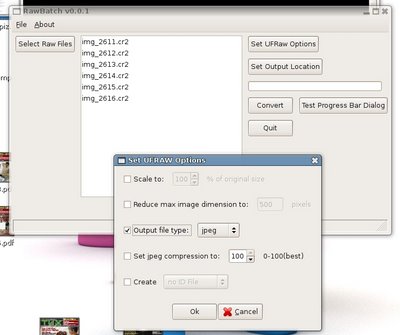
One thing that I was glad to see at the RawStudio page was a screenshot showing the ability to paste RAW conversion settings from one image to another, this is tremendously useful and something that UFRaw doesn't do right now.
In fact, while perusing the links provided in the Linux.com article, I was checking out the dcraw page and found links to a whole host of RAW related projects. Many of which already do exactly what I am doing with my simple GUI for UFRaw project. Oh well. I'll still try to get it into working order just to keep my Python skills from fading completely ;)
BTW, the app is not completely dead yet. I'm working on it every so often when I get the chance and I've got most of the main functionality in the GUI already coded. Here's a screenshot:

Absolute Beginner Talk - For Linux Newbies
Derek Djons has a very useful and interesting blog called Absolute Beginner Talk aimed at the newbie Linux user. If you are thinking of switching to Linux or you're a newbie to Linux like me, you're probably on the lookout for good sources of practical information, he's definitely providing one. Check it out.
Saturday, August 05, 2006
Plight of the white male? Really?
Looking at the sexism-shitstorm Dave Winer seems to be weathering lately, I have to say that it's definitely been mountain building time at the molehill. Now I consider myself pretty liberal. I'm not an opponent of political correctness. I feel it has its place. It serves a purpose but it's not something that should be all-encompassing. If for instance, Canada's indigenous people want to be called 'Native Canadians' or 'First Nations' or 'Aboriginals', it really makes no difference to me. I will refer to them as they wish. Some people have a real problem doing that and complain about it until the cows come home. I don't. It is simply a matter of logic for me. It makes no difference to me what I call them, but it makes them (and me) happy to accomodate them. Where is the tough decision there?
I am simply happy to accommodate others concerns simply because they normally don't affect me. However, reading Dave's remarks in his post-blogHer posting, I don't think he did anything other than speak his mind and heart. There was nothing hurtful, or hateful in those remarks. Were there really things that negatively affected anyone at all? If you regularly read Dave's blog I don't think you'll find any air of sexism (quite the opposite actually). But you will also find that he writes many times from the heart. Would I have posted it? Likely not. But that is more my problem than his. His tendency to speak his mind is why I read him and why he is well-read.
However... there is one thing in Dave's recent post ' About the s-word' that I disagree with. He states:
C'mon. That's just bullshit rhetoric. I'm white, male and aging rapidly. And I've had it really easy up to now and I still do. I know it, and you know it too. Look around at the state of North American society and tell me that the middle-aged white male is disenfranchised. It's simply not true. It's simply whining.
I remember fellow white, male engineering students grumbling about how more than half of our graduating class was of middle-eastern descent. "They're taking away opportunities for 'Canadian' students!" - I remember the complaints quite clearly. Bullshit. I was friends with these students and while we were out getting drunk at the local clubs or in our residence rooms, these guys were studying. They deserved to be there. If we decided to piss away our education then it's our own fault. Grrr.
Don't whine about the plight of the aging white male. There are so many other real plights to complain about like poverty, the homeless and illiteracy.
I am simply happy to accommodate others concerns simply because they normally don't affect me. However, reading Dave's remarks in his post-blogHer posting, I don't think he did anything other than speak his mind and heart. There was nothing hurtful, or hateful in those remarks. Were there really things that negatively affected anyone at all? If you regularly read Dave's blog I don't think you'll find any air of sexism (quite the opposite actually). But you will also find that he writes many times from the heart. Would I have posted it? Likely not. But that is more my problem than his. His tendency to speak his mind is why I read him and why he is well-read.
However... there is one thing in Dave's recent post ' About the s-word' that I disagree with. He states:
And something I've only been learning in the last few years, if you're old, white and male, you're worth less than shit.
C'mon. That's just bullshit rhetoric. I'm white, male and aging rapidly. And I've had it really easy up to now and I still do. I know it, and you know it too. Look around at the state of North American society and tell me that the middle-aged white male is disenfranchised. It's simply not true. It's simply whining.
I remember fellow white, male engineering students grumbling about how more than half of our graduating class was of middle-eastern descent. "They're taking away opportunities for 'Canadian' students!" - I remember the complaints quite clearly. Bullshit. I was friends with these students and while we were out getting drunk at the local clubs or in our residence rooms, these guys were studying. They deserved to be there. If we decided to piss away our education then it's our own fault. Grrr.
Don't whine about the plight of the aging white male. There are so many other real plights to complain about like poverty, the homeless and illiteracy.
Friday, August 04, 2006
Who do you write for?

Kent Newsome has some really lucid opinions on the blogosphere and the misconception of it's importance and penetration. He also challenges people to write a paragraph answering the question: "Why do you write a blog and who do you write for?". Here you go sir:
I am surrounded by people who, for the most part, don't share my interests, so I write to express my otherwised buried thoughts on those subjects I care about. I write to challenge myself - can I focus and hone this swirling cloud of ideas into a cohesive set of statements? I also sometimes write to educate people, or at least contribute to an education on things, to broaden people's horizons. I take information from the net ALL the time, I feel it's right to contribute something as well. And finally, I write to explore and develop my own creativity. My profession - structural engineering - doesn't lend itself to this type of creativity (it has its own, completely different form of creativity). So if I look at those reasons, and their associated targets, I'd say I write mostly for my own selfish purposes, with a dash of 'helpfulness to others' thrown in as well. I would think it only logical that the people reading my blog on any kind of regular basis share some of my interests, but I don't think I target them in my writing. This is mostly a cathartic activity for me.
Curiously enough, I tend to google definitions all the time - I hate using a word or term incorrectly - it's so unelegant, and when I checked on "cathartic", wouldn't you know, the first ten definitions dealt with relieving constipation.. Hmmm...
Something really different...
Just when you thought non-linking was officially debunked, Scoble's written another annoying post about the subject. This time it seems like the main intent was to 'stir the pot'. (sounds like maybe Dvorak is ghost-writing for him).
Two things get me, the first being one of the initial comments (and Robert's response):
Smiley or no smiley, it sounds a little too Dvorakian to me. C'mon Robert, you can do better.
The second bit that just begs for a jibe is:
If Steve really wanted to do something different, he would translate his ideas into plain English, devoid of obtuse metaphors, so that they could actually be evaluated, and perhaps understood by the huddled masses. Now that would be different.
And if generating conversation is the goal, then I think Dave's method of actually writing about what he feels does a better, more honest and interesting job of it. Even if it does get him in trouble.
I'd like to see A-listers adopt a complete moratorium on linking for something like 2 months. Y'know, just to see if it works. According to Steve, it should work brilliantly. Any takers? ;)
Two things get me, the first being one of the initial comments (and Robert's response):
What does this give you? Being noticed?
Comment by James M. — August 3, 2006 @ 9:27 am
James: it gets guys like you to comment. :-)
Comment by Robert Scoble — August 3, 2006 @ 9:35 am
Smiley or no smiley, it sounds a little too Dvorakian to me. C'mon Robert, you can do better.
The second bit that just begs for a jibe is:
Seriously? I’m not gonna stop linking. I actually don’t agree with Gillmor either. But, I do appreciate that he tries to do something different which gets a conversation to start. If we were all the same this world would be so damn boring.
If Steve really wanted to do something different, he would translate his ideas into plain English, devoid of obtuse metaphors, so that they could actually be evaluated, and perhaps understood by the huddled masses. Now that would be different.
And if generating conversation is the goal, then I think Dave's method of actually writing about what he feels does a better, more honest and interesting job of it. Even if it does get him in trouble.
I'd like to see A-listers adopt a complete moratorium on linking for something like 2 months. Y'know, just to see if it works. According to Steve, it should work brilliantly. Any takers? ;)
Thursday, August 03, 2006
Maybe ultra-targeted ads are not the Holy Grail
Dave Winer writes:
Is perfectly targeted product information really always welcome? On whose terms? The key thing is that part of being perfectly targeted to me is only showing up in my face when I need it, or perhaps even more restrictively, when I want it. That's a tough one isn't it? But that is the holy grail of advertising in my books.
I must be one of the few people in the world who *doesn't* always want to buy something. The key is somehow finding out when I'm interested in buying something and then, what I'm interested in buying.
At the risk of sounding like a luddite, I think focusing web technology efforts on providing a better 'Yellow Pages' model might be a path missed by many. I would give my left nut for a killer ad-site targeted to me. But one that I can go to, not one shoved in my face.
Google already does this to a large degree with their Google Local service, but it could be much much better.
I still visit Canada411.com when I'm trying to find a local service. It's an ugly, awkward site. It could be made a whole lot better and a whole lot more useful. That, my friends is the nut that nobody is even trying to crack. Instead, everyone wants to shove unwanted (and at the same time targeted) ads at me in a way that they hope doesn't piss me off. Is this model really working? If so, for how long?
"When they finish the process of better and better targeted advertising, that's when the whole idea of advertising will go poof, will disappear. If it's perfectly targeted, it isn't advertising, it's information. Information is welcome, advertising is offensive."
Is perfectly targeted product information really always welcome? On whose terms? The key thing is that part of being perfectly targeted to me is only showing up in my face when I need it, or perhaps even more restrictively, when I want it. That's a tough one isn't it? But that is the holy grail of advertising in my books.
I must be one of the few people in the world who *doesn't* always want to buy something. The key is somehow finding out when I'm interested in buying something and then, what I'm interested in buying.
At the risk of sounding like a luddite, I think focusing web technology efforts on providing a better 'Yellow Pages' model might be a path missed by many. I would give my left nut for a killer ad-site targeted to me. But one that I can go to, not one shoved in my face.
Google already does this to a large degree with their Google Local service, but it could be much much better.
I still visit Canada411.com when I'm trying to find a local service. It's an ugly, awkward site. It could be made a whole lot better and a whole lot more useful. That, my friends is the nut that nobody is even trying to crack. Instead, everyone wants to shove unwanted (and at the same time targeted) ads at me in a way that they hope doesn't piss me off. Is this model really working? If so, for how long?
Ubuntu billboard spotted...
You know you've finally 'arrived' as an OS when you see the following:
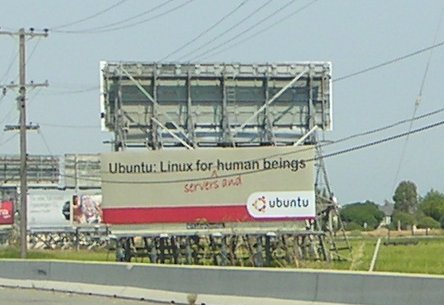
It's about time baby! Photo courtesy of WildBill which was referenced on Ubuntonista's blog.
It's about time baby! Photo courtesy of WildBill which was referenced on Ubuntonista's blog.
Tuesday, August 01, 2006
Somebody please write "Gestures for Dummies".. I beg you..
Ok. I am officially crying "Uncle!". Scoble's 'Gesture Firestorm' post leaves me dazed and confused, almost like one of the endless headlocks that my older brother used to give me throughout my youth.
Scoble contends that his posts about his mother and Montana were a 'gesture to the world' that was returned in kind by a 'gesture' from Rick Goff who informed him of news about a fire in that area. Robert then goes on to explain that he now understands what Steve Gillmor means by 'gestures'. I'm sure glad he does. I'm not entirely sure I do.
If 'gestures' mean the things I do which indicate my wants, needs or interests, then I'm not sure anybody will be able to usurp Google's lock on this information. They've already built a 'gesture' bank the size of which is just scary. Based on storing and scanning my Gmail, and search data, they've built a huge base of personal information from which to springboard all kinds of algorithmic-based services of the kind Scoble cites.
I truly wish Gillmor would hire someone to take his ideas and translate them into honest-to-gosh plain english, if indeed that's possible. Maybe there are some true nuggets in there, I just can't seem to decipher them. I think Doc Searls or even better yet, Dave Slusher should be hired on to route-the-info from InfoRouter so to speak.
And just to add confusion to the daze, witness this gem from Robert's post:
Huh? I'd only consider myself smarter than you Robert because I'd have put the link in. Do you really think that people will stop in the middle of your article to Google a subject within your post? It is much easier (and dare I say - smarter) that I middle-click the interesting links in your post to open them on additional tabs for exploration after reading your post.
Will SOMEBODY please explain to me why making me search for things that you could easily point me to is somehow doing me (or that 'thing') a great service? Honestly, I want an explanation as to how this does anything for you as the blogger or him as a subject within your blog? (And in plain english please - babblespeak will not be tolerated).
I hope I'm wrong, but maybe Scoble is being assimilated by the Borg, only the Borg was not Microsoft but something else entirely. How soon until you're saying Office IS Dead Robert? ;)
[Update: Missed this somehow. Kent Newsome attempts to Debunk This Gesture Nonsense]
Scoble contends that his posts about his mother and Montana were a 'gesture to the world' that was returned in kind by a 'gesture' from Rick Goff who informed him of news about a fire in that area. Robert then goes on to explain that he now understands what Steve Gillmor means by 'gestures'. I'm sure glad he does. I'm not entirely sure I do.
If 'gestures' mean the things I do which indicate my wants, needs or interests, then I'm not sure anybody will be able to usurp Google's lock on this information. They've already built a 'gesture' bank the size of which is just scary. Based on storing and scanning my Gmail, and search data, they've built a huge base of personal information from which to springboard all kinds of algorithmic-based services of the kind Scoble cites.
I truly wish Gillmor would hire someone to take his ideas and translate them into honest-to-gosh plain english, if indeed that's possible. Maybe there are some true nuggets in there, I just can't seem to decipher them. I think Doc Searls or even better yet, Dave Slusher should be hired on to route-the-info from InfoRouter so to speak.
And just to add confusion to the daze, witness this gem from Robert's post:
"One other thing. I didn’t link to Fred Wilson’s blog. Why? Cause if you really cared you’d have read it by now, right? I assume my readers know how to use Google and TechMeme. Cause you’re smarter than me and I can find Fred in both places right now."
Huh? I'd only consider myself smarter than you Robert because I'd have put the link in. Do you really think that people will stop in the middle of your article to Google a subject within your post? It is much easier (and dare I say - smarter) that I middle-click the interesting links in your post to open them on additional tabs for exploration after reading your post.
Will SOMEBODY please explain to me why making me search for things that you could easily point me to is somehow doing me (or that 'thing') a great service? Honestly, I want an explanation as to how this does anything for you as the blogger or him as a subject within your blog? (And in plain english please - babblespeak will not be tolerated).
I hope I'm wrong, but maybe Scoble is being assimilated by the Borg, only the Borg was not Microsoft but something else entirely. How soon until you're saying Office IS Dead Robert? ;)
[Update: Missed this somehow. Kent Newsome attempts to Debunk This Gesture Nonsense]
Chain Linking
Partly because it will piss off Mr. 'anti-linking' Gillmor (and now for chrissakes even Scoble!) I add myself to the list.
What you do is simply repost this blog entry as-is on your blog and add your website to the top (or bottom) of the chain of links below. Then email the blog entry to a couple blogger friends. For participating, you’ll get a little link love, a.k.a. Google juice.
1. http://www.kbcafe.com/iBLOGthere4iM/2. http://www.newsome.org/
3. http://www.chipsquips.com/
4. http://tracytakespics.blogspot.com
5. http://jack-of-all-tradez.blogspot.com
Subscribe to:
Posts (Atom)


